
Go Back   Digiex > Computing Section > Guides and Tutorials > Multimedia

Reply
 
LinkBack Thread Tools Display Modes
Old 24-11-08, 00:23   #1
Resident Nutter
 
InsaneNutter's Avatar
 
Join Date: Jun 2007
Location: Yorkshire, England, UK
Posts: 3,668
Thanks: 382
Thanked 439 Times in 232 Posts
Blog Entries: 8
InsaneNutter has a reputation beyond reputeInsaneNutter has a reputation beyond reputeInsaneNutter has a reputation beyond reputeInsaneNutter has a reputation beyond reputeInsaneNutter has a reputation beyond reputeInsaneNutter has a reputation beyond reputeInsaneNutter has a reputation beyond reputeInsaneNutter has a reputation beyond reputeInsaneNutter has a reputation beyond reputeInsaneNutter has a reputation beyond reputeInsaneNutter has a reputation beyond repute
Default Windows Media Center TV Pack 2008 Download and Installation Guide

Windows Media Center TV Pack 2008 is an update for Windows Media Center included with Vista Home Premium and Ultimate, it is primarily targeted at adding support for additional international broadcast standards.

The TV Pack was only released to licensed OEMs, there for unavailable to people who want to build there own Media PC’s powered by Media Center. However you can stop worrying about that as you can download it right here

Feature List:
  • Integrated Services Digital Broadcasting – Terrestrial (ISDB-T) Digital television standard for Japan
  • Digital Video Broadcasting – Satellite (DVB-S) free-to-air satellite standards in Europe
  • Digital Video Broadcasting – Terrestrial (DVB-T) digital television with improved user experience in Europe
  • ClearQAM (Unencrypted Digital Cable)in the United States
  • Interactive television with integrated Broadcast Markup language (BML) in Japan and Multimedia and Hypermedia information coding Expert Group (MHEG) (MHEG5) in Europe
This update does not include native support for subscription-based satellite tuners or the H.264 video standard sadly. (For people who live in the UK this basically means you carnt get BBC HD, ITV HD and any other HD channels in Media Centre, however Ill post a guide later on on how to get BBC and ITV HD working in Media Center.)


Some things to note before installing:
  • Installation of the TV Pack must be on top of a clean Vista SP1 install, it will not install without Vista SP1. Apparently it will install on a none clean install of SP1 (an install that has been patched on windows update) but its not recommended.
  • Media Center TV Pack 2008 cannot be uninstalled so bear that in mind
  • Finally Media Center TV Pack is dependent on PlayReady for playing and recording protected content, if you follow this guide you will end up installing that.
Installation Instructions:

1) Install Vista and Update to SP1 if not already done.

(Do not launch Media Center or go through Media Center Setup)

2) Install Media Center TV Pack 2008

Download Windows Media Center TV Pack 2008 (x86)
Download Windows Media Center TV Pack 2008 (x64)

3) Install the PlayReady PC Runtime

Download PlayReady PC Runtime v1.2 (x86 and x64)

4) Install the following patches

KB951685 - The video playback application stops responding when you watch video or Live TV on a Windows Vista-based computer.

Download KB951685 (X86 and x64)

KB950754 - Noticeable problems occur in the video when you use the DirectSound renderer on Windows Vista.

Download KB950754 (x86 and x64)

5) Install any required or recommended Windows Updates and drivers for your pc

6) Launch Media Center and go through Media Center Setup

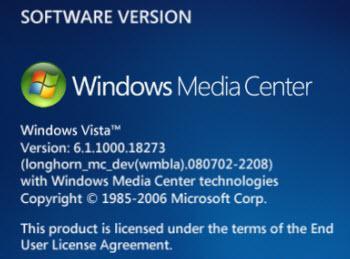
Media Center Version Info:
Attached Thumbnails
Windows Media Center TV Pack 2008 Download and Installation Guide-software-version.jpg  
Attached Files
File Type: rar MediaCenterTVPack2008-KB953272.rar (43.10 MB, 100875 views)
File Type: rar MediaCenterTVPack2008-KB953272-x64.rar (47.87 MB, 36613 views)
File Type: rar KB950754.rar (1.98 MB, 52246 views)
File Type: rar PlayReadyPC.rar (1.95 MB, 39383 views)
File Type: rar KB951685.rar (1.01 MB, 23479 views)
__________________
InsaneNutter is offline   Reply With Quote

Adverts are shown to help cover bandwidth costs - Donate or make 30+ posts to remove them.
Old 18-03-09, 13:48   #2
Stayed to Post
 
Join Date: Mar 2009
Posts: 1
Thanks: 0
Thanked 0 Times in 0 Posts
hoss789 is on a distinguished road
Default

I had a problem with the KB950754 file. I downloaded it from this site and extracted it. The extracted file did not match but I was easily able to get it off of Microsoft's website. After that the install worked flawlessly!
hoss789 is offline   Reply With Quote
Old 19-03-09, 11:12   #3
Stayed to Post
 
Join Date: Mar 2009
Posts: 1
Thanks: 0
Thanked 0 Times in 0 Posts
Elric is on a distinguished road
Default

Hello,

I cant download this??

Download Windows Media Center TV Pack 2008 (x86)
Elric is offline   Reply With Quote
Old 19-03-09, 11:22   #4
Resident Nutter
 
InsaneNutter's Avatar
 
Join Date: Jun 2007
Location: Yorkshire, England, UK
Posts: 3,668
Thanks: 382
Thanked 439 Times in 232 Posts
Blog Entries: 8
InsaneNutter has a reputation beyond reputeInsaneNutter has a reputation beyond reputeInsaneNutter has a reputation beyond reputeInsaneNutter has a reputation beyond reputeInsaneNutter has a reputation beyond reputeInsaneNutter has a reputation beyond reputeInsaneNutter has a reputation beyond reputeInsaneNutter has a reputation beyond reputeInsaneNutter has a reputation beyond reputeInsaneNutter has a reputation beyond reputeInsaneNutter has a reputation beyond repute
Default

KB950754 has probably been updated since I attached it in that post, either way the one in this post works with the TV pack as should the one on the Microsoft website.

What error do you get downloading it, have you had a look at this? http://digiex.net/guides-tutorials/2...nt-digiex.html

Just tested the link and its working perfect here.
__________________
InsaneNutter is offline   Reply With Quote
Old 29-03-09, 18:44   #5
Stayed to Post
 
Join Date: Mar 2009
Posts: 4
Thanks: 0
Thanked 0 Times in 0 Posts
WVZR-1 is on a distinguished road
Default KB951685 link in 1st post!

In #4 of the first post the Patch KB951685 actually seems to be KB950754 after it is extracted. I installed the KB950754 first and then the KB951685 from the link and paid "no attention" to the description after extracted and I got a "Does not apply"! I poked around and downloaded the same file again and I see after extraction the error it seems. I went to MS updates and got the actual file and moved on. I've seen others post similar errors in other forums.

I see also in the attached files at the end of the post both file sizes are noted as being 1.98MB (exactly the same size)!
WVZR-1 is offline   Reply With Quote
Old 29-03-09, 19:19   #6
Resident Nutter
 
InsaneNutter's Avatar
 
Join Date: Jun 2007
Location: Yorkshire, England, UK
Posts: 3,668
Thanks: 382
Thanked 439 Times in 232 Posts
Blog Entries: 8
InsaneNutter has a reputation beyond reputeInsaneNutter has a reputation beyond reputeInsaneNutter has a reputation beyond reputeInsaneNutter has a reputation beyond reputeInsaneNutter has a reputation beyond reputeInsaneNutter has a reputation beyond reputeInsaneNutter has a reputation beyond reputeInsaneNutter has a reputation beyond reputeInsaneNutter has a reputation beyond reputeInsaneNutter has a reputation beyond reputeInsaneNutter has a reputation beyond repute
Default

Thanks for pointing that out, it has been replaced with the correct file
__________________
InsaneNutter is offline   Reply With Quote
Old 31-03-09, 00:26   #7
Stayed to Post
 
Join Date: Mar 2009
Posts: 1
Thanks: 0
Thanked 0 Times in 0 Posts
pepple69 is on a distinguished road
Default

The last step is very important. I was able to install TV Pack over an existing install with no problems....UNTIL I tried to use WMC with XBOX 360 - it wouldn't work at all. You MUST install "Windows Media Center TV Pack 2008 Cumulative Update Feb 09" from Microsoft, as well as any other recommended updates that apply to your particular hardware/software. But have TV Pack 2008 installed first or Windows Update will not recognize. Now everything works perfectly with Windows Vista 64bit.
pepple69 is offline   Reply With Quote
Old 08-04-09, 20:08   #8
Stayed to Post
 
Join Date: Apr 2009
Posts: 1
Thanks: 0
Thanked 0 Times in 0 Posts
Gbarcs is on a distinguished road
Default

Thank you. No expert me and recklessly installed TV Pack 2008 over Vista SP1 install and brilliant, it worked! Little bit of a mix up with the download KB's but easily sorted. I wonder how many people are aware you can do this, I stumbled upon you by accident.
Gbarcs is offline   Reply With Quote
Old 20-04-09, 17:13   #9
Stayed to Post
 
Join Date: Apr 2009
Posts: 1
Thanks: 0
Thanked 0 Times in 0 Posts
tanker2k6 is on a distinguished road
Angry

I am still getting "This computer is not digital cable ready. You will not be able to set it up for use with a CableCard".

I have followed the instructions to a "T". I have not skipped anything. I had my neighbor over here, who is a Comcast tech, and he can't seem to figure it out either.

I have performed all Vista Updates that are available.

Specs:

Vista Home Premium 64-bit
8gb PC6400 DDR2
Phenom II x4 940 Black Edition
EVGA GTX 295
24" Samsung 245BW Monitor
ATI TV Wonder Digital Cable Tuner w/CableCard installed and activated

How the heck do I enable Digital Cable on my computer ?

Any help is appreciated.

tanker
tanker2k6 is offline   Reply With Quote
Old 21-04-09, 05:53   #10
Stayed to Post
 
Join Date: Apr 2009
Posts: 1
Thanks: 0
Thanked 0 Times in 0 Posts
soch is on a distinguished road
Default Video error after TV pack upgrade

I had Vista Ultimate and went through the above steps and now MCE complains with video error for livetv or recordedtv. I ca't do anything with MCE now.

Any help would be appreciated.

Fixed the problem. On my Intel on board G33 graphics controller changed the BIOS setting to 256MB & fixed (instead of DVMT).
soch is offline   Reply With Quote
 
Reply

Bookmarks

Tags
center, dvb-s, dvb-s2, media, tv pack 2008, vista, windows, wmc
Thread Tools
Display Modes

Posting Rules
You may not post new threads
You may not post replies
You may not post attachments
You may not edit your posts

BB code is On
Smilies are On
[IMG] code is On
HTML code is Off
Trackbacks are On
Pingbacks are On
Refbacks are On


Similar Threads
Thread Thread Starter Forum Replies Last Post
Windows XP SP3 Ux Theme Patch (Home, Pro, Media Center, Tablet and VLK) InsaneNutter Applications 5 07-10-09 18:24
Help - i want media center on my pc blizard442 Computer Discussion and Help Center 9 23-12-08 10:30
Xbox Media Center (XBMC) Atlantis Beta 1 Released - Linux, Mac, Windows and Xbox InsaneNutter Front Page News 1 05-10-08 18:10
HTPC (Media Center PC) Spec, What do you think? InsaneNutter Computer Discussion and Help Center 9 19-08-08 16:01
Windows XP Service Pack 3 RTM Build 5512 Download -WindowsXP-KB936929-SP3-x86-ENU.exe InsaneNutter Applications 1 23-04-08 19:04


All times are GMT. The time now is 20:09.


Powered by vBulletin® Version 3.8.4
Copyright ©2000 - 2010, Jelsoft Enterprises Ltd.
SEO by vBSEO 3.3.2 ©2009, Crawlability, Inc.
Site contents, theme and layout © 2003 - 2009, Digiex
Digiex™ is a protected Trademark