

InsaneNutter
Resident Nutter
Adding SRT subtitles to an MKV video without spending hour re-encoding the video is a very simple thing to do.
To do this we will use MKVToolnix, this is a Windows GUI for mkvmerge.
1. Download you need to download and install MKVToolnix 7.1.0 (32bit) or MKVToolnix 7.1.0 (64bit)
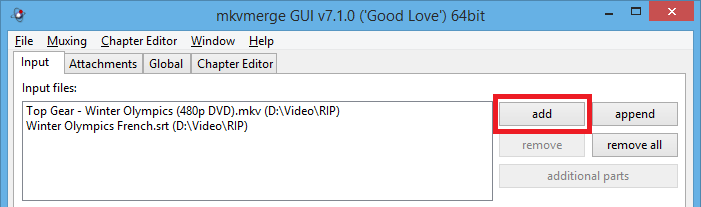
2. After you have done this load MKVToolnix, then click the add button and add the MKV video you wish to add sub titles to, next click the add button again and add the SRT subtitles:
3. Next click on the SRT subtitle track, here you can select the language of the subtitles, or even give the subtitle track a name if you wish, if you set the subtitle track as default it will automatically play with the video file. If not you have to manually select the subtitle track:
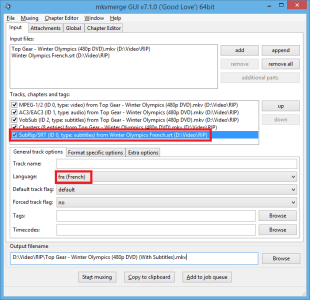
4. Finally choose where to save a copy of your video, with the srt subtitles embedded. Then click "Start Muxing":

5. As you are not re-encoding the video, this should complete very quickly:
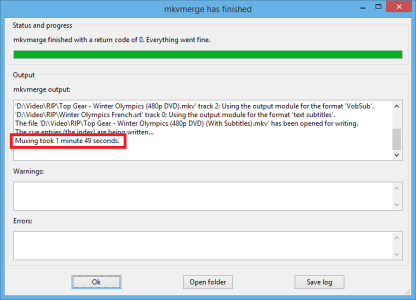
6. You will now have the copy of the MKV video, with the srt subtitles embedded.
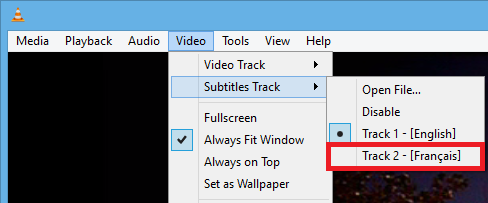
7. You will be able to choose the subtitle track you added in your favourite video player, an example of doing this in VLC can be seen below:
That's all, I hope this helps you add / embed srt subtitle tracks in your MKV video files.
To do this we will use MKVToolnix, this is a Windows GUI for mkvmerge.
1. Download you need to download and install MKVToolnix 7.1.0 (32bit) or MKVToolnix 7.1.0 (64bit)
2. After you have done this load MKVToolnix, then click the add button and add the MKV video you wish to add sub titles to, next click the add button again and add the SRT subtitles:
3. Next click on the SRT subtitle track, here you can select the language of the subtitles, or even give the subtitle track a name if you wish, if you set the subtitle track as default it will automatically play with the video file. If not you have to manually select the subtitle track:
4. Finally choose where to save a copy of your video, with the srt subtitles embedded. Then click "Start Muxing":
5. As you are not re-encoding the video, this should complete very quickly:
6. You will now have the copy of the MKV video, with the srt subtitles embedded.
7. You will be able to choose the subtitle track you added in your favourite video player, an example of doing this in VLC can be seen below:
That's all, I hope this helps you add / embed srt subtitle tracks in your MKV video files.





