

Nimrod
Dev Ops
- Joined
- Jun 1, 2007
- Messages
- 1,511
Every so often a thread needs to belong to someone else. Content moved over from an old site, a post made from the wrong account, something staff posted on a member's behalf. Or it needs a different date, like a download posted today that should sit with the others from when it actually came out. XenForo can't do either, and editing the database by hand leaves post counts, the forum's last post and half a dozen other things wrong.
So we made a proper tool for it. One form, reachable from the post's menu, the thread tools or inline moderation, and it puts everything right afterwards. It's what our admins use here.
Free, change it however you like.
Download Digiex-ChangeAuthorDate-1.0.0.zip
WHAT IT DOES
"Change author or date" shows up for staff with permission in three places:
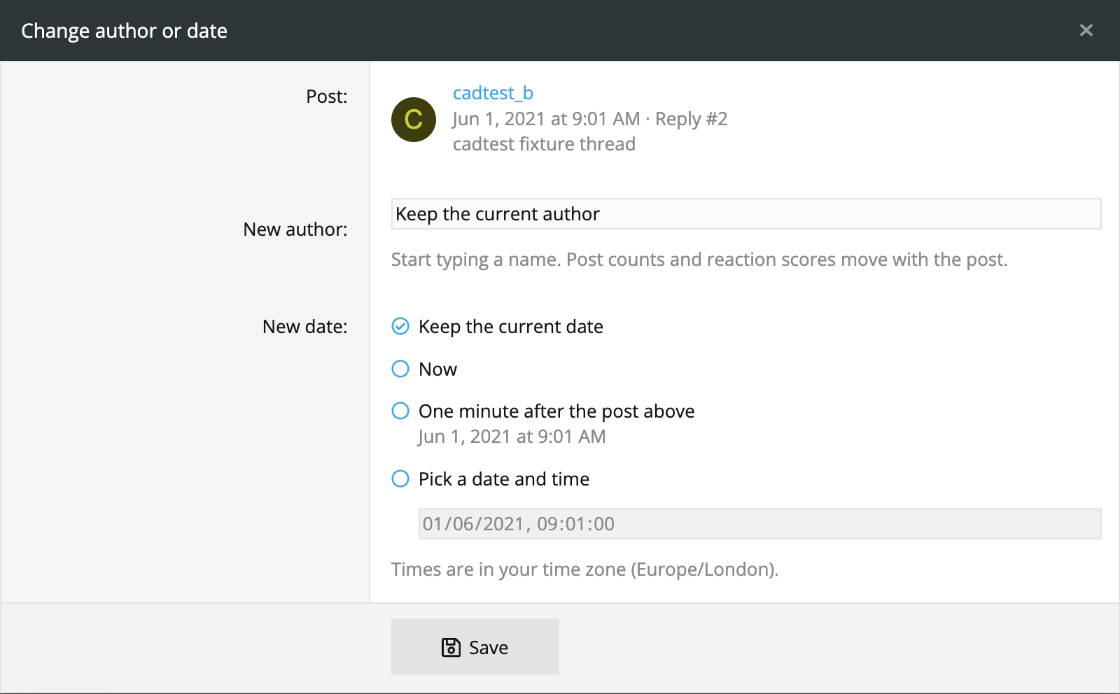
The form shows who posted it and when. Type a new member's name, or leave it empty to keep them. For the date you can keep it, set it to now, put it one minute after the post above, or pick any date and time in your own time zone. With several selected they keep their order and get spaced a few minutes apart.
Afterwards it fixes everything that hangs off the author and date: both members' post counts, reaction scores and solution counts, who gets the reactions, attachment ownership, the thread's first and last post, the forum's last post, the order of posts in the thread, the news feed and the search index. Counts are worked out exactly the way XenForo's own rebuild tools do it, so running those afterwards changes nothing.
A thread's first post has to stay its oldest, so you can't date a reply before it. Future dates aren't allowed. Every change goes in the moderator log with the old and new author or date.
INSTALL
XenForo 2.3 only, PHP 8.0 or newer.
Admin CP -> Add-ons -> Install/upgrade from archive, and upload the zip. Or copy the upload folder into your XenForo root and install it from the add-ons list, or from the command line:
Nobody can use it until you give them permission. Admin CP -> Groups & permissions -> User group permissions, pick a group (Administrative for example), and under Forum moderator permissions set "Change the author of threads and posts" and "Change the date of threads and posts" to Yes. They can also be set per forum or for single moderators, and they're separate, so you can let someone change dates but not authors.
WORTH KNOWING
Threads and posts only. Profile posts, media and resources aren't covered.
The menu links go into XenForo's default post and thread templates. If your style has heavily changed copies of those the links might not show, but inline moderation still works.
Uninstalling removes everything it added. There are no tables, and changes you already made stay as they are.
There's more detail in the README.md inside the zip. Questions or improvements, post them here.
So we made a proper tool for it. One form, reachable from the post's menu, the thread tools or inline moderation, and it puts everything right afterwards. It's what our admins use here.
Free, change it however you like.
Download Digiex-ChangeAuthorDate-1.0.0.zip
WHAT IT DOES
"Change author or date" shows up for staff with permission in three places:
- the more options menu on any post
- the thread tools menu, which changes the thread's first post (that's where a thread's author and date come from)
- inline moderation, for several posts or threads at once
The form shows who posted it and when. Type a new member's name, or leave it empty to keep them. For the date you can keep it, set it to now, put it one minute after the post above, or pick any date and time in your own time zone. With several selected they keep their order and get spaced a few minutes apart.
Afterwards it fixes everything that hangs off the author and date: both members' post counts, reaction scores and solution counts, who gets the reactions, attachment ownership, the thread's first and last post, the forum's last post, the order of posts in the thread, the news feed and the search index. Counts are worked out exactly the way XenForo's own rebuild tools do it, so running those afterwards changes nothing.
A thread's first post has to stay its oldest, so you can't date a reply before it. Future dates aren't allowed. Every change goes in the moderator log with the old and new author or date.
INSTALL
XenForo 2.3 only, PHP 8.0 or newer.
Admin CP -> Add-ons -> Install/upgrade from archive, and upload the zip. Or copy the upload folder into your XenForo root and install it from the add-ons list, or from the command line:
php cmd.php xf:addon-install Digiex/ChangeAuthorDateNobody can use it until you give them permission. Admin CP -> Groups & permissions -> User group permissions, pick a group (Administrative for example), and under Forum moderator permissions set "Change the author of threads and posts" and "Change the date of threads and posts" to Yes. They can also be set per forum or for single moderators, and they're separate, so you can let someone change dates but not authors.
WORTH KNOWING
Threads and posts only. Profile posts, media and resources aren't covered.
The menu links go into XenForo's default post and thread templates. If your style has heavily changed copies of those the links might not show, but inline moderation still works.
Uninstalling removes everything it added. There are no tables, and changes you already made stay as they are.
There's more detail in the README.md inside the zip. Questions or improvements, post them here.



