

• Welcome to the Digiex Download Center, you are welcome to download anything you like here. No registration is required! Digiex offers direct download links with no captchas or wait times.
    The team do our best to ensure no content infringes copyrights and provide a DMCA Takedown request form to request the removal of content from Digiex.

    Notable sections: Pokemon Archives | Xbox Archives | Xbox 360 Archives

Forza Motorsport 3 Title Update #2

xzKinGzxBuRnzx

Veteran
Joined
Aug 9, 2008
Messages
1,702
Forza Motorsport 3 Title Update #2

Download:

Forza Motorsport 3 Title Update #2

How to use

You need to unzip this file and put it inside the cache folder on Partition 3 of the Xbox 360 hard drive.

To do this you will need a way to connect the Xbox 360 hard drive to the PC such as the Microsoft Transfer Kit or Datel Xsata.

This tutorial will explain how to access the Xbox 360’s hard drive with Xplorer 360: https://digiex.net/consoles/1269-xbox...ard-drive.html
 

Attachments

well... i put the archive in the cache folder, but when i put my hdd in my xbox, the animation on cockipit still the same thing...

the old archive in my hdd was: TU_16L622D_000000G000000.0000000000084

the new archive is: TU_16L622D_000000K000000.00000000000G5

i've tried to keep the two archives and didn't work.... i've tried to keep only the new archive and didn't work... after that i've tried to rename the new as the name as the old, and it didn't work too
 
well... i put the archive in the cache folder, but when i put my hdd in my xbox, the animation on cockipit still the same thing...

the old archive in my hdd was: TU_16L622D_000000G000000.0000000000084

the new archive is: TU_16L622D_000000K000000.00000000000G5

i've tried to keep the two archives and didn't work.... i've tried to keep only the new archive and didn't work... after that i've tried to rename the new as the name as the old, and it didn't work too

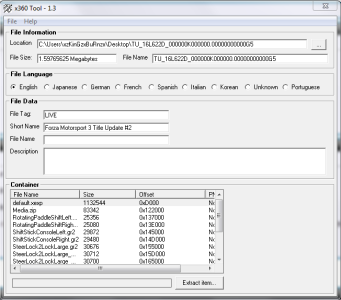
Below shows that is title #2 update. Perhaps you need to clear the cache, (will erase all updates) also, don't rename it, editing the file will most likely break it. Also, it may not ask you to update I'm not sure as I always download my updates from LIVE. So, just place it in the cache, it may not pop up and ask to update, because it should detect it and just use it.
 

Attachments

  • Capture.PNG
    Capture.PNG
    46 KB · Views: 2,379
Below shows that is title #2 update. Perhaps you need to clear the cache, (will erase all updates) also, don't rename it, editing the file will most likely break it. Also, it may not ask you to update I'm not sure as I always download my updates from LIVE. So, just place it in the cache, it may not pop up and ask to update, because it should detect it and just use it.

humm.. but, i'm afraid to clear the cache... don't have any way different of that to make the update functional?
 
It worked for me...maybe its your game version

it have appeared a pop up asking to update or not? and you've deleted the old archive of update of forza 3 in the cache folder, or you just put the new archive?
 
I can't update neither.. I just put it inside the cache folder, but nothing happened to the game.. can anyone help me???

Thanks in advance..
 
this update is only for the pal version of forza motorsport 3 (media id 5DD89BE4). the ntsc version media id is 1235FA6A.
 

About Digiex

Digiex is a technology and gaming forum, founded in 2004 by InsaneNutter and Nimrod. Digiex has served the internet community with breaking news, detailed guides, exclusive downloads and a popular discussion forum. A small, friendly community of like‑minded people has developed over the years. People are encouraged to register and participate in on‑going discussions.

Get Social

Back
Top Bottom



