seanpr92
Godlike

MUST HAVE RAINMETER INSTALLED TO USE THEME
—RELEASE———————————————————————————————
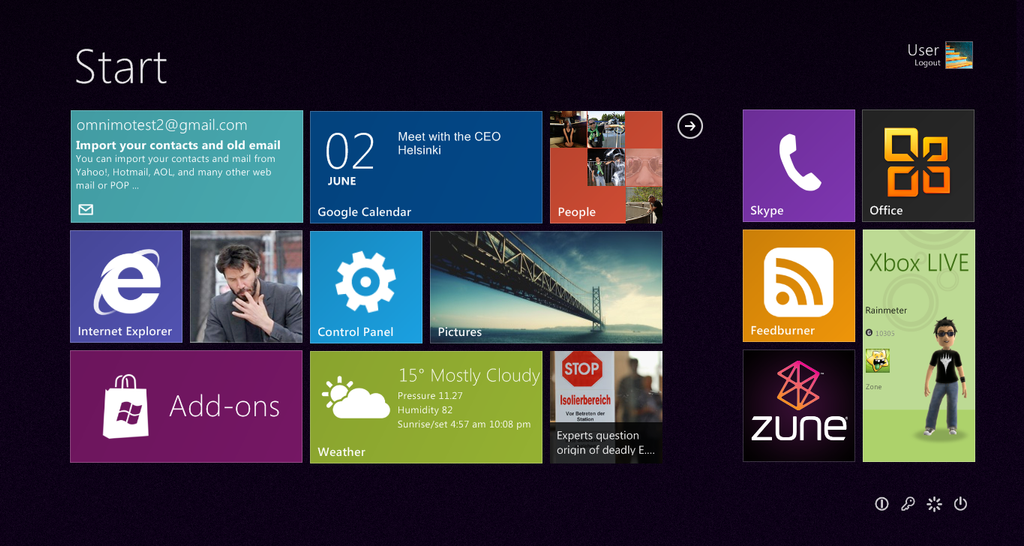
The long awaited 3rd version of Omnimo is finally here! There is a good reason why it took so long to complete - for one, unlike Omnimo 2, this is a mind-blowingly large update. You might say that the whole thing was completely redone, adding tons of new features, a whooping amount of new panels, text items and extras. You won't be disappointed with all the new improvements and possibilities! Additionally to the updated product - we have launched the omnimo website which contains a panels marketplace. You can extend the features of omnimo by downloading additional panels, text items and even custom languages!
—WHAT IS OMNIMO———————————————————————————————
It’s a Windows Phone 7 inspired multifunctional interactive desktop information center based on rainmeter. This suite will turn your desktop into a productive and attractive workarea , delivering only the information you need. Every interactive tile gives you information at a glance, and can be easily customized to your needs. Unlike the initial Metro design, Omnimo gives you limitless customization potential, you can customize just about every aspect of it!
—WHAT'S INCLUDED———————————————————————————————
Omnimo.rmskin - self extracting installation file for rainmeter containing the suite
readme.txt - contains faq, read it in case you run into any problems
ClearVS - a clear taskbar visual style
—HOW TO INSTALL———————————————————————————————
Make sure you have Rainmeter 1.3 installed, then just double click the Omnimo.rmskin file, the extraction might take a minute or two, after that you'll be guided by the Intro.
—PROBLEM———————————————————————————————
There might be some last minute bugs. Report any issues you might encounter in the comments or by email: omnimosupport[at]gmail.com
—CREDITS———————————————————————————————
Omnimo 3 was developed by fediaFedia and Xyrfo
Thanks to Varelse42, Giblet and poiru for their contribution to the project.
Credits to Kaelri, Gavatx, Flo, joshj132, x966123, kenz0, chrfb, JSMorley, gerguter, xjannikx
Beta testers: Bruno, AndrewDBarker
Bridge wallpaper by tonavenlbeek
Wallpapers in the preview: Dvno II, iDrops
If I forgot someone, please tell!
—LICENSE———————————————————————————————
Zune, Windows Phone 7, the Windows Phone 7 UI are registered trademarks of Microsoft Corporation. Omnimo UI was created for customization purposes only, with no intent to infringe upon the trademarks of Microsoft Corporation in the U.S. and/or other countries.
The project is not using, even partially, any code from Windows Phone 7 and has been done enterely from scratch.
Omnimo is licensed under Creative Commons Attribution-NonCommercial-NoDerivs 3.0 Unported License.
———————————————————————————————
4.0 preview should be up in few days