How Speed Up You Internet Free Only Changing Dns

wesley85166

Elite Member
Joined
Dec 25, 2014
Messages
89
Location
Brasil
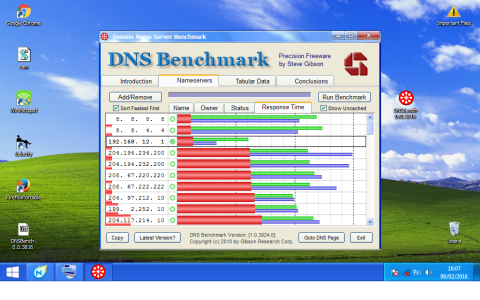
1) Download dns benchand run it
2)go on nameservers
3) prees run benchmark
4) Wait finish
5)in my test the fastest dns is 192.168.7.1 and 192.168.5.1
6)change you dns in windows contol panel
Sem título.png
 

Attachments

Last edited:
You don't need a 3rd party software to use googles DNS servers. Its very easy to change your DNS servers in windows, linux, osx and on most routets.
 
Inglês
downarrow_gray.png

Bro it and to know what the fastest dns not to usegoogle dns and dns actually faster for me and192.168.7.1 and 192.168.5.1


192.168.*.* addresses are internal to your network, unless your router is one of them and it's running a local DNS passthrough, you aren't using those addresses for DNS servers. If your router is running local DNS and you didn't set your own DNS servers on it, you're using your ISP's DNS servers.
8.8.4.4 and 8.8.8.8 are hosted by google. https://developers.google.com/speed/public-dns/

OpenDNS is also a good option if you don't trust google for name server your lookups.
 
I've used Google's DNS's servers for many years as historically they have been more reliable than my ISP's. In addition when we've made DNS changes on Digiex they have propagated to Google's DNS servers many hours before my ISP's.

OpenDNS has useful features such as been able to block sites, view statistics and so on. People with not so advanced routers have been using it to block Nintendo's update servers for the Wii U.

 

About Digiex

Digiex is a technology and gaming forum, founded in 2004 by InsaneNutter and Nimrod. Digiex has served the internet community with breaking news, detailed guides, exclusive downloads and a popular discussion forum. A small, friendly community of like‑minded people has developed over the years. People are encouraged to register and participate in on‑going discussions.

Get Social

Back
Top Bottom