

Rick
Veteran
About.
This tutorial will show you how to stream video and music from your android device, and other upnp devices to your xbox 360. This should also work for apple and windows phone devices with similar upnp apps.
Requirements.
-Xbox 360 connected to upnp enabled local network
-Android device connected to upnp enabled local network.
1.Download and install the upnp app.
A.Download bubbleupnp app from the google playstore
https://play.google.com/store/apps/details?id=com.bubblesoft.android.bubbleupnp&hl=en
Note: Not the paid version.
Or
B.Download the apk file from digiex, no extraction necessary.
Download Bubble UPNP (Digiex Mirror)
Note: Not the paid version.
Or
C.Samsung devices might have an upnp app installed, it's called Allshare.
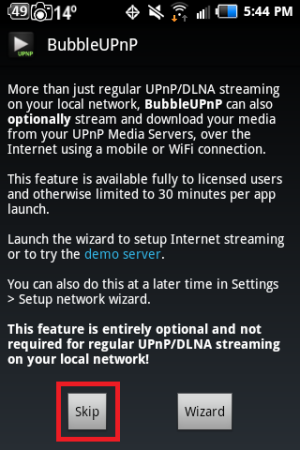
2.Skip the internet streaming wizard.
3.Turn on the xbox 360 and go to the dashboard.
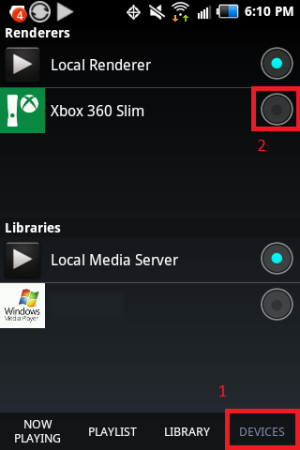
4.Click on devices(1) and change the Renderers(device to stream to) to the xbox 360(2). You could use this for other devices also.
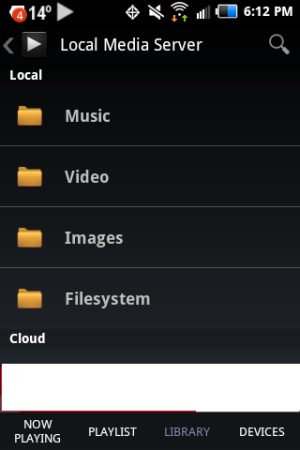
5.The libraries section will pickup your android device library and other connected computers with access to the music and video.
Note: If you get an error for windows media player libraries, you will need to allow the connection.
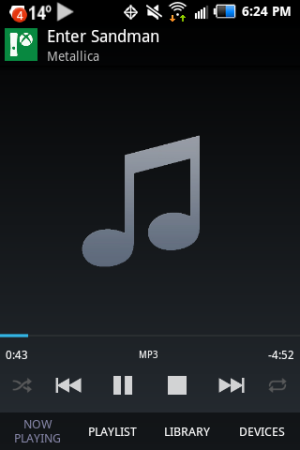
6.Select any music or video and it should play if the xbox 360 supports it.
This tutorial will show you how to stream video and music from your android device, and other upnp devices to your xbox 360. This should also work for apple and windows phone devices with similar upnp apps.
Requirements.
-Xbox 360 connected to upnp enabled local network
-Android device connected to upnp enabled local network.
1.Download and install the upnp app.
A.Download bubbleupnp app from the google playstore
https://play.google.com/store/apps/details?id=com.bubblesoft.android.bubbleupnp&hl=en
Note: Not the paid version.
Or
B.Download the apk file from digiex, no extraction necessary.
Download Bubble UPNP (Digiex Mirror)
Note: Not the paid version.
Or
C.Samsung devices might have an upnp app installed, it's called Allshare.
2.Skip the internet streaming wizard.
3.Turn on the xbox 360 and go to the dashboard.
4.Click on devices(1) and change the Renderers(device to stream to) to the xbox 360(2). You could use this for other devices also.
5.The libraries section will pickup your android device library and other connected computers with access to the music and video.
Note: If you get an error for windows media player libraries, you will need to allow the connection.
6.Select any music or video and it should play if the xbox 360 supports it.




