

seanpr92
Godlike
***This will debrand your mobile phone to generic nokia
Pre-requisites:
a) Download NaviFirm (this tool allows you to obtain nokia firmwares for all nokia devices, and including all variants).
b) Download Nokia Care Suite v5 (this version includes support for Lumia 710 and 800).
During the Care Suite installation, you may be asked to download and install some Microsoft VC re-distributables. Once you have done this, re-start the installation.
Download the firmware from Nokia
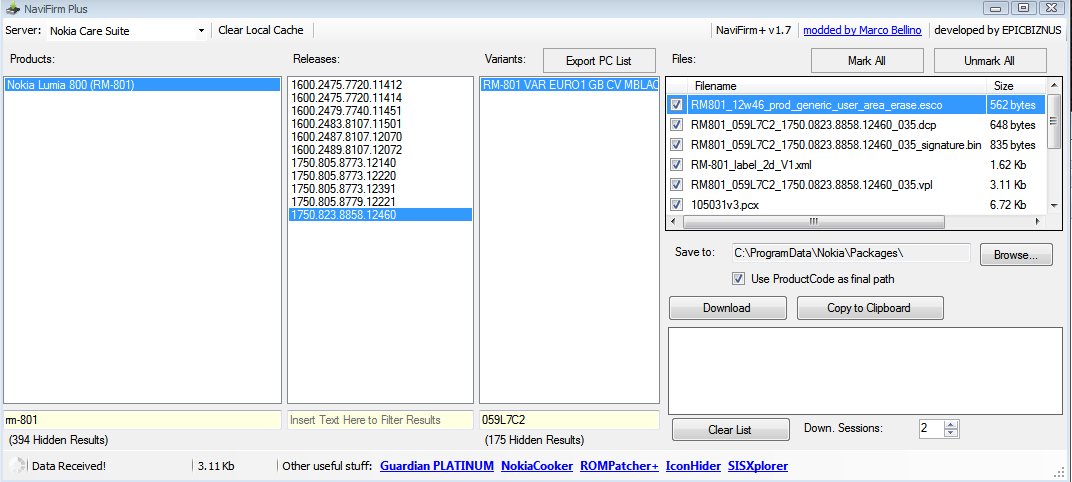
d) Using NaviFirm, download the "country variant" version of the latest firmware (At the time of writing, WP7.8 ):
NB: I did attempt to flash the same firmware version (IE unbranded 11451 over the top of branded 11451, but it fails saying that it already exists. If you have the latest firmware on your device, please rollback to an older version using Zune and the backup created during your previous upgrade process OR use this guide to flash an older version onto your device).
Copy firmware
e) We need to copy the downloaded firmware into the Nokia suite
Flashing the device
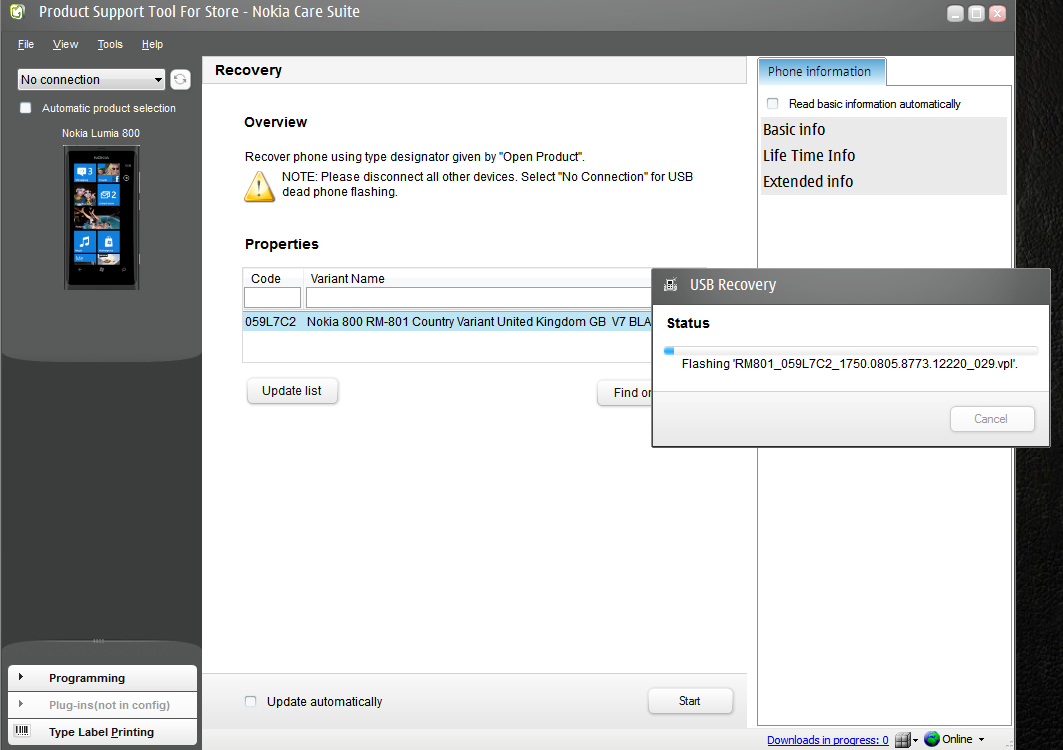
j) During a flash, your phone will re-boot several times. This process may take 10 minutes or , be patient. Do not unplug the phone until its completed.
The process should last around 10 minutes. DO NOT UNPLUG YOUR DEVICE MAY RESULT IN SOFT OR HARDBRICK
Refrences: References
XDA forum flashing nokia attempts thread
* PLease note WP 7.8 has the new EU volume restriction which makes internal speaker quieter if you wish to downgrade just download a lower version on navifirm
Pre-requisites:
a) Download NaviFirm (this tool allows you to obtain nokia firmwares for all nokia devices, and including all variants).
b) Download Nokia Care Suite v5 (this version includes support for Lumia 710 and 800).
During the Care Suite installation, you may be asked to download and install some Microsoft VC re-distributables. Once you have done this, re-start the installation.
Download the firmware from Nokia
d) Using NaviFirm, download the "country variant" version of the latest firmware (At the time of writing, WP7.8 ):
- In the products list, enter the filter "RM-801" (filters are entered at the bottom of the application window)
- Under releases, choose the one that you noted bottom of list is most recent 7.8 release
- Under the variants list, filter for "GB" (or your country code if outside the UK)
- You will see a list of variants for GB, for example, Vodafone, Orange etc.
- Select the "country variant" firmware version, this is the unbranded original Nokia release.
- Finally, click the download button.
NB: I did attempt to flash the same firmware version (IE unbranded 11451 over the top of branded 11451, but it fails saying that it already exists. If you have the latest firmware on your device, please rollback to an older version using Zune and the backup created during your previous upgrade process OR use this guide to flash an older version onto your device).
Copy firmware
e) We need to copy the downloaded firmware into the Nokia suite
- Open Nokia Care Suite by right clicking and choosing RUN AS ADMINISTRATOR
- Double click on the Product Support Tool from the list.
- In the File->Settings menu, copy the products path (eg C:\ProgramData\Nokia\Packages\Products)
- Using Windows Explorer, make sure the above directory exists. You may need to unhide system files if you cannot see this directory.
- Create a new directory called RM-801 in this folder.
- Copy your firmware files that you downloaded from NaviFirm into this RM-801 folder.
Flashing the device
j) During a flash, your phone will re-boot several times. This process may take 10 minutes or , be patient. Do not unplug the phone until its completed.
- In the Support Tool, on the left, choose the Programming tab.
- Choose Refurbish and then select Start.
The process should last around 10 minutes. DO NOT UNPLUG YOUR DEVICE MAY RESULT IN SOFT OR HARDBRICK
Refrences: References
XDA forum flashing nokia attempts thread
* PLease note WP 7.8 has the new EU volume restriction which makes internal speaker quieter if you wish to downgrade just download a lower version on navifirm




