Laptop connected by HDMI cable

dlf

Member
Joined
Dec 18, 2011
Messages
6
I have a 11" or so laptop (Windows 7 64 Bit) connected to a receiver by HDMI which is connected to our Samsung TV by another HDMI, but sound is coming from the laptop instead of the 'surround' speakers. How can I resolve this? I want to watch some youtube vids (playthroughs in (near) HD) on the TV . . . . . . . Oh and I KNOW I've gotten sound from the speakers (non-Laptop) before today. . .


Regardless of what I've tried I can never see a TV icon.
 
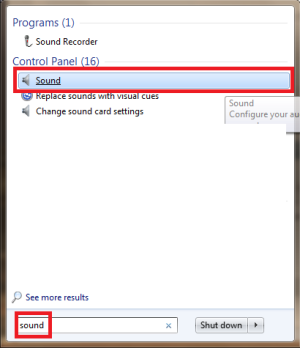
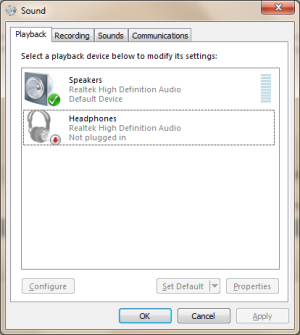
Click on start and type in sound click on the one under control panel, you should see this screen right click on the tv and select set as default device.
(click on the below images)
 

Attachments

  • Capture 0.PNG
    Capture 0.PNG
    31.8 KB · Views: 1,172
  • Capture 1.PNG
    Capture 1.PNG
    46.6 KB · Views: 1,136
Cept I get two options: speakers & Realtek Digital Output, except I don't see a TV icon so I can't choose that. Why is that not showing?
 
Plug your tv in & right click in the open space and make sure show disabled & disconnected devices are checked.
 
Regardless of of what I've tried I don't ever get a TV icon. Probably a cable were missing although HDMI should be both picture & sound.
 
are you up to date with drivers? run windows update and install the drivers for video card,sound card,ect
 
Only updates are for WIndows Office and some security update for x64 systems.
 
usually in the sound list your tv should pop up,if not there could be an icon near the time(bottom right) for your sound device
 
No TV icon what-so-ever anywhere. You DO agree through that the HDMI SHOULD be providing both the sound & picture?

Laptop -> Receiver (by HDMI cable) -> Samsung HDTV (by another HDMI cable) . . . [doesn't 'work']
yet
PS3 -> Receiver (HDMI Cable) -> Samsung TV (by probably the same HDMI cable as above) [works] . . . . . . .
Wii -> Samsung TV (by RCA cables) -- doesn't really get sound from the Receiver speakers with the rec on.

--------------------------------------------------------------------------------------------------------------------------------------------------------------
FINALLY! I had thought you couldn't right click the icons in the tab of 'playback devices' but you can and I did find a TV icon hiding. It may be only two or three speakers but it's better than coming from the laptop.
 
with my setup i have a surround sound>tv(red & white cables)
xbox(hdmi)>tv
so any device plugged into the tv will go through the surround sound (if your tv has the setting for it)

HDMI has both picture & sound
This setup should work better.
so hook everything up like this

ps3 & wii & laptop > tv
receiver (red & white cables) > tv (audio output)
 
I have no option in control panel for hdmi just sdif . Anyone know if this is because the video card does not support hdmi audio just hdmi video cause I have video
 
Right click in the white space and click the two options -- do they still not show?
 
yes thats correct , i checked both of them , i have video just no audio , I cant figure it out , i updated to most currect video driver from nvidia website , graphics card is geforce 6500
 
also it shows the little bar moving around like its playing something but no audio
 

About Digiex

Digiex is a technology and gaming forum, founded in 2004 by InsaneNutter and Nimrod. Digiex has served the internet community with breaking news, detailed guides, exclusive downloads and a popular discussion forum. A small, friendly community of like‑minded people has developed over the years. People are encouraged to register and participate in on‑going discussions.

Get Social

Back
Top Bottom