Setting Up Static IP

Dark Scyth

Veteran
Joined
Mar 3, 2009
Messages
2,530
attachment.php


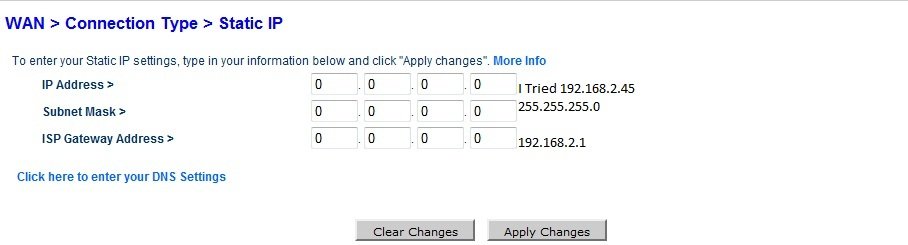
When I tried to use 192.168.2.45, it would say "Refresh" and wouldn't work. I tried 192.168.1.45 and it will go to the next screen as it normally should but shouldn't it have a 2 where the 1 is?

I have the ports that are needed to be open I just need to figure out how to set up a Static IP.
 

Attachments

  • Static IP.jpg
    Static IP.jpg
    42.8 KB · Views: 2,223
Your trying to set your internet ip as a static ip there, you want to look for “static dhcp” so your router will always hand out the same ip to the same computer.

Not all routers can do this, if yours can’t you can assign your pc a static ip address manually on the network connection properties.

2aimtojicochxr0y0ynn.jpg
 
It doesn't work...atleast for me... I tried to but it basically says hell no it can't happen, something working? no, no, no.. If I try 192.168.2.3 which is what it needs to be and then my router says "wft?" because it won't work unless I replace the 192.168.(2).3 with 192.168.(1).3 but if I do that then I don't have internet access because IT NEEDS TO BE A 2 instead of 1...I need a linksys, screw belkin.
 
Your router and pc’s have to be on the same subnet, when your messing about changing 192.168.(2).3 to 192.168.(1).3 your altering the subnet.

For your average home network you only need one subnet, from what I can gather this is 192.168.2.x on your network. Lets forget about trying to get the router to assign static ip’s to computers on your lan and do it the manual way.

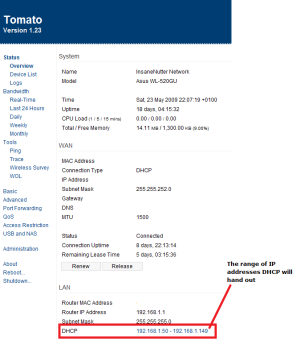
Does your router tell you the range of IP addresses DHCP will hand out? For example my router will give the IP addresses from 192.168.1.50 to 192.168.1.99 to any pc’s not configured with a static ip address. (see screenshot below)

attachment.php


I can manually assign any pc or device on your network a static ip address aslong as its not in that range.

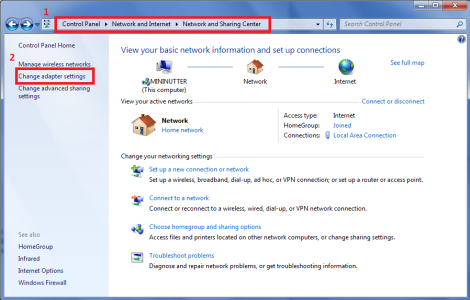
In windows 7 go to the network adaptor properties as seen in the screenshot below.

attachment.php


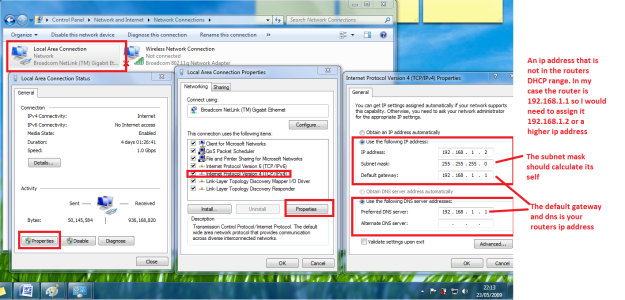
Now assign your computer an IP address in the same subnet as your router but not in the DHCP range, if your router ip is 192.168.2.1 your computer could for example be assigned 192.168.2.2 ip address as its on the same subnet, you couldn’t assign your computer 192.168.3.2 because that would but it on a different subnet to the router.

attachment.php


If you enter the DNS and default gateway settings as your routers ip address you should be able to get internet access when you assign yourself a static ip address.

 

Attachments

  • router1.png
    router1.png
    35.3 KB · Views: 2,393
  • router2.png
    router2.png
    113 KB · Views: 2,463
  • router3.png
    router3.png
    441.4 KB · Views: 3,705

About Digiex

Digiex is a technology and gaming forum, founded in 2004 by InsaneNutter and Nimrod. Digiex has served the internet community with breaking news, detailed guides, exclusive downloads and a popular discussion forum. A small, friendly community of like‑minded people has developed over the years. People are encouraged to register and participate in on‑going discussions.

Get Social

Back
Top Bottom