Your router and pc’s have to be on the same subnet, when your messing about changing 192.168.(2).3 to 192.168.(1).3 your altering the subnet.
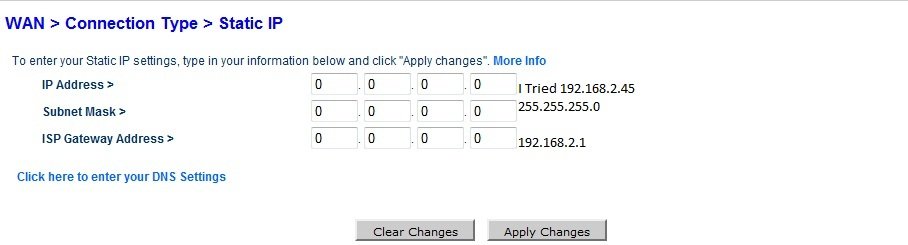
For your average home network you only need one subnet, from what I can gather this is 192.168.2.x on your network. Lets forget about trying to get the router to assign static ip’s to computers on your lan and do it the manual way.
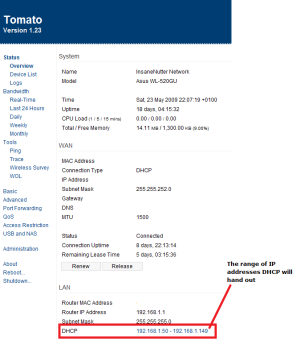
Does your router tell you the range of IP addresses DHCP will hand out? For example my router will give the IP addresses from 192.168.1.50 to 192.168.1.99 to any pc’s not configured with a static ip address. (see screenshot below)
I can manually assign any pc or device on your network a static ip address aslong as its not in that range.
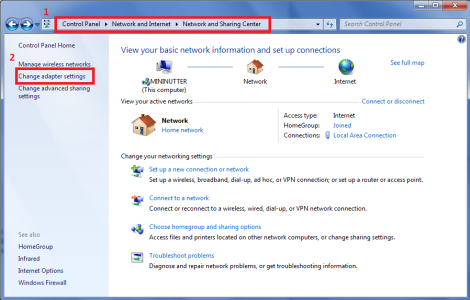
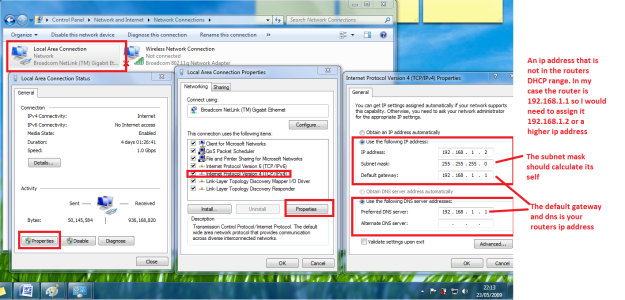
In windows 7 go to the network adaptor properties as seen in the screenshot below.
Now assign your computer an IP address in the same subnet as your router but not in the DHCP range, if your router ip is 192.168.2.1 your computer could for example be assigned 192.168.2.2 ip address as its on the same subnet, you couldn’t assign your computer 192.168.3.2 because that would but it on a different subnet to the router.
If you enter the DNS and default gateway settings as your routers ip address you should be able to get internet access when you assign yourself a static ip address.