


InsaneNutter
Resident Nutter
Avalaunch is a dashboard replacement for the Xbox. It provides new functionality to the Xbox such as a skinnable interface that lets you control how your Xbox looks. Avalaunch has the ability to download new skins from online websites, the ability to download saved games and to access the X-Link Kai (free) gaming network through an integrated interface.
Download:
Avalaunch 0.49.3 Download
Avalaunch 0.49.3 MultiGameDisk Download (This version can be burned on to a DVD with mutliple games, giving you a menu to launch all the games on that DVD)
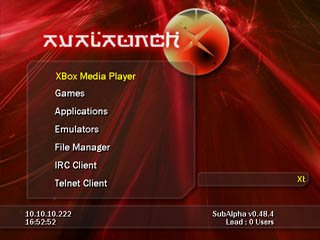
Main Menu - The main dashboard screen. Avalaunch displays its built in internet connectivity with it's RSS News feeds supplied with up to the minute information from such sites as Xbox-Scene.com, and is completely user configurable to read any RSS feeds that you supply it:
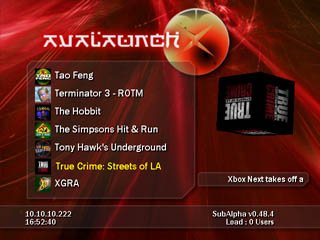
Games Menu - Avalaunch automagically pulls the title image from the game's XBE and displays it for you next to the title. It also displays a rotating or fixed cube with the title image over on the right.
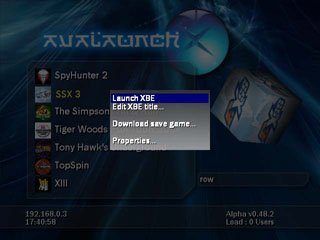
Games Menu Submenu - By pressing start while selecting a game, you bring up the Avalaunch games submenu that allows you to do such things as edit the XBE title, download saved games from xboxsaves.com, or view the file properties of the game.
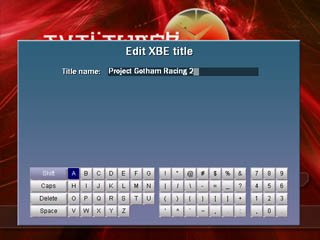
Edit XBE Title Menu - This image displays the use of the onboard keyboard to change how a title is displayed for a given game. Youcan also use your usb keyboard if you have one.
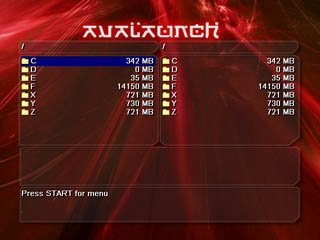
File Manager - Avalaunch has a built in File Manager which means no more switching to another application just to move games. Not only that, but this Filemanager will allow you to connect to a remote FTP, such as another xbox, and transfer files to and from it, all from within the dashboard!
Download:
Avalaunch 0.49.3 Download
Avalaunch 0.49.3 MultiGameDisk Download (This version can be burned on to a DVD with mutliple games, giving you a menu to launch all the games on that DVD)
Main Menu - The main dashboard screen. Avalaunch displays its built in internet connectivity with it's RSS News feeds supplied with up to the minute information from such sites as Xbox-Scene.com, and is completely user configurable to read any RSS feeds that you supply it:
Games Menu - Avalaunch automagically pulls the title image from the game's XBE and displays it for you next to the title. It also displays a rotating or fixed cube with the title image over on the right.
Games Menu Submenu - By pressing start while selecting a game, you bring up the Avalaunch games submenu that allows you to do such things as edit the XBE title, download saved games from xboxsaves.com, or view the file properties of the game.
Edit XBE Title Menu - This image displays the use of the onboard keyboard to change how a title is displayed for a given game. Youcan also use your usb keyboard if you have one.
File Manager - Avalaunch has a built in File Manager which means no more switching to another application just to move games. Not only that, but this Filemanager will allow you to connect to a remote FTP, such as another xbox, and transfer files to and from it, all from within the dashboard!





