


Nimrod
Vibe Coder
- Joined
- Jun 1, 2007
- Messages
- 1,496
Any forum that's been around a while is full of dead links. Threads get deleted, merged or tidied up, but the links to them are still on Google, in people's bookmarks and on other sites. XenForo just shows "The requested thread could not be found." and that's it.
The URL usually says what they were after though, since XenForo puts the thread title in it. This add-on takes those words and lists up to five live threads that match, under the normal error page. Quite often what they wanted is still on the forum, just in a different thread.
Free, change it however you like.
Download Digiex-ThreadNotFound-1.0.0.zip
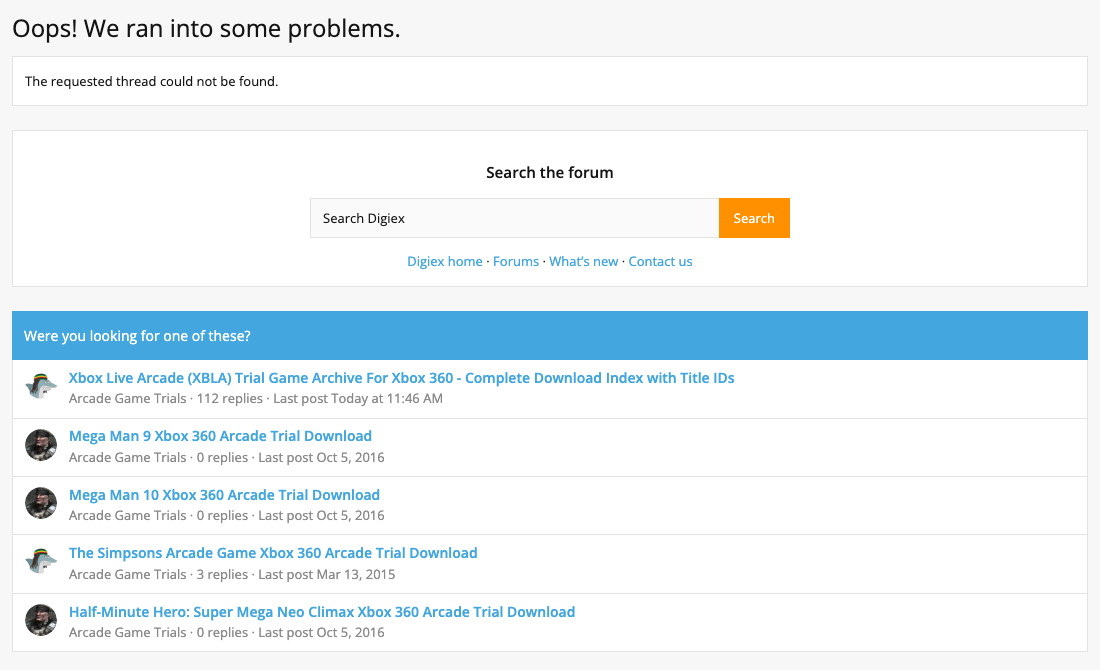
The search box in the middle is something separate we added to our error page, it isn't part of the add-on.
You can try it on this one, an old download thread we removed when we tidied up our downloads:
https://digiex.net/threads/xbox-360-arcade-game-trial-downloads-digiex-mega-pack-1.6483/
Or make up a link with a few real words in it and a big number on the end.
HOW IT WORKS
It doesn't use XenForo's search for this. With the default MySQL search XenForo needs every word to match and sorts by date, so a long title from a URL usually finds nothing. Instead it queries the full-text index XenForo already has, which ranks by relevance and doesn't need every word to match. If two threads match about as well, the one with more replies goes first. It's one query and takes a millisecond or two.
There are no settings, install it and it works.
WHAT IT LEAVES ALONE
The page is still a 404 and nothing is redirected, so search engines still see the page as gone.
Suggestions are checked against what the visitor is allowed to see. Guests won't be shown threads from forums they can't read, and deleted or moderated threads are never shown.
If the thread exists but the visitor can't see it, they get the normal no permission page with no suggestions, so nothing about the hidden thread gets out.
If there are no words in the link, or nothing matches, the page is exactly what XenForo would normally show. Other error pages aren't touched.
If the query fails for any reason it goes in the server error log and the visitor gets the normal page.
INSTALL
XenForo 2.3 only, PHP 8.0 or newer.
Admin CP -> Add-ons -> Install/upgrade from archive, and upload the zip. Or copy the upload folder into your XenForo root and install it from the add-ons list, or from the command line:
Then open a link to a thread that doesn't exist, with some real words in it, like
It needs "Include content title in URLs" turned on (Admin CP -> Options -> Search engine optimization), which it is by default. If you use Elasticsearch (XenForo Enhanced Search), XenForo stops filling the MySQL search index, so you may get few or no suggestions.
CHANGING IT
The text is in phrases starting
It only matches thread titles, not post content, and only handles thread links (not posts, members, forums etc).
Uninstalling removes the template and phrases. There are no tables.
There's more detail in the README.md inside the zip. Questions or improvements, post them here.
The URL usually says what they were after though, since XenForo puts the thread title in it. This add-on takes those words and lists up to five live threads that match, under the normal error page. Quite often what they wanted is still on the forum, just in a different thread.
Free, change it however you like.
Download Digiex-ThreadNotFound-1.0.0.zip
The search box in the middle is something separate we added to our error page, it isn't part of the add-on.
You can try it on this one, an old download thread we removed when we tidied up our downloads:
https://digiex.net/threads/xbox-360-arcade-game-trial-downloads-digiex-mega-pack-1.6483/
Or make up a link with a few real words in it and a big number on the end.
HOW IT WORKS
/threads/halo-reach-demo-download.12345/ is read as "halo reach demo download", and those words are matched against thread titles.It doesn't use XenForo's search for this. With the default MySQL search XenForo needs every word to match and sorts by date, so a long title from a URL usually finds nothing. Instead it queries the full-text index XenForo already has, which ranks by relevance and doesn't need every word to match. If two threads match about as well, the one with more replies goes first. It's one query and takes a millisecond or two.
There are no settings, install it and it works.
WHAT IT LEAVES ALONE
The page is still a 404 and nothing is redirected, so search engines still see the page as gone.
Suggestions are checked against what the visitor is allowed to see. Guests won't be shown threads from forums they can't read, and deleted or moderated threads are never shown.
If the thread exists but the visitor can't see it, they get the normal no permission page with no suggestions, so nothing about the hidden thread gets out.
If there are no words in the link, or nothing matches, the page is exactly what XenForo would normally show. Other error pages aren't touched.
If the query fails for any reason it goes in the server error log and the visitor gets the normal page.
INSTALL
XenForo 2.3 only, PHP 8.0 or newer.
Admin CP -> Add-ons -> Install/upgrade from archive, and upload the zip. Or copy the upload folder into your XenForo root and install it from the add-ons list, or from the command line:
php cmd.php xf:addon-install Digiex/ThreadNotFoundThen open a link to a thread that doesn't exist, with some real words in it, like
/threads/some-topic-on-your-board.99999999/.It needs "Include content title in URLs" turned on (Admin CP -> Options -> Search engine optimization), which it is by default. If you use Elasticsearch (XenForo Enhanced Search), XenForo stops filling the MySQL search index, so you may get few or no suggestions.
CHANGING IT
The text is in phrases starting
digiex_tnf_ under Appearance -> Phrases, and the layout is the digiex_thread_not_found template. It uses XenForo's normal block styling, so it should already match your style. The number of suggestions is DIGIEX_TNF_SHOW at the top of the controller.It only matches thread titles, not post content, and only handles thread links (not posts, members, forums etc).
Uninstalling removes the template and phrases. There are no tables.
There's more detail in the README.md inside the zip. Questions or improvements, post them here.



