

Hoffman
Addict
- Joined
- Jun 1, 2007
- Messages
- 885
Wii U WUP Installer Y Mod will install Wii U Games, Wii U DLC and Wii U Updates from the Wii U's SD card to either the Wii U's internal memory or Wii U formatted hard drive.
If you have a fast SD card games should install pretty fast.
Download:
Download Wii U WUP Installer Y Mod
Link to the Wii U WUP Installer Y Mod Github page if you wish to download the source code.
1. How to use Wii U WUP Installer Y Mod:
Extract Wii U WUP Installer Y Mod to \wiiu\apps\wupinstaller on your Wii U's SD card
This will allow Wii U WUP Installer Y Mod to be loaded from the Homebrew Channel like any other Wii U homebrew application.
2. How to prepare content to install with Wii U WUP Installer Y Mod:
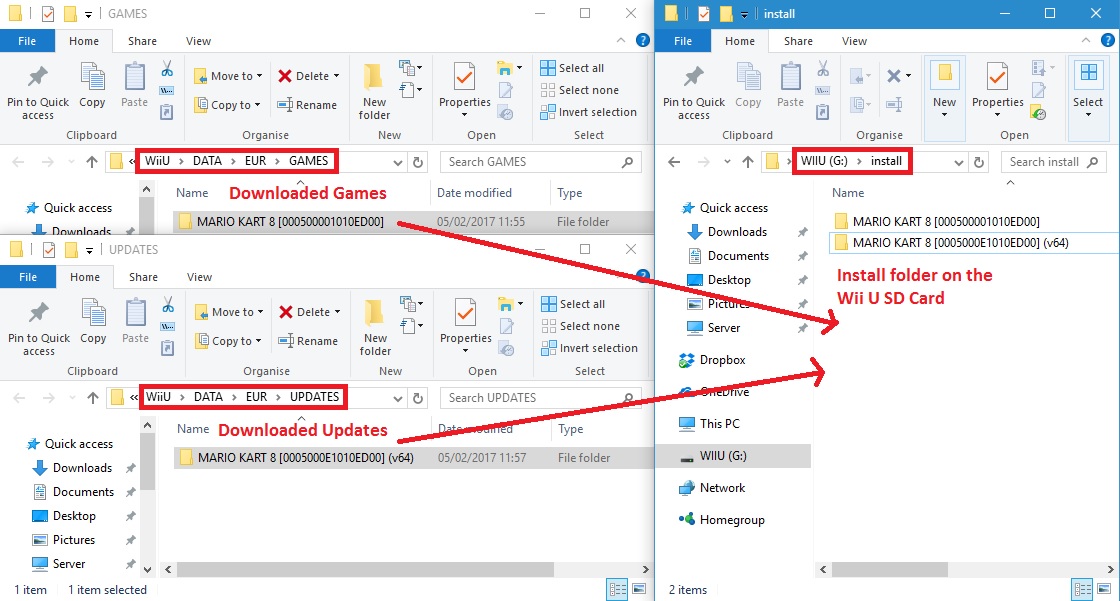
If you haven't already follow this tutorial on how to download / prepare Wii U Games / Updates For USB Y Mod Install
3. How to install Wii U content from the SD card:
1. Load Wii U WUP Installer Y Mod from the Homebrew Launcher
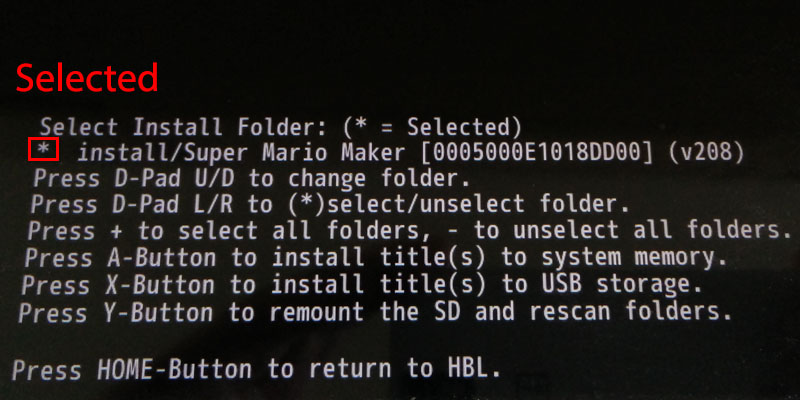
2. Select the content to install:
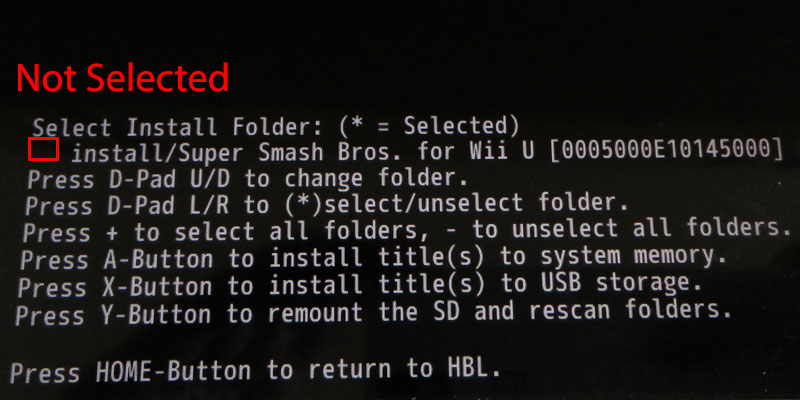
Not selected content example:
3. Install the content:
When a directory is installed, there is a 5s delay when you can press B to cancel the next install, otherwise you can leave the Wii U and it will go through the process of installing all the content you selected.
4. Installing more content
You can remove the SD card once you have installed all the current content on it, you can then delete this on a PC and copy more content to it.
Place the SD card back in the Wii U and press Y to remount and rescan folders on SD, now simply install more content again as described above.
5. Additional notes:
If you only want to install 1 directory, press - to unselect all, then you just have to have the directory you want shown, then select X or A depending on where you want to install.
If you select 1 or more directories with the right d-pad, a * appears to show they are selected, then select X or A depending on where you want to install and only selected directories are installed.
End result:
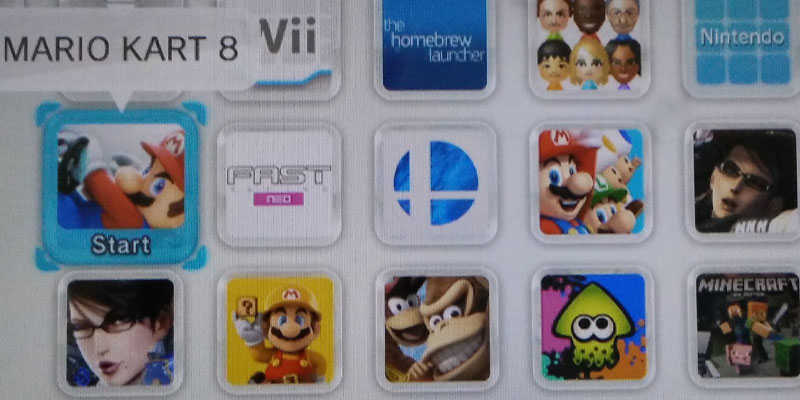
You can have all your games on the Wii U home screen ready to play:
And yes for anyone who is wondering i do own the games ive installed on disc:
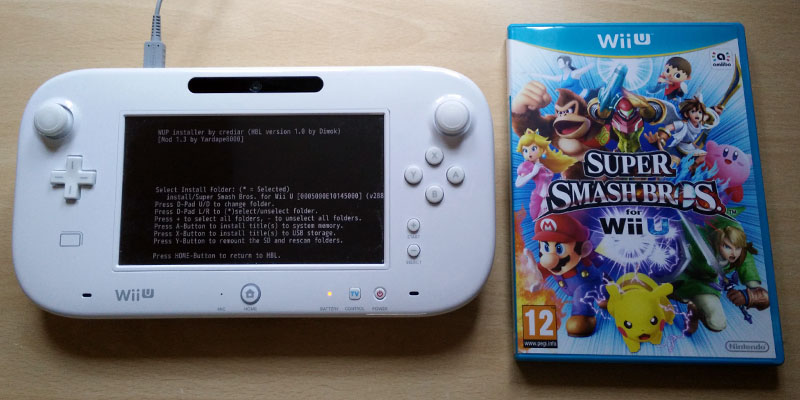
I hope this help you to understand the pretty easy process to install your Wii U games and updates for easy loading from the home screen.
If you have a fast SD card games should install pretty fast.
Download:
Download Wii U WUP Installer Y Mod
Link to the Wii U WUP Installer Y Mod Github page if you wish to download the source code.
1. How to use Wii U WUP Installer Y Mod:
Extract Wii U WUP Installer Y Mod to \wiiu\apps\wupinstaller on your Wii U's SD card
This will allow Wii U WUP Installer Y Mod to be loaded from the Homebrew Channel like any other Wii U homebrew application.
2. How to prepare content to install with Wii U WUP Installer Y Mod:
- On your Wii U's SD card create a folder called install.
- Copy all your Wii U Games, DLC and Updates to the install folder on the SD card, keeping them in individual folders.
- Note the content must have been downloaded / prepared using Wii U USB helper to be in the correct format, install content obtained from else where at your own risk, especially if installing to your Sysnand. Otherwise you risk bricking. It is safe to install any content prepared by Wii U USB helper.
- install/game 1
- install/game 2
- install/game 2 update
If you haven't already follow this tutorial on how to download / prepare Wii U Games / Updates For USB Y Mod Install
3. How to install Wii U content from the SD card:
1. Load Wii U WUP Installer Y Mod from the Homebrew Launcher
2. Select the content to install:
- Use up/down on the d-pad to select the folder.
- Left = deselect, right = select, plus = select all, minus = deselect all.
- Selected directories will display *
Not selected content example:
3. Install the content:
- Press A to install all selected to NAND.
- Press X to install all selected to USB.
When a directory is installed, there is a 5s delay when you can press B to cancel the next install, otherwise you can leave the Wii U and it will go through the process of installing all the content you selected.
4. Installing more content
You can remove the SD card once you have installed all the current content on it, you can then delete this on a PC and copy more content to it.
Place the SD card back in the Wii U and press Y to remount and rescan folders on SD, now simply install more content again as described above.
5. Additional notes:
If you only want to install 1 directory, press - to unselect all, then you just have to have the directory you want shown, then select X or A depending on where you want to install.
If you select 1 or more directories with the right d-pad, a * appears to show they are selected, then select X or A depending on where you want to install and only selected directories are installed.
End result:
You can have all your games on the Wii U home screen ready to play:
And yes for anyone who is wondering i do own the games ive installed on disc:
I hope this help you to understand the pretty easy process to install your Wii U games and updates for easy loading from the home screen.





