Red Faction: Guerrilla Xbox 360 Demo Download

InsaneNutter

Resident Nutter
Joined
Jun 1, 2007
Messages
11,864
Location
UK
red-faction-guerrilla-box.jpg

About Red Faction: Guerrilla:

Lured by the rich veins of Martian ore, miner Alec Mason arrives on Mars hungry for a new life. But the promise of a brighter future for Mason quickly fades. The Earth Defense Force, once protectors of Martian colonists, have adopted heavy-handed checkpoints and omnipresent armed patrols. As violence escalates, an underground resistance known as the Red Faction is swiftly gathering strength to combat the EDF. Mason’s quest for a new life has become a battle for survival, and the fate of the planet now rests with him and the Red Faction.

Title ID: 54518845

Download:

Download Red Faction: Guerrilla Xbox 360 Demo

How to Install:

To play this demo simply extract the zip file and copy the extracted folders and demo file into the Content\0000000000000000 folder on the Xbox 360's internal hard drive, or a USB drive configured for use in the Xbox 360.
After copying the demo to an Xbox 360 storage device, you can go to the Demos section on the dashboard and load the demo to play.

Helpful Tutorials:
  1. Inject a demo to a USB flash drive
  2. Inject a demo to the Xbox 360 Hard Drive
  3. Burn a demo to a CD or DVD
  4. Configure a USB memory stick to be used as Xbox 360 storage
Need help with something else? Visit our Xbox 360 Guides.
 
Last edited by a moderator:
It’s the single player demo of the game that will be released in June this year.
 
I hope its similar to the one on PS2, with updated graphics more weapons. I liked being able to blow a hole in the wall anywhere, unlike most games where if you do have to blow up a wall only that one part will blow up and nothing else will be scratched.
 
*For those who don't have Nero and can't manage to find another burning program (like me)*

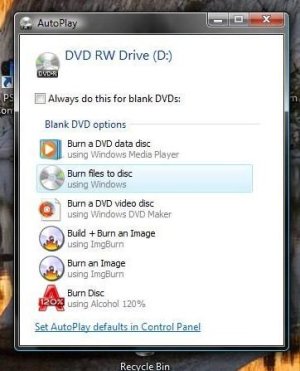
Place a blank DVD into the disc drive. Then this should pop-up. Then click Burn files to disc.

attachment.php
attachment.php


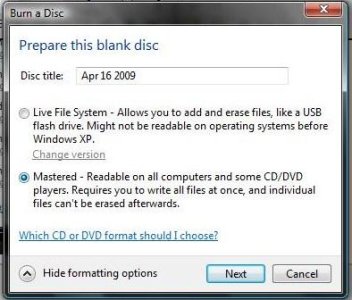
Then click show formatting options, make sure Mastered is what you have it on. Then click next. (The Disc title does not matter.)

attachment.php
attachment.php


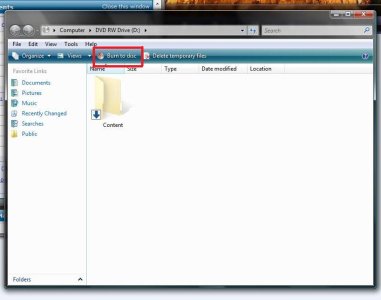
Then drag the content folder in here, then click burn to disc.
attachment.php

attachment.php


Works for Vista users, may work for XP users too. (for some reason the pics felt like disappearing.)
 

Attachments

  • Demo Burn.jpg
    Demo Burn.jpg
    36.9 KB · Views: 6,912
  • Demo Burn1.jpg
    Demo Burn1.jpg
    38 KB · Views: 6,856
  • Demo Burn2.jpg
    Demo Burn2.jpg
    57.1 KB · Views: 6,903
Last edited:
Works for Vista users, may work for XP users too.

It won't work for XP users as DVD burning was only introduced in Vista as far as I know. I downloaded the beta for the MP but never got round to playing it so I can see if I missed anything with this demo. Thanks InsaneNutter!
 
So I ran into some trouble. When I used WinRar to unpack the files and get the content folder, I did not have the actual demo file. I unpacked everything, went into the content folder and all of the folders inside it, but when I got to the last folder, there was no demo file. Should I try downloading th demo again?
 
So I ran into some trouble. When I used WinRar to unpack the files and get the content folder, I did not have the actual demo file. I unpacked everything, went into the content folder and all of the folders inside it, but when I got to the last folder, there was no demo file. Should I try downloading th demo again?

Have you tried burning it yet? Also how big is the file when you click properties on the content folder?
 
Got the latest version of WinRAR?

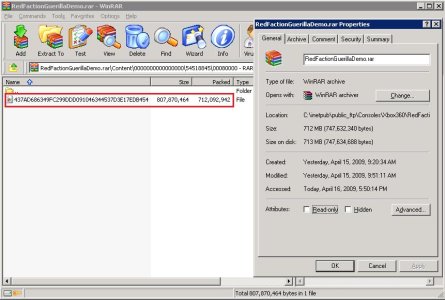
Before extracting open up the rar file and go through the folders do you have one huge file that’s inside all the folders?

The rar file you downloaded should be 712MB (747,632,340 bytes)

How does what you have compare to the attached screenshot?
 

Attachments

  • rf.jpg
    rf.jpg
    80.5 KB · Views: 1,798
When you un rar you should end up with a folder named "content". All you do is burn that folder (the content folder) to a dvd and you are done!

There is no demo.exe or anything. Just the content folder which you burn!

_____________

Burned using nero and it worked fine! Not a bad game either just got stuck near the start lol. I want to play the online!
 
I have downloaded this twice now. When I go to unrar the file, I get a message saying that the big file within all of the folders is corrupt so the only thing I get is all of the folders, but no large file inside all of them. Any ideas?
 
How big is the RAR file? It should be around 720MB if I recall. I know when I got disconnected from the internet on my laptop it said that it was fully downloaded even though it was only at about 400MB.
 
Glad you got it, it’s always best to use a download manager or something that allows you to resume downloads when downloading large files.
 
Thanks! I've been wanting to see how it's evolved after the epically disappointing multi-player demo last year.
 
I personally didn’t find this demo that interesting either, I did like how you could destroy everything on it though.
 

About Digiex

Digiex is a technology and gaming forum, founded in 2004 by InsaneNutter and Nimrod. Digiex has served the internet community with breaking news, detailed guides, exclusive downloads and a popular discussion forum. A small, friendly community of like‑minded people has developed over the years. People are encouraged to register and participate in on‑going discussions.

Get Social

Back
Top Bottom