


Nimrod
Vibe Coder
- Joined
- Jun 1, 2007
- Messages
- 1,500
If you have a Steam Machine (or a Steam Deck, or anything else on SteamOS) and your SD card has ever gone read-only after waking the box from sleep, this is for you. It's a small script you launch from ES-DE's Ports menu with a controller, and it tells you in one screen whether your SD card can still be written to, so you find out before you lose an evening's saves rather than after.
THE PROBLEM
I found this one the hard way. Put the Steam Machine to sleep, wake it up later, carry on playing, and at some point every 3DS game started throwing a fatal error inside the emulator. Nothing wrong with Azahar, nothing wrong with the ROMs. The SD card had quietly remounted itself read-only.
What makes it nasty is that a read-only card doesn't look broken. Reads still work, so ES-DE shows your library, ROMs load and games boot. It's every write that fails: saves, save states, memory cards, emulator settings. Depending on the emulator you either get a vague fatal error, or worse, nothing at all and your progress just never gets saved. There is nothing on screen in Game Mode telling you the card has gone.
On the Steam Machine the SD slot is actually an internal USB card reader (Generic USB3.0-CRW, 0bda:0316), and it doesn't always survive a resume from sleep. Around 40 to 70 seconds after waking, the kernel resets the reader. Most of the time it comes straight back and you'd never know. Sometimes a write gets lost in the reset, ext4 notices, and it does the sensible thing and remounts the card read-only to protect it. The kernel log looks like this:
A few things I've learned from logging it for a couple of weeks:
There's also a third, harmless outcome that's worth knowing about, because it looks scary in the log. Sometimes the reset only loses the one read that was in flight:
That's fine. The data is still on the card, the filesystem never notices, and the card stays read-write. Whatever was loading at the time just needs launching again. The only difference from the bad one is READ versus WRITE, which is exactly the sort of thing you can't check from the sofa.
WHAT THE SCRIPT DOES
Launch it from Ports and a few seconds later you get a verdict on the TV in big text, which closes itself. No mouse needed, nothing to click.
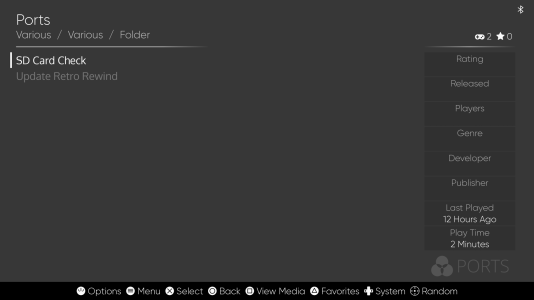
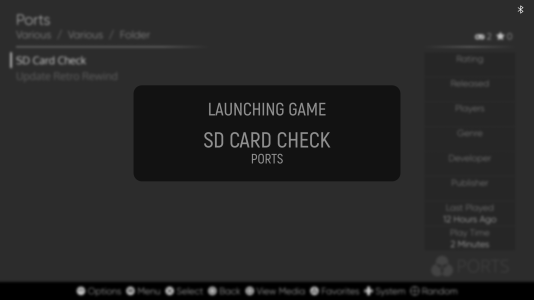
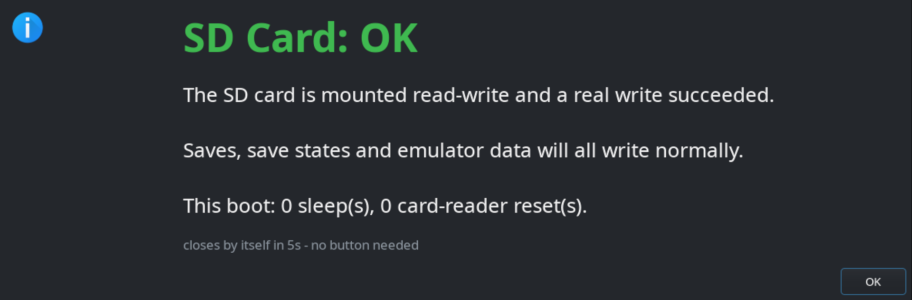
It checks four things:
And gives you one of these:
The warnings stay up for 12 seconds so you've time to read them. Every run is also logged to ~/.local/share/sd-check.log.
It changes nothing on your system. The only thing it writes is that test file, which it deletes straight away, and the log.
INSTALL
3 steps, no root
1. Copy "SD Card Check.sh" into your ES-DE ports folder.
On a default EmuDeck setup that is Emulation/roms/ports/ - under
/run/media/deck/<CARD>/Emulation or ~/Emulation, wherever yours lives.
2. chmod +x "SD Card Check.sh"
3. Restart ES-DE. It only scans the ports folder at startup.
The file name is what shows in the menu, so rename it if you like.
USING IT
ES-DE -> Ports -> SD Card Check.
Worth running after waking the box, especially if the first launch was slow, and any time an emulator throws an error you can't explain.
No ES-DE? Run it from Konsole in Desktop Mode or over SSH and the result is printed in the terminal too:
It finds the card on its own: whichever card the script is sitting on, otherwise the SD card under /run/media. If you've got more than one drive plugged in you can point it at one:
AVOIDING IT IN THE FIRST PLACE
There isn't a proper fix yet. It's a kernel and card reader issue, not something a setting in SteamOS sorts out, and the usual USB quirks don't apply to this reader. What does work:
Tested on SteamOS 3.8.16 (Valve Steam Machine), Game Mode, EmuDeck + ES-DE.
Nothing in it is specific to that box. It should work on a Steam Deck or other SteamOS device too (it knows about both USB card readers and the Deck's built-in slot), but I've only run it on the Steam Machine, so shout if it misbehaves on yours.
Script attached - it is plain shell, read it before you run it.
THE PROBLEM
I found this one the hard way. Put the Steam Machine to sleep, wake it up later, carry on playing, and at some point every 3DS game started throwing a fatal error inside the emulator. Nothing wrong with Azahar, nothing wrong with the ROMs. The SD card had quietly remounted itself read-only.
What makes it nasty is that a read-only card doesn't look broken. Reads still work, so ES-DE shows your library, ROMs load and games boot. It's every write that fails: saves, save states, memory cards, emulator settings. Depending on the emulator you either get a vague fatal error, or worse, nothing at all and your progress just never gets saved. There is nothing on screen in Game Mode telling you the card has gone.
On the Steam Machine the SD slot is actually an internal USB card reader (Generic USB3.0-CRW, 0bda:0316), and it doesn't always survive a resume from sleep. Around 40 to 70 seconds after waking, the kernel resets the reader. Most of the time it comes straight back and you'd never know. Sometimes a write gets lost in the reset, ext4 notices, and it does the sensible thing and remounts the card read-only to protect it. The kernel log looks like this:
Code:
usb 2-1: reset SuperSpeed USB device number 2 using xhci_hcd
sd 0:0:0:0: [sda] tag#0 device offline or changed
I/O error, dev sda, sector 2056 op 0x1:(WRITE)
EXT4-fs error (device sda1) in __ext4_new_inode:1094: IO failure
Aborting journal on device sda1-8
EXT4-fs (sda1): Remounting filesystem read-only
A few things I've learned from logging it for a couple of weeks:
- It's the sleep that triggers it. On my box 8 out of 11 real sleeps reset the card reader, and one of those took the card read-only.
- You can't predict it from how long it slept. A 77 second sleep reset the reader, an 11 hour one didn't, a 17 hour one did.
- The card itself is fine. Clean filesystem, no read errors, nothing in lost+found. It's the link to the card that drops, not the flash dying.
- The early warning is a slow first launch after waking. ES-DE lives on the card, so it's the first thing to read it, and you'll sometimes see it hang for about 30 seconds while the kernel waits on the reader before resetting it. If that's all that happens, you got away with it. If games start erroring afterwards, you didn't.
- Once it has gone read-only, a reboot is the only fix. The filesystem journal has been aborted and nothing short of a remount at boot will clear it.
There's also a third, harmless outcome that's worth knowing about, because it looks scary in the log. Sometimes the reset only loses the one read that was in flight:
Code:
I/O error, dev sda, sector 318769416 op 0x0:(READ)That's fine. The data is still on the card, the filesystem never notices, and the card stays read-write. Whatever was loading at the time just needs launching again. The only difference from the bad one is READ versus WRITE, which is exactly the sort of thing you can't check from the sofa.
WHAT THE SCRIPT DOES
Launch it from Ports and a few seconds later you get a verdict on the TV in big text, which closes itself. No mouse needed, nothing to click.
It checks four things:
- Is the card mounted at all.
- A real write test. It creates a tiny hidden file on the card and deletes it again. Mount options can still say "rw" when the device underneath has gone, so only an actual write proves it.
- The kernel log for this boot, for errors on the SD card only. Filesystem errors, a read-only remount or a lost write are red. A lost read on its own is amber.
- How exposed you've been, i.e. how many real sleeps this boot has had and how many times the card reader has been reset. Short "bounce" sleeps of a few seconds are ignored, as they're too short to reset anything.
And gives you one of these:
- OK: mounted read-write and a real write worked. Play on. Closes after 5 seconds.
- SURVIVED A RESET: the card is fine, one read was lost when the reader reset. Relaunch whatever was loading, no need to reboot.
- ERRORS FOUND: writes still work but the filesystem has logged errors. Save and reboot.
- READ-ONLY - DO NOT PLAY: nothing you do will save. Reboot now.
The warnings stay up for 12 seconds so you've time to read them. Every run is also logged to ~/.local/share/sd-check.log.
It changes nothing on your system. The only thing it writes is that test file, which it deletes straight away, and the log.
INSTALL
3 steps, no root
1. Copy "SD Card Check.sh" into your ES-DE ports folder.
On a default EmuDeck setup that is Emulation/roms/ports/ - under
/run/media/deck/<CARD>/Emulation or ~/Emulation, wherever yours lives.
2. chmod +x "SD Card Check.sh"
3. Restart ES-DE. It only scans the ports folder at startup.
The file name is what shows in the menu, so rename it if you like.
USING IT
ES-DE -> Ports -> SD Card Check.
Worth running after waking the box, especially if the first launch was slow, and any time an emulator throws an error you can't explain.
No ES-DE? Run it from Konsole in Desktop Mode or over SSH and the result is printed in the terminal too:
Code:
"./SD Card Check.sh"It finds the card on its own: whichever card the script is sitting on, otherwise the SD card under /run/media. If you've got more than one drive plugged in you can point it at one:
Code:
SD_CHECK_PATH=/run/media/deck/MyCard "./SD Card Check.sh"AVOIDING IT IN THE FIRST PLACE
There isn't a proper fix yet. It's a kernel and card reader issue, not something a setting in SteamOS sorts out, and the usual USB quirks don't apply to this reader. What does work:
- Don't sleep the box. Shut it down instead and turn off the sleep timers in Settings > Power. That's what I've ended up doing.
- If it has already happened, reboot before you play anything else.
- Back your saves up. A read-only card doesn't damage anything already saved, but any progress since it flipped is gone.
Tested on SteamOS 3.8.16 (Valve Steam Machine), Game Mode, EmuDeck + ES-DE.
Nothing in it is specific to that box. It should work on a Steam Deck or other SteamOS device too (it knows about both USB card readers and the Deck's built-in slot), but I've only run it on the Steam Machine, so shout if it misbehaves on yours.
Script attached - it is plain shell, read it before you run it.



