

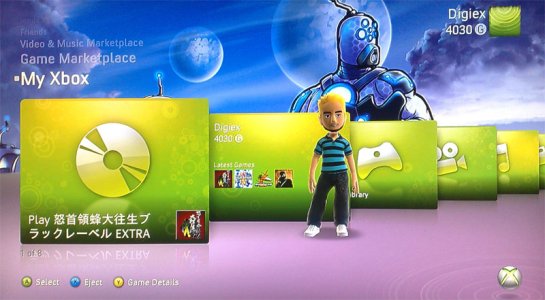
The Maw Premium Theme Download

InsaneNutter

Resident Nutter
Joined
Jun 1, 2007
Messages
11,886
Location
UK
the-maw-jpg.3897

You will need some way of connecting either your 360’s Hard Drive or Memory card to the PC, you cannot burn this to a CD and copy it to your 360.

Once you have either a hard drive or memory card connected to the PC load Xplorer 360 up and click Drive > Open > Hard drive or memory card.

If you are using a memory card open Partition 1, If you are using a 360 hard drive open Partition 3

Unzip the theme, the folders and theme file should be copied to: Content\0000000000000000\

The end result should look something like this:
end-result-jpg.2290


Now just sign your profile in, go to the my xbox section, click your gamertag, click change theme and enjoy!

The Maw Premium Theme Download
 

Attachments

  • The Maw.jpg
    The Maw.jpg
    109.8 KB · Views: 16,336
  • The Maw.zip
    The Maw.zip
    7.5 MB · Views: 3,577
Can we install this themes to the xbox360 with a usb? you know with xtaf and this stuff...
thank you
 

About Digiex

Digiex is a technology and gaming forum, founded in 2004 by InsaneNutter and Nimrod. Digiex has served the internet community with breaking news, detailed guides, exclusive downloads and a popular discussion forum. A small, friendly community of like‑minded people has developed over the years. People are encouraged to register and participate in on‑going discussions.

Get Social

Back
Top Bottom



