Your oldest windows install?

InsaneNutter

Resident Nutter
Joined
Jun 1, 2007
Messages
11,869
Location
UK
What is your oldest Windows install that still works / is in use today?

We have some pretty old computers at work, one of them is running Windows XP and has an install date of: 12/09/2003, 14:50:51

I don't think its doing bad for an almost 10 year old computer, its still pretty snappy. Although it will be replaced sometime as its not capable of running Windows 8.
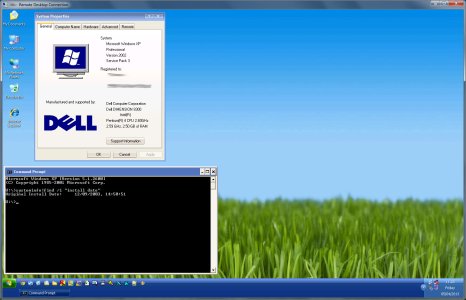
10-year-windows-xp-install.jpg

To find-out open a command prompt and type in:

Code:
systeminfo|find /i "install date"
 
My windows 7 install has the date of: 27/9/2010 8:38:00 PM
I used to own some old computers with windows xp on it, i got rid of them though.
 
10/02/2013, 15:26:09

Currently using Windows XP, but in 2014 I'll be updating to Windows 7 because in 2014 Windows XP will be officially discontinued.
 
Lol don't use it now but I had windows 3.1 that me and you tried to upgrade with no luck
 
What is your oldest Windows install that still works / is in use today?

We have some pretty old computers at work, one of them is running Windows XP and has an install date of: 12/09/2003, 14:50:51

I don't think its doing bad for an almost 10 year old computer, its still pretty snappy. Although it will be replaced sometime as its not capable of running Windows 8.

View attachment 12811

To find-out open a command prompt and type in:

Code:
systeminfo|find /i "install date"

Do you type that in with or without the quotation marks? That's also the wrong command. I just tried it and all I got was this:

Microsoft Windows XP [Version 5.1.2600]
(C) Copyright 1985-2001 Microsoft Corp.
C:\Documents and Settings\Alison>systeminfo|find /i "install date"
'systeminfo' is not recognized as an internal or external command,
operable program or batch file.
C:\Documents and Settings\Alison>systeminfo|find /i install date
'systeminfo' is not recognized as an internal or external command,
operable program or batch file.
C:\Documents and Settings\Alison>
 
Try doing

cd C:\Windows\System32

then systeminfo|find /i "install date"

You can do systeminfo without quotes however it usually displays too much info to see what you want.
 
Yup they did, however a patch was released to remove it. Although as you say ill be amazed if anyone is still running it all these years later.
 

About Digiex

Digiex is a technology and gaming forum, founded in 2004 by InsaneNutter and Nimrod. Digiex has served the internet community with breaking news, detailed guides, exclusive downloads and a popular discussion forum. A small, friendly community of like‑minded people has developed over the years. People are encouraged to register and participate in on‑going discussions.

Get Social

Back
Top Bottom