


InsaneNutter
Resident Nutter
Dash2Gam is a replacement dashboard for the Xbox console.
Some features of Dash2Gam are:
Download: Dash2Gam 3.0B Xbox Dashboard
Download: Dash2Gam 3.1B Patch
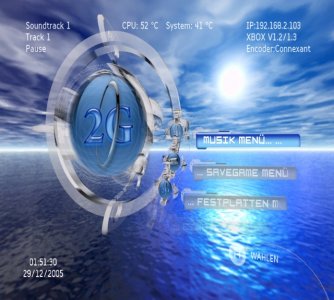
Dash2Gam Screenshot:
How to use:
To copy the file ' dvd.dll' with the root of the partition E:
To copy the file ' Dash2Gam' plus the executable or you want.
To configure your dashboard by modifying the file ' config.ini' (for the beginners) in the file ' Dash2Gam/2GAM.data/'or the file ' config_pro.ini' (to initiate them) in the file ' Dash2Gam/2GAM.data/' more the files of section in the file ' Dash2Gam/2GAM.data/Datas/Config/'.
Launch the file 'Dash2Gam.xbe' (as an application or as default dashboard).
Note: If you wish to use the Config Pro, do not forget to set up JUST the first line of the file 'config.ini' for beginners.
Button Combos:
The default button presets are as follow :
 ...................... to restart the Xbox from the Main Menu
 ...................... to display the Music Control Panel (by tHc)
(BLACK) .................. to play the game MemoryX (by BobMcGee)
(Right Stick) ............ to take a screenshot of your dashboard. You can snap up to 11 shots per session, they would be saved in the directory 'Screenshot' at the root of your E: drive
(Left Stick) ............. to load the next Skin
(Left) + (A) ............. to change the background image
(Left) + ............. to display or not the Clock
(Left) + ............. to show informations about your Xbox
(Left) + (BLACK) ......... to display or not the Audio Vizualizer on Main Menu
(Left) + ............. to show or not the soundtrack, name and time of the background music
(Left) + (Right) + ... to switch off the Xbox
(Left) + (Right) + ... to open/close the DVD tray
If you are using the config_pro.ini file, do not forget to fill out the 1st line of the config.ini for beginners
Some features of Dash2Gam are:
- it is possible to put the dash anywhere you want (except cd/dvd).
- Embedded FTP Server in the dashboard
- Embedded Region Free DVD Reader in the dashboard
- Support the setup of the Xbox LED color
- Support of the '0' key to switch off the Xbox while a DVD is playing
- Scan a lot of Hardware informations of the Xbox
- Display a lot of informations about the Xbox
- Display of time and date on every screen
- Display on every screen the soundtrack, name and time of the current background music
- 29 buttons to set up (launching applications or internal function)
- Display the amount of space used/free on each drive
- Skin support
- Possibility to set a password for each application or internal function
- Custom Screensaver
- The choice of the reader (internal or other) for playing a video DVD or audio CD
- Multi-language: french, english, german, spanish (+ easily other languages)
Download: Dash2Gam 3.0B Xbox Dashboard
Download: Dash2Gam 3.1B Patch
Dash2Gam Screenshot:
How to use:
To copy the file ' dvd.dll' with the root of the partition E:
To copy the file ' Dash2Gam' plus the executable or you want.
To configure your dashboard by modifying the file ' config.ini' (for the beginners) in the file ' Dash2Gam/2GAM.data/'or the file ' config_pro.ini' (to initiate them) in the file ' Dash2Gam/2GAM.data/' more the files of section in the file ' Dash2Gam/2GAM.data/Datas/Config/'.
Launch the file 'Dash2Gam.xbe' (as an application or as default dashboard).
Note: If you wish to use the Config Pro, do not forget to set up JUST the first line of the file 'config.ini' for beginners.
Button Combos:
The default button presets are as follow :
...................... to restart the Xbox from the Main Menu ...................... to display the Music Control Panel (by tHc)(BLACK) .................. to play the game MemoryX (by BobMcGee)
(Right Stick) ............ to take a screenshot of your dashboard. You can snap up to 11 shots per session, they would be saved in the directory 'Screenshot' at the root of your E: drive
(Left Stick) ............. to load the next Skin
(Left) + (A) ............. to change the background image
(Left) +
............. to display or not the Clock(Left) +
............. to show informations about your Xbox(Left) + (BLACK) ......... to display or not the Audio Vizualizer on Main Menu
(Left) +
............. to show or not the soundtrack, name and time of the background music(Left) + (Right) +
... to switch off the Xbox(Left) + (Right) +
... to open/close the DVD trayIf you are using the config_pro.ini file, do not forget to fill out the 1st line of the config.ini for beginners





