


Nimrod
Dev Ops
- Joined
- Jun 1, 2007
- Messages
- 1,514
Like most older boards, Digiex gets a steady trickle of profile spam. Someone registers, gets past the captcha, confirms the email, puts a website link on their profile and never posts. Over a few years that adds up to thousands of empty accounts.
The add-ons that clean this up were around $50, which felt a lot for a bit of housekeeping, so we wrote our own. It's free, change it however you like.
Download Digiex-AutoDeleteZeroPosts-1.0.0.zip
WHAT IT DOES
Once a day (02:00 UTC by default) it deletes accounts that:
It deletes them the same way the "Delete user" button in the Admin CP does, so anything they left behind (conversations, reactions etc.) stays under their old username as a guest.
It doesn't stop spam signups, it just clears out the ones that never did anything.
SAFETY
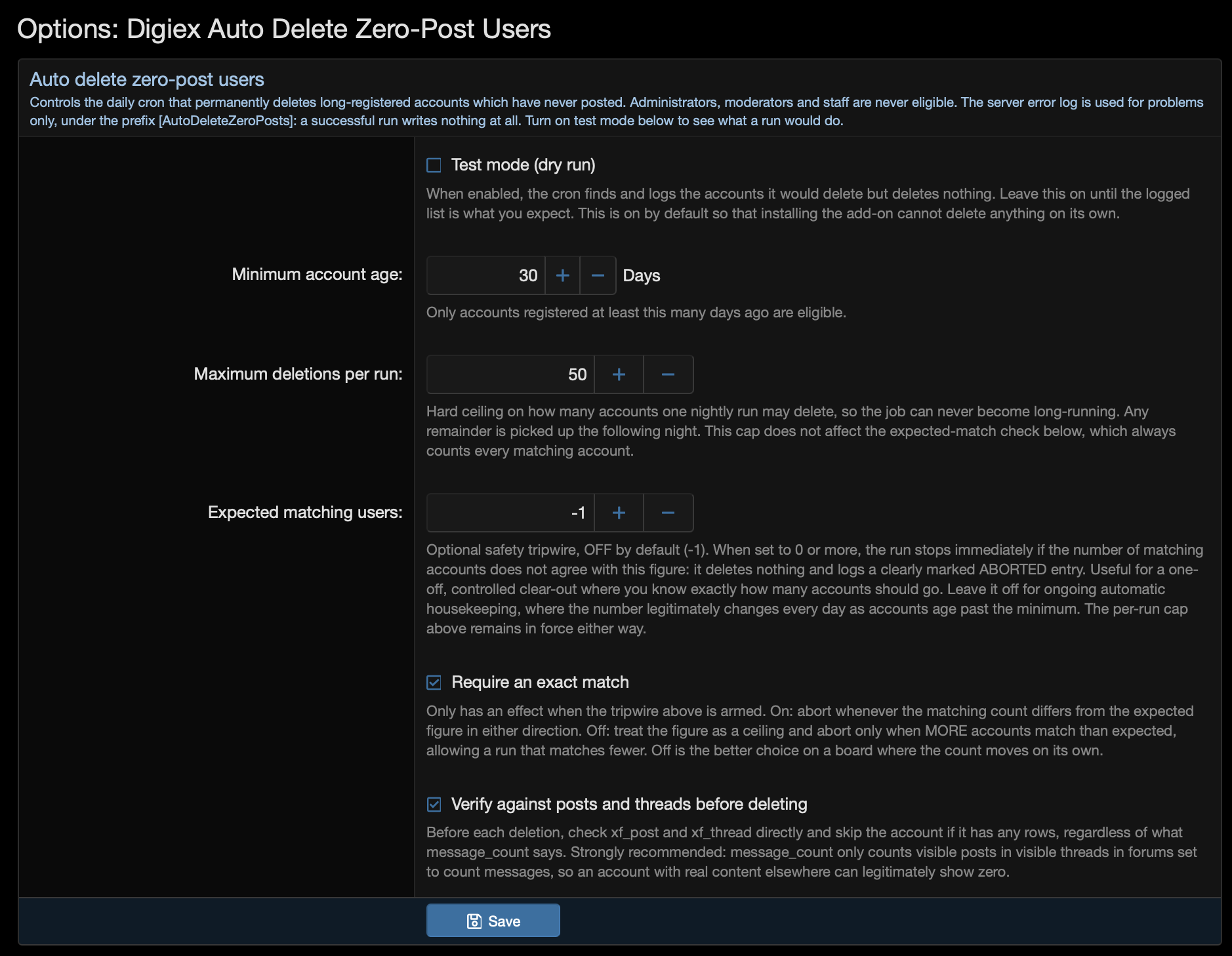
It installs in test mode, so nothing gets deleted until you turn that off. In test mode it writes the list of accounts it would have deleted to the server error log.
It deletes at most 50 accounts a run, so a big backlog clears over a few nights rather than all at once.
Before deleting anyone it checks the actual post and thread tables, not just the post count, as that can be wrong after an import.
There's also an optional "expected matching users" setting for a one-off cleanup. Put in the number test mode showed you, and if the real count is different it stops without deleting anything.
There is no undo for deleting users in XenForo. Take a backup before the first live run.
INSTALL
XenForo 2.3 only, PHP 8.0 or newer.
Admin CP -> Add-ons -> Install/upgrade from archive, and upload the zip. Or copy the upload folder into your XenForo root and install it from the add-ons list, or from the command line:

FIRST RUN
1. Set the minimum account age under Admin CP -> Options -> Auto delete zero-post users
2. Wait for the nightly run, or run it straight away with
3. Find the TEST MODE line in Admin CP -> Tools -> Server error log
4. Read the list properly. Long-time lurkers who only read, or only ever used private messages, will be on it
5. If you're happy with it, turn test mode off
The command also takes --dry-run, --live, --limit, --min-age, --expected and --no-guard if you want to override the settings for one run.
WORTH KNOWING
Only posts and threads count. Someone who has only ever sent private messages, profile posts or reactions counts as never posted. If that matters on your board, raise the minimum age.
Accounts still waiting on email confirmation or approval are included, which is where most of the bot signups sit.
XenForo's cron only runs when the site gets traffic, so on a quiet board it may run a bit late.
A normal live run logs nothing. If you see an [AutoDeleteZeroPosts] line in the error log, something needs a look.
Uninstalling removes the cron entry, options and phrases. It has no tables of its own, so nothing is left behind. Deleted accounts don't come back.
There's more detail in the README.md inside the zip. Questions or improvements, post them here.
The add-ons that clean this up were around $50, which felt a lot for a bit of housekeeping, so we wrote our own. It's free, change it however you like.
Download Digiex-AutoDeleteZeroPosts-1.0.0.zip
WHAT IT DOES
Once a day (02:00 UTC by default) it deletes accounts that:
- registered at least 30 days ago (you can change this)
- have never made a post or started a thread
- are not an admin, moderator or staff member
It deletes them the same way the "Delete user" button in the Admin CP does, so anything they left behind (conversations, reactions etc.) stays under their old username as a guest.
It doesn't stop spam signups, it just clears out the ones that never did anything.
SAFETY
It installs in test mode, so nothing gets deleted until you turn that off. In test mode it writes the list of accounts it would have deleted to the server error log.
It deletes at most 50 accounts a run, so a big backlog clears over a few nights rather than all at once.
Before deleting anyone it checks the actual post and thread tables, not just the post count, as that can be wrong after an import.
There's also an optional "expected matching users" setting for a one-off cleanup. Put in the number test mode showed you, and if the real count is different it stops without deleting anything.
There is no undo for deleting users in XenForo. Take a backup before the first live run.
INSTALL
XenForo 2.3 only, PHP 8.0 or newer.
Admin CP -> Add-ons -> Install/upgrade from archive, and upload the zip. Or copy the upload folder into your XenForo root and install it from the add-ons list, or from the command line:
php cmd.php xf:addon-install Digiex/AutoDeleteZeroPostsFIRST RUN
1. Set the minimum account age under Admin CP -> Options -> Auto delete zero-post users
2. Wait for the nightly run, or run it straight away with
php cmd.php digiex-adzp:run3. Find the TEST MODE line in Admin CP -> Tools -> Server error log
4. Read the list properly. Long-time lurkers who only read, or only ever used private messages, will be on it
5. If you're happy with it, turn test mode off
The command also takes --dry-run, --live, --limit, --min-age, --expected and --no-guard if you want to override the settings for one run.
WORTH KNOWING
Only posts and threads count. Someone who has only ever sent private messages, profile posts or reactions counts as never posted. If that matters on your board, raise the minimum age.
Accounts still waiting on email confirmation or approval are included, which is where most of the bot signups sit.
XenForo's cron only runs when the site gets traffic, so on a quiet board it may run a bit late.
A normal live run logs nothing. If you see an [AutoDeleteZeroPosts] line in the error log, something needs a look.
Uninstalling removes the cron entry, options and phrases. It has no tables of its own, so nothing is left behind. Deleted accounts don't come back.
There's more detail in the README.md inside the zip. Questions or improvements, post them here.




