InsaneNutter
Resident Nutter
The problem:
So you have seen something you want to watch on 4 on Demand, but don’t want to watch it on your PC? or stream it on a mobile device due to bandwidth restrictions.
4oD uses DRM, which means anything you can download will only play on the PC that downloaded it, not very useful if you would like to watch it else where at a later date.
Note: This tutorial is many years old now and probably doesn't work with any of the content on 4oD anymore.
The solution:
Not all is lost, we can use rtmpdump with the rtmpExplorer user interface to rip content from 4oD in .flv (Flash) format, we can then use ffmpeg to mux the .flv video back in to an .mp4 video which should play perfectly on most devices.
If you follow this tutorial the end result should be a nice mp4 file with no DRM attached to it.
Its worth mentioning the quality of your download will vary, the newer content on 4oD is of much higher quality than content that has been on there for a couple of years.
Note: You need to be accessing 4oD from a UK ip address, so if you are outside the UK you will require a VPN to view or download anything on 4oD.
If you havent got a VPN provider yet, I strongly recommend NordVPN. If you use the coupon code "2YDeal2017" you can get 2 years service for only $79.99 which is a massive steal. I picked NordVPN because of its zero logging policy, it's Netflix US friendly as well as P2P friendly while operating out of Panama meaning DMCA and Blocking Streams just doesnt happen.
Lets get started:
First Download my 4oD rip package, this includes all the applications you need in one neat package.
When this has downloaded unzip it somewhere, your desktop will be fine.
Go in to the folder containing the files you just unzipped and load rtmpExplorer

You will need to allow access to the internet if prompted

Now go to 4 on Demand (4oD) and find the program you wish to rip.
Copy the URL of this in to RTMP Explorer:

Still in RTMP Explorer click play on the video, as if you were going to watch it normally

Ignore the adverts as they play (or watch them if you enjoy that sort of thing)

When the adverts have finished this is where the download process will now start, instead of your web browser playing the video rtmpsrv will download it, saving it as an flv file.
The speed here will vary greatly depending on your internet connection, it takes me around 1 or 2 minutes to rip a show on a 20mbit connection.
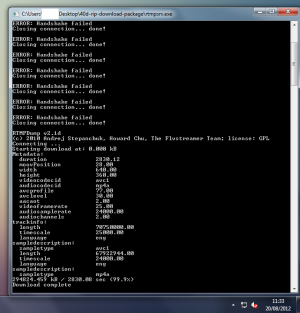
Wait until rtmpsrv says the download complete, when it has you have ripped the program from 40d!

Mux the FLV video back in to an MP4:
Now all that is left to do is to mux it back to an MP4, so it will be compatible with the majority of media players and mobile devices out there.
You want to load Command Prompt which can be found by clicking the Start Orb, going to All Programs > Accessories > or pressing the windows key + r and typing in CMD.
After you want to navigate to the folder you unzipped in Command Prompt, if this was on your desktop you would likley only need to type: cd 40d-rip-download-package

Once in the folder type:
ffmpeg -i file.flv -vcodec copy -acodec copy your-download.mp4
file.flv = the name of the file ripped from 4oD
your-download.mp4 = the name you want the mux'ed MP4 to be.
The process should only take a couple of seconds

The quality will vary, with the newer programs generally been higher quality
Episode from Skins series 3 released in 2009.

Episode from Skins series 5 released in 2011

As you can see the more recent content on 4oD is a higher resolution and bitrate.
Congratulations you are done! the mp4 file should play in your favourite media player, or portable media player.
This is the only free way to rip content from 4oD at the time of posting, it has worked perfectly for many months. I cant guarantee it will work in the future as Channel 4 could change how 4oD works, however it works now at the time of posting.
Enjoy
FAQ:
Q: I get a black screen when i try rip another program:

A: Load internet explorer and clear your internet history, it should work fine then. You might have to do this every time after ripping a show, i have to anyway for the next one to rip correctly.

So you have seen something you want to watch on 4 on Demand, but don’t want to watch it on your PC? or stream it on a mobile device due to bandwidth restrictions.
4oD uses DRM, which means anything you can download will only play on the PC that downloaded it, not very useful if you would like to watch it else where at a later date.
Note: This tutorial is many years old now and probably doesn't work with any of the content on 4oD anymore.
The solution:
Not all is lost, we can use rtmpdump with the rtmpExplorer user interface to rip content from 4oD in .flv (Flash) format, we can then use ffmpeg to mux the .flv video back in to an .mp4 video which should play perfectly on most devices.
If you follow this tutorial the end result should be a nice mp4 file with no DRM attached to it.
Its worth mentioning the quality of your download will vary, the newer content on 4oD is of much higher quality than content that has been on there for a couple of years.
Note: You need to be accessing 4oD from a UK ip address, so if you are outside the UK you will require a VPN to view or download anything on 4oD.
If you havent got a VPN provider yet, I strongly recommend NordVPN. If you use the coupon code "2YDeal2017" you can get 2 years service for only $79.99 which is a massive steal. I picked NordVPN because of its zero logging policy, it's Netflix US friendly as well as P2P friendly while operating out of Panama meaning DMCA and Blocking Streams just doesnt happen.
Lets get started:
First Download my 4oD rip package, this includes all the applications you need in one neat package.
When this has downloaded unzip it somewhere, your desktop will be fine.
Go in to the folder containing the files you just unzipped and load rtmpExplorer
You will need to allow access to the internet if prompted
Now go to 4 on Demand (4oD) and find the program you wish to rip.
Copy the URL of this in to RTMP Explorer:
Still in RTMP Explorer click play on the video, as if you were going to watch it normally
Ignore the adverts as they play (or watch them if you enjoy that sort of thing)
When the adverts have finished this is where the download process will now start, instead of your web browser playing the video rtmpsrv will download it, saving it as an flv file.
The speed here will vary greatly depending on your internet connection, it takes me around 1 or 2 minutes to rip a show on a 20mbit connection.
Wait until rtmpsrv says the download complete, when it has you have ripped the program from 40d!
Mux the FLV video back in to an MP4:
Now all that is left to do is to mux it back to an MP4, so it will be compatible with the majority of media players and mobile devices out there.
You want to load Command Prompt which can be found by clicking the Start Orb, going to All Programs > Accessories > or pressing the windows key + r and typing in CMD.
After you want to navigate to the folder you unzipped in Command Prompt, if this was on your desktop you would likley only need to type: cd 40d-rip-download-package
Once in the folder type:
ffmpeg -i file.flv -vcodec copy -acodec copy your-download.mp4
file.flv = the name of the file ripped from 4oD
your-download.mp4 = the name you want the mux'ed MP4 to be.
The process should only take a couple of seconds
The quality will vary, with the newer programs generally been higher quality
Episode from Skins series 3 released in 2009.
Episode from Skins series 5 released in 2011
As you can see the more recent content on 4oD is a higher resolution and bitrate.
Congratulations you are done! the mp4 file should play in your favourite media player, or portable media player.
This is the only free way to rip content from 4oD at the time of posting, it has worked perfectly for many months. I cant guarantee it will work in the future as Channel 4 could change how 4oD works, however it works now at the time of posting.
Enjoy
FAQ:
Q: I get a black screen when i try rip another program:
A: Load internet explorer and clear your internet history, it should work fine then. You might have to do this every time after ripping a show, i have to anyway for the next one to rip correctly.