

• Welcome to the Digiex Download Center, you are welcome to download anything you like here. No registration is required! Digiex offers direct download links with no captchas or wait times.
    The team do our best to ensure no content infringes copyrights and provide a DMCA Takedown request form to request the removal of content from Digiex.

    Notable sections: Pokemon Archives | Xbox Archives | Xbox 360 Archives

EvolutionX Build 3935 Download - Replacement Xbox Dashboard

InsaneNutter

Resident Nutter
Joined
Jun 1, 2007
Messages
11,874
Location
UK
evox1.jpg

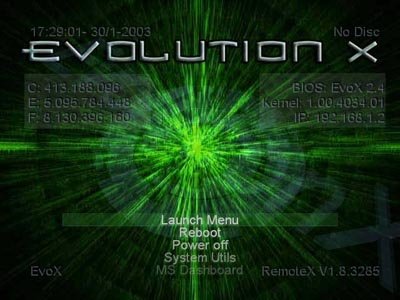
Evolution-X was one of the first Xbox dashboards to incorporate in-game reset, activated by pushing down four buttons simultaneously on the joypad (Back, Start or Black, Left trigger, and Right trigger), which is now a feature available in every dashboard today. It is also highly customizable, allowing the user to set their own menu structure by modifying the Evox.ini configuration file and use custom skins which change the visual style of the dashboard and choose what system information it should display.

Note: Dont confuse the Evolution-X dashboard with the Evo-X Bios

Download:

Download EvolutionX Build 3935

Evolution-X Features:

  • Microsoft Dashboard Replacement
  • Built in FTP Server
  • Configurable Menu System
  • Flash BIOS utility
  • Upgrade Harddisk and Format/Partition easily
  • Create game backups
  • Build in Trainer menu system
  • Easy to edit configuration file
  • Simplistic and straightforward menu design
  • Compatible with many Xbox game trainers
  • In-game reset
  • Does not allow users access to potentially dangerous things without explicitly telling it to
  • Will boot to a very basic menu instead of crashing if the configuration file is missing or corrupt
  • Can easily be run from a CD if user still wants access to Xbox Live
  • Can easily be installed via softmod
  • Small size
  • Big skinning community
 
Hello,

I am net here and new to consoles too. I was recently given an original Xbox when I told a friend that I think it's cool when people mod them and use them for emulators. I have figure out how to soft mod it, and I have it booting to Evolution X 3935(which is why I am starting here.) I could use some help figuring out the initial "how to" stuff. For example, if I load an emulator by FTP, how do I get it to appear In the menu under Emulators?
I would also like to know how boot to another dashboard, like XBMC, if I choose to.
 
I think you need to FTP emulators in to E:\Emus for them to show under emulators on the evox dashboard.

To change the dashboard you would need to boot another app / dashboard from your apps folder, which has an FTP server.
Then simply delete evolution x and replace it with xbmc, ensuring the default.xbe end up in the same folder.

The default.xbe needs to be signed though depending on the exploit the console has been modded with. What i have done on friends Xbox's is sign a default xbe which is essentially a shortcut to E:\Apps\xbmc\default.xbe

So E:\dashboard\default.xbe can stay there and i can update XBMC which resides in E:\Apps\xbmc\ as and when i please without worrying if i need to sign an xbe or not. I can certainly go in to more detail if you decide to do this and provide my signed default.xbe shortcut when i'm at home if required.

That's what i did well over 10 years ago, if that's still the best way today i honestly couldn't say. However the various Xbox's i did softmod still work all these years later.
 

About Digiex

Digiex is a technology and gaming forum, founded in 2004 by InsaneNutter and Nimrod. Digiex has served the internet community with breaking news, detailed guides, exclusive downloads and a popular discussion forum. A small, friendly community of like‑minded people has developed over the years. People are encouraged to register and participate in on‑going discussions.

Get Social

Back
Top Bottom



