Fallout: New Vegas Xbox 360 Title Update 5 Download [Media ID 6470401C]

Neoteam1

Addict
Joined
Apr 10, 2011
Messages
694
Location
United Kingdom
fallout-new-vegas-box.jpg

Fallout: New Vegas Title Update: 5
Title ID: 425307E0
Media ID: 6470401C
Region: PAL
​

Download:

Download Fallout: New Vegas Xbox 360 Title Update 5 [Media ID 6470401C]

How to Install:

This title update goes in Content\0000000000000000\425307E0\000B0000, where the Xbox 360 keeps its larger title updates, on its hard drive or on a USB drive configured for use in the Xbox 360.
  1. Extract the zip.
  2. Use a FATX tool such as Horizon or USB Xtaf to inject the 425307E0 folder into Content\0000000000000000 (it holds 425307E0\000B0000).
  3. Start the game and the update loads with it. It only works with the version of the game whose Media ID is above.

About Fallout: New Vegas:

Experience all the sights and sounds of fabulous New Vegas, brought to you by Vault-Tec, America's First Choice in Post Nuclear Simulation. Explore the treacherous wastes of the Great Southwest from the safety and comfort of your very own vault: Meet new people, confront terrifying creatures, and arm yourself with the latest high-tech weaponry as you make a name for yourself on a thrilling new journey across the Mojave wasteland. A word of warning, however - while Vault-Tec engineers have prepa…

Helpful Tutorials:
  1. How to use Xbox 360 Title Updates
  2. Inject a title update with Horizon
  3. Inject a title update into Content on a USB drive
  4. Open the Xbox 360 hard drive on a PC with Party Buffalo
  5. Configure a USB memory stick to be used as Xbox 360 storage
Need help with something else? Visit our Xbox 360 Guides.
 

Attachments

This one works for me, version on the settings page is now 1.4.0.

Thanks a lot, been waiting for this one!
 
Thanks :) do you know if this one fixes the save bug? And how are you supposed to pass this from the pc to xbox? Im a bit scrubbish, sorry <.<
 
are you supposed to have some sort of folder on the pen? because i cant seem to get this to work. After i use Xtaf to inject the update i go into the pen to see if theres anything and there isnt. Same happens on xbox.
 
are you supposed to have some sort of folder on the pen? because i cant seem to get this to work. After i use Xtaf to inject the update i go into the pen to see if theres anything and there isnt. Same happens on xbox.

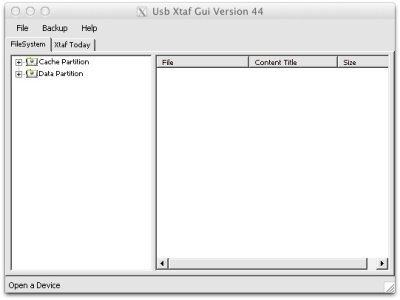
You should use the new version of USB Xtaf , then when you open usb xtaf & your Xbox 360 formatted usb flash drive you should see two folders called "Cache" & "Contend" The update goes into the Cache folder .

Use this version of USB Xtaf : https://digiex.net/downloads/downlo...sb-storage-explorer-xplorer-xtaf-v44-new.html

Also see the screenshot :
 

Attachments

  • USB Xtaf.jpg
    USB Xtaf.jpg
    29.8 KB · Views: 1,803
i did that, but once i put the pen onto my xbox nothing appears on the pen, and when i put the pen back in my pc, and use xtaf to check if the update is there, it isnt <.<

Edit: Ive read some posts where you have to create a folder with content > 00000 blabla > + the update you want and then inject with Xtaf. I did this and what i wrote on the top ( "i did that, but once i put the pen onto my xbox nothing appears on the pen, and when i put the pen back in my pc, and use xtaf to check if the update is there, it isnt <.<" ) didnt occur now. SOOOO damn confusing
 

About Digiex

Digiex is a technology and gaming forum, founded in 2004 by InsaneNutter and Nimrod. Digiex has served the internet community with breaking news, detailed guides, exclusive downloads and a popular discussion forum. A small, friendly community of like‑minded people has developed over the years. People are encouraged to register and participate in on‑going discussions.

Get Social

Back
Top Bottom