


The latest official squads update for FIFA 14 19 july 2014
Download: FIFA 14 Squad Update 19 july 2014
how to transfer
This Tutorial will use fsd and network and horizon
1-Connect you're jtag to the network (router)
2-Open FSD and take the ip
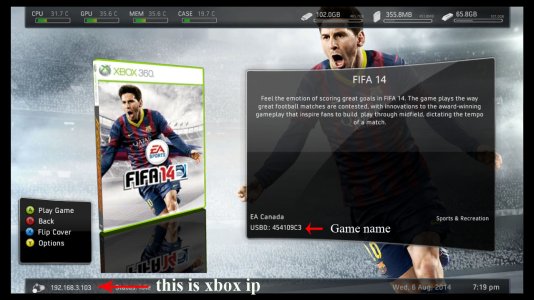
3-open the ip in explore
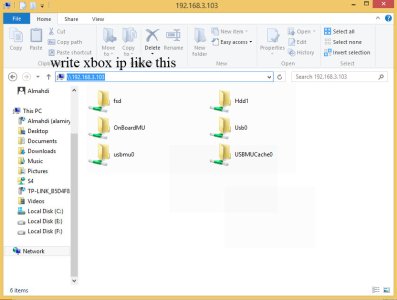
4-Go to where save profile mine in Hdd1 so its on \\192.168.3.103\Hdd1\Content
if it on xbox memory unit its name OnBoeadMU
if it on hard drive its name Hdd1
if it on external storage its name Usb# (# is number if you have two external storage then you have Usb0 & Usb1)
if you have more than one profile then you see like this
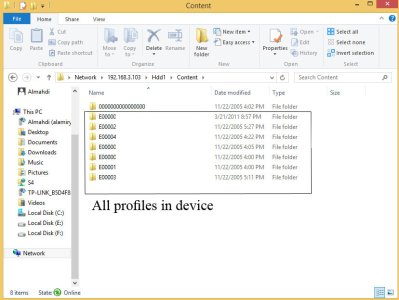
if you can't know what on it's you's profile game on just open find foldr game name in step 2 if you can't find it then sherch other profile
5-when enter in you're profile game just open any folder and then open 00000001 folder and open file you see in horizon (Tools - Package Manager - Open)
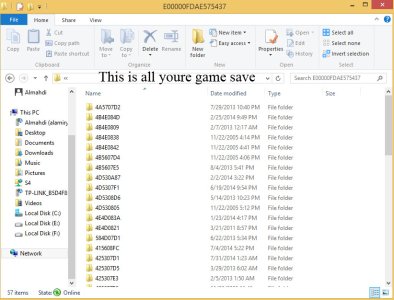
6-click agen Package Manager and open Squads Update file then copy the profile id , device id , console id fileds from save you open to Squads Update
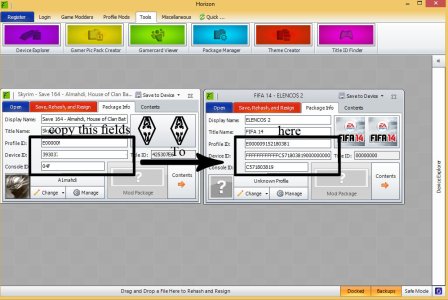
7-click Save,Rehash, and Resign in horizon then copy Squads Update to
\\192.168.3.103\Hdd1\Content\profile\454109C3\00000001
change Hdd1 if you profile not in hard drive
1-Connect you're jtag to the network (router)
2-Open FSD and take the ip
3-open the ip in explore
4-Go to where save profile mine in Hdd1 so its on \\192.168.3.103\Hdd1\Content
if it on xbox memory unit its name OnBoeadMU
if it on hard drive its name Hdd1
if it on external storage its name Usb# (# is number if you have two external storage then you have Usb0 & Usb1)
if you have more than one profile then you see like this
if you can't know what on it's you's profile game on just open find foldr game name in step 2 if you can't find it then sherch other profile
5-when enter in you're profile game just open any folder and then open 00000001 folder and open file you see in horizon (Tools - Package Manager - Open)
6-click agen Package Manager and open Squads Update file then copy the profile id , device id , console id fileds from save you open to Squads Update
7-click Save,Rehash, and Resign in horizon then copy Squads Update to
\\192.168.3.103\Hdd1\Content\profile\454109C3\00000001
change Hdd1 if you profile not in hard drive
Attachments
Last edited:





