Arpman
Member
- Joined
- Sep 30, 2009
- Messages
- 11
This is my first time putting a theme on this forum, so I'll just repeat the known instructions from the other members. I also thought that isn't fair that one of the most anticipated games don't have a theme, so i made one . Hope you enjoy.
"You will need some way of connecting either your 360’s Hard Drive or Memory card to the PC, you cannot burn this to a CD and copy it to your 360.
Once you have either a hard drive or memory card connected to the PC load Xplorer 360 up and click Drive > Open > Hard drive or memory card.
If you are using a memory card open Partition 1, If you are using a 360 hard drive open Partition 3
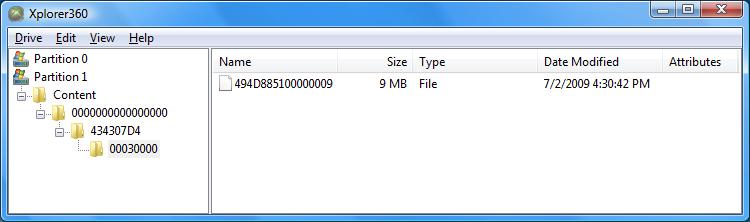
Unzip the theme, the folders and theme file should be copied to: Content\0000000000000000\
The end result should look something like this:
Now just sign your profile in, go to the my xbox section, click your gamertag, click change theme and enjoy!"
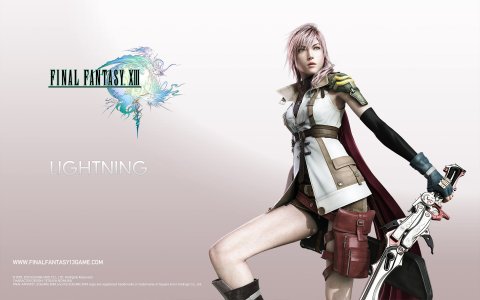
Sorry for not posting any screenshots, but the main picture looks like the annexed one.
. Hope you enjoy."You will need some way of connecting either your 360’s Hard Drive or Memory card to the PC, you cannot burn this to a CD and copy it to your 360.
Once you have either a hard drive or memory card connected to the PC load Xplorer 360 up and click Drive > Open > Hard drive or memory card.
If you are using a memory card open Partition 1, If you are using a 360 hard drive open Partition 3
Unzip the theme, the folders and theme file should be copied to: Content\0000000000000000\
The end result should look something like this:
Now just sign your profile in, go to the my xbox section, click your gamertag, click change theme and enjoy!"
Sorry for not posting any screenshots, but the main picture looks like the annexed one.