
Hello,
Well here goes my first technical post.
I recently discovered, by complete chance, how to get your start menu back.
Firstly it will not be the start menu of old, nor is this one of those windows 8 apps that promise to put it back. This is just a shortcut to where your start menu is and you can make a shortcut of it on your desktop, for easy access to your programs.
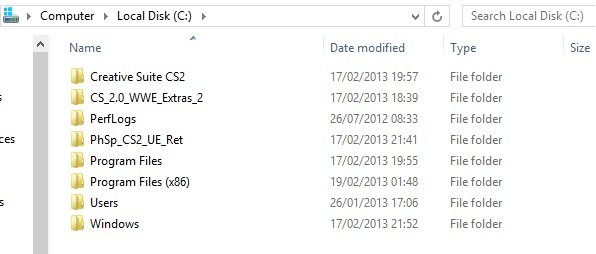
Firstly go the main folder C:/ or wherever your windows 8 is located.
Then on the ribbon at the top pick the view tab and check the box for hidden items
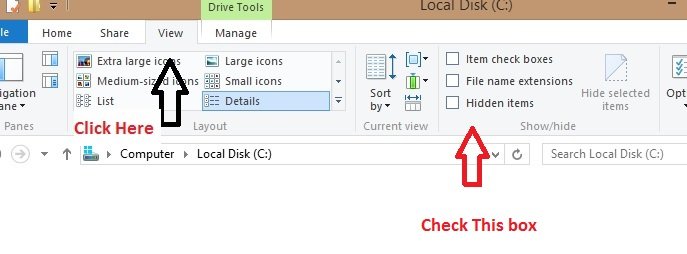
The hidden folders should then appear
Go into the program data folder
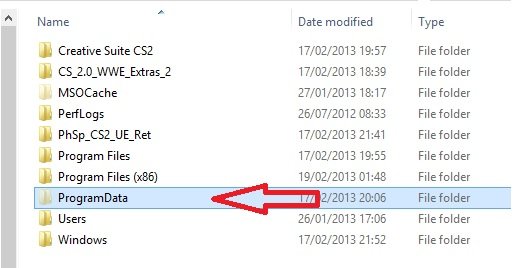
And follow this path Program Data/ Microsoft/ Windows
Your start menu is here
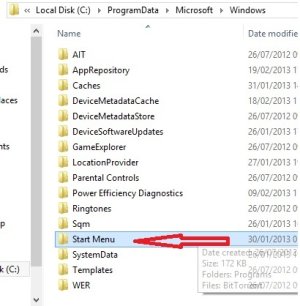
Now really all you have to do is left click and drag the icon on to your desktop,and then choose the Create Shortcut Here menu item.
I advise not to put the folder properly on your desktop because you could cause a bug
Now I changed the icon
Here's how to do it
Right click the shortcut icon now on your desktop and chose properties
This dialogue box should appear
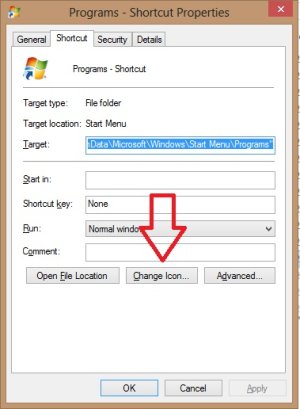
Click that button and pick any icon you like
And voilà Your start menu is back. Hint there is a neat window logo hear the end that I use
Thank for reading as ever
Popcorn
Well here goes my first technical post.
I recently discovered, by complete chance, how to get your start menu back.
Firstly it will not be the start menu of old, nor is this one of those windows 8 apps that promise to put it back. This is just a shortcut to where your start menu is and you can make a shortcut of it on your desktop, for easy access to your programs.
Firstly go the main folder C:/ or wherever your windows 8 is located.
Then on the ribbon at the top pick the view tab and check the box for hidden items
The hidden folders should then appear
Go into the program data folder
And follow this path Program Data/ Microsoft/ Windows
Your start menu is here
Now really all you have to do is left click and drag the icon on to your desktop,and then choose the Create Shortcut Here menu item.
I advise not to put the folder properly on your desktop because you could cause a bug
Now I changed the icon
Here's how to do it
Right click the shortcut icon now on your desktop and chose properties
This dialogue box should appear
Click that button and pick any icon you like
And voilà Your start menu is back. Hint there is a neat window logo hear the end that I use
Thank for reading as ever
Popcorn





