Home pass for my New 3DS XL

Amon Cabrera

New Member
Joined
Sep 6, 2016
Messages
4
Hello, I was trying the home street pass tutorial on this site and I managed to get everything working up to the point that I connected to the wifi that I made but I haven't received a single street pass.
could there be something I did wrong or does no one use home pass?

Edit; I now had Nintendo Zone appear on my 3DS but it won't let me connect, is it part of the home pass? I got error code 013-9202.

Thanks in advance.
 
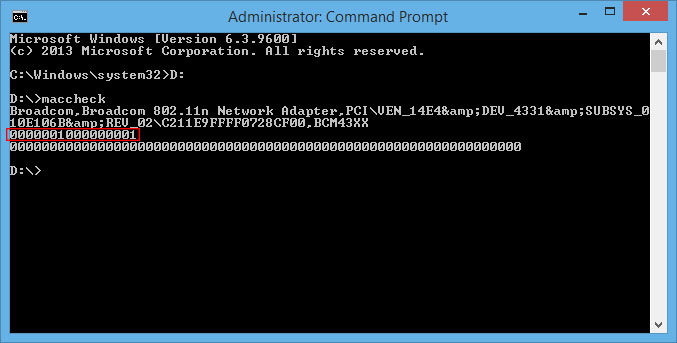
The first thing i check is did you ensure your wireless nic is compatible?

14206d1417970077-nintendo-3ds-how-streetpass-over-internet-homepass-tutorial-homepass-streetpass-pc-setup-2.jpg


A random problem i have noticed is after getting a batch of StreetPasses I can no longer get any more, you can usually fix this by going to Network Connections. right clicking on your Ethernet connection (your internet connection), go to properties, then click the sharing tab. Now uncheck the box sharing the connection to the fake Nintendo Zone Hotspot, press ok, then go back and share the internet again.

The tutorial i posted for doing this on Windows still works, however I can tell you i've since discovered it's much easier and more reliable to do it with a Raspberry Pi.

PiPass or SpillPassPi2 both work great on the Raspberry Pi.
 
Yup I have the 0s and 1s just the same as the screen shot, but I haven't gotten a single street pass.
Don't really know what a Raspberry Pi is, but I don't really know how willing I am to buy something to get street passes.
 

About Digiex

Digiex is a technology and gaming forum, founded in 2004 by InsaneNutter and Nimrod. Digiex has served the internet community with breaking news, detailed guides, exclusive downloads and a popular discussion forum. A small, friendly community of like‑minded people has developed over the years. People are encouraged to register and participate in on‑going discussions.

Get Social

Back
Top Bottom