InsaneNutter
Resident Nutter
Q: How do I compress an Unreal Tournament 2004 Map?
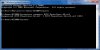
A: Load command prompt and change directory to your UT 2004 system folder (cd C:\Games\UT2004\System) for example.
Ensure the map you want to compress is in the UT 2004 System folder and type ucc compress MAP-NAME.ut2
For example: ucc compress VCTF-Powerlines-LD.ut2
You will then get a file called MAP-NAME.uz2 which is a compressed map that you can use on your redirect.
Example: VCTF-Powerlines-LD.uz2
A: Load command prompt and change directory to your UT 2004 system folder (cd C:\Games\UT2004\System) for example.
Ensure the map you want to compress is in the UT 2004 System folder and type ucc compress MAP-NAME.ut2
For example: ucc compress VCTF-Powerlines-LD.ut2
You will then get a file called MAP-NAME.uz2 which is a compressed map that you can use on your redirect.
Example: VCTF-Powerlines-LD.uz2