

At the bottom of this post are some UPS Patches you can use to patch the different executables.
So you don't have to do any Hex Editing yourself.
How To Unlock The Full Version Of The Game
This is only needed on the XBOX 360 version of the game if you prefer having extracted game files. However you can apply this to all versions of the game. If you browse to the \Data\Config\ folder. You will see a file named User.cfg. If you open this file in a text editor like Notepad++. You will see the following line in the config file.
enableTrialMode=true
If you don't have this line in your config file. You can add it to the config file if you want to. Setting this line to 'true' will enable the demo mode on all versions of the game. Setting this line to 'false' will enable access to the full version of the game.
How To Unlock The 5 Exclusive Costumes
Costume Quest 2 had 5 exclusive costumes that were only available on some versions of the game. The Eyeball, Pumpkin, Robot, & Unicorn costumes were only available on Steam if you Pre-Ordered the game. The Sackboy costume was only available on the Playstation version. I believed the costumes were available in all versions of the game and was just locked away. Turns out I was right. After many many hours of a trying a bunch of things. I was finally able to Hex Edit the game and enable access to the exclusive costumes. It was a very simple change that works on all versions of the game. This guide won't tell you how to unlock all versions of the game. But you can use the information to apply it to other versions. I also won't be including any of the tools needed to apply the mod. You will have to locate those tools yourself.
Some things to note. This change should work on saves you already have. If they don't then you will have to start a new game to get access to the exclusive costumes. Also once you do this mod. Your saves will only work on a modded version. If you try to load the save on an unmodded version of the game. The game will crash.
To access the exclusive costumes. You have to purchase them from Shady's Secret Shop.



PC (Epic Games\Steam)
The PC version of the Costume Quest 2 is the easiest to Mod.
( 1 ) Located the Costume Quest 2 executable.
For Steam it will be CostumeQuest2.exe & CostumeQuest2_DX9.exe.
For Epic Games it will be CostumeQuest2.exe.
( 2 ) Open the executable in a Hex Editor. I use Hex Workshop myself.
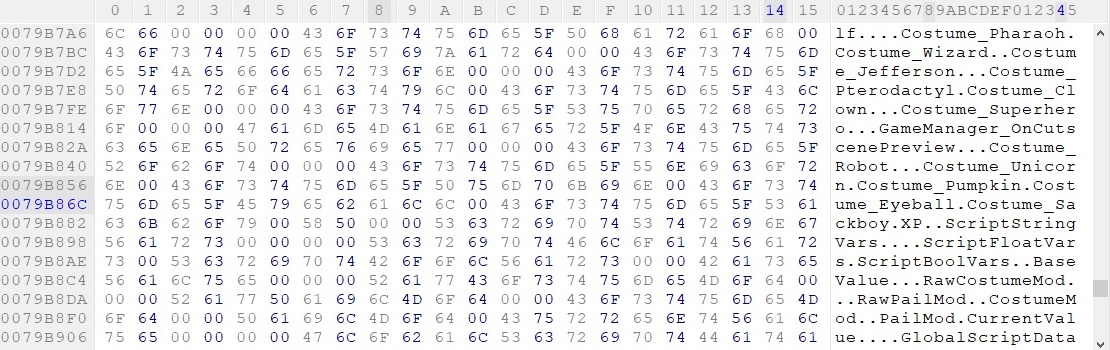
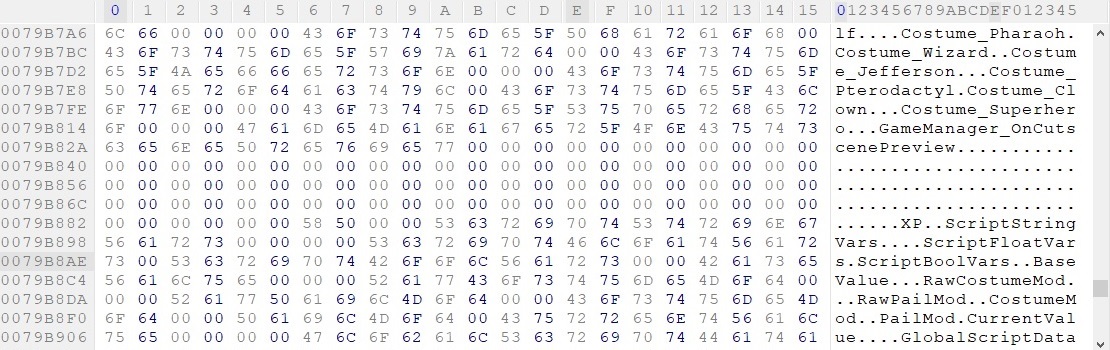
( 3 ) Use the Search function to locate the Text String 'Costume_Robot'.
Then zero out the following costumes --> Costume_Robot, Costume_Unicorn, Costume_Pumpkin, Costume_Eyeball, & Costume_Sackboy.
See the pictures below on how it should look Before and After the change.
( 4 ) Now save the changes.
( 5 ) After you save the changes you can close the Hex Editor, then go run the Game and you will see you have access to the exclusive costumes.
Before
After
XBOX 360
( 1 ) Copy the games GOD Package and Title Update to your PC.
( 2 ) Use a tool like Horizon, Le Fluffie, or Velocity to extract the GOD Package and Title Update.
( 3 ) Make a new folder and copy the games default.xex and title update default.xexp to this folder.
( 4 ) Copy xextool.exe v6.3 to this new folder and use the following commands.
--> xextool -p default.xexp default.xex
--> xextool -eu default.xex
This will patch the games executable with the title update and uncrypt the executable.
( 5 ) Open the default.xex in your Hex Editor and apply the same changes you did in the Step 6 of the PC Version.
( 6 ) Save the changes and close your Hex Editor.
( 7 ) Use xextool again and use the following command to encrypt the default.xex.
--> xextool -ee default.xex
( 8 ) If your planning to play the game extracted.
Then copy your patched default.xex to the same folder where you extracted you extracted the games GOD Package to and replace the file.
Then edit the User.cfg to unlock the full version of the game as stated above in the How To Unlock The Full Version Of The Game above.
( 9 ) If you prefer to keep the game as a GOD Package.
Then open the games GOD Package in Le Fluffie or Velocity. I Velocity myself.
Then use the replace function to replace the default.xex with your modded default.xex.
You can also replace the User.cfg with your edited one if you want.
Now click Rehash button.
( 10 ) Now you can FTP or copy your modded extract files or modded GOD Package to your XBOX 360 and run the game.
You won't need to copy over the Title Update because it was added to the game in step 4.
You may need to use XM360 to patch the GOD Package as it still may appear as a demo on the dashboard.
( 11 ) Go run the Game and you will see you have access to the exclusive costumes.
Wii U
Modding this version of the game will be a bit more challenging. You will need to get the Wii U Cafe SDK v2.12.13 installed and working on your PC. Make sure you already have Costume Quest 2 and the Title Update installed on your Wii U.
( 1 ) Locate where the Game is installed on the Wii U. NAND = storage_mlc USB = storage_usb
My location for the Game was --> \storage_usb\usr\title\00050000\1017da00\code\
My location for the Update was --> \storage_usb\usr\title\0005000e\1017da00\code\
( 2 ) Copy the Seed.rpx file from both locations to your PC.
( 3 ) Now use the tool rpl2elf to convert both Seed.rpx files to an Seed.elf.
--> rpl2elf Seed.rpx Seed.elf
( 4 ) Open both of the Seed.elf files in your Hex Editor and apply the same changes you did in the Step 6 of the PC Version.
( 5 ) Save the changes and close your Hex Editor.
( 6 ) Now you will have to startup the Wii U Cafe SDK v2.12.13 environment.
Then switch to the directory that has your modded Seed.elf files and use the following command.
--> makerpl64 -f -z6 -s -old Seed.elf
This will convert your modded Seed.elf back to a Seed.rpx.
( 7 ) Now you can replace both the Seed.rpx files on your Wii U with your modded Seed.rpx files.
( 8 ) Go run the Game and you will see you have access to the exclusive costumes.
Playstation 3
Coming Shorty (Possibly - I still need to learn how to mod this version)
UPS Patch Files
These patches were made for the Canada/USA version of the Game.
If you have a different version of the game and would like a UPS Patch.
Then please send me a Private Message and I will try to make a Patch if I can.
Please read the readme.txt. The XBOX 360 version will require some other tools.
Epic Games - Costume Quest 2 - 5 Costumes By AmyGrrl.zip
Steam - Costume Quest 2 - 5 Costumes By AmyGrrl.zip
XBLA - Costume Quest 2 - 5 Costumes By AmyGrrl.zip
Wii U - Costume Quest 2 - 5 Costumes By AmyGrrl.zip
So you don't have to do any Hex Editing yourself.
How To Unlock The Full Version Of The Game
This is only needed on the XBOX 360 version of the game if you prefer having extracted game files. However you can apply this to all versions of the game. If you browse to the \Data\Config\ folder. You will see a file named User.cfg. If you open this file in a text editor like Notepad++. You will see the following line in the config file.
enableTrialMode=true
If you don't have this line in your config file. You can add it to the config file if you want to. Setting this line to 'true' will enable the demo mode on all versions of the game. Setting this line to 'false' will enable access to the full version of the game.
How To Unlock The 5 Exclusive Costumes
Costume Quest 2 had 5 exclusive costumes that were only available on some versions of the game. The Eyeball, Pumpkin, Robot, & Unicorn costumes were only available on Steam if you Pre-Ordered the game. The Sackboy costume was only available on the Playstation version. I believed the costumes were available in all versions of the game and was just locked away. Turns out I was right. After many many hours of a trying a bunch of things. I was finally able to Hex Edit the game and enable access to the exclusive costumes. It was a very simple change that works on all versions of the game. This guide won't tell you how to unlock all versions of the game. But you can use the information to apply it to other versions. I also won't be including any of the tools needed to apply the mod. You will have to locate those tools yourself.
Some things to note. This change should work on saves you already have. If they don't then you will have to start a new game to get access to the exclusive costumes. Also once you do this mod. Your saves will only work on a modded version. If you try to load the save on an unmodded version of the game. The game will crash.
To access the exclusive costumes. You have to purchase them from Shady's Secret Shop.
PC (Epic Games\Steam)
The PC version of the Costume Quest 2 is the easiest to Mod.
( 1 ) Located the Costume Quest 2 executable.
For Steam it will be CostumeQuest2.exe & CostumeQuest2_DX9.exe.
For Epic Games it will be CostumeQuest2.exe.
( 2 ) Open the executable in a Hex Editor. I use Hex Workshop myself.
( 3 ) Use the Search function to locate the Text String 'Costume_Robot'.
Then zero out the following costumes --> Costume_Robot, Costume_Unicorn, Costume_Pumpkin, Costume_Eyeball, & Costume_Sackboy.
See the pictures below on how it should look Before and After the change.
( 4 ) Now save the changes.
( 5 ) After you save the changes you can close the Hex Editor, then go run the Game and you will see you have access to the exclusive costumes.
Before
After
XBOX 360
( 1 ) Copy the games GOD Package and Title Update to your PC.
( 2 ) Use a tool like Horizon, Le Fluffie, or Velocity to extract the GOD Package and Title Update.
( 3 ) Make a new folder and copy the games default.xex and title update default.xexp to this folder.
( 4 ) Copy xextool.exe v6.3 to this new folder and use the following commands.
--> xextool -p default.xexp default.xex
--> xextool -eu default.xex
This will patch the games executable with the title update and uncrypt the executable.
( 5 ) Open the default.xex in your Hex Editor and apply the same changes you did in the Step 6 of the PC Version.
( 6 ) Save the changes and close your Hex Editor.
( 7 ) Use xextool again and use the following command to encrypt the default.xex.
--> xextool -ee default.xex
( 8 ) If your planning to play the game extracted.
Then copy your patched default.xex to the same folder where you extracted you extracted the games GOD Package to and replace the file.
Then edit the User.cfg to unlock the full version of the game as stated above in the How To Unlock The Full Version Of The Game above.
( 9 ) If you prefer to keep the game as a GOD Package.
Then open the games GOD Package in Le Fluffie or Velocity. I Velocity myself.
Then use the replace function to replace the default.xex with your modded default.xex.
You can also replace the User.cfg with your edited one if you want.
Now click Rehash button.
( 10 ) Now you can FTP or copy your modded extract files or modded GOD Package to your XBOX 360 and run the game.
You won't need to copy over the Title Update because it was added to the game in step 4.
You may need to use XM360 to patch the GOD Package as it still may appear as a demo on the dashboard.
( 11 ) Go run the Game and you will see you have access to the exclusive costumes.
Wii U
Modding this version of the game will be a bit more challenging. You will need to get the Wii U Cafe SDK v2.12.13 installed and working on your PC. Make sure you already have Costume Quest 2 and the Title Update installed on your Wii U.
( 1 ) Locate where the Game is installed on the Wii U. NAND = storage_mlc USB = storage_usb
My location for the Game was --> \storage_usb\usr\title\00050000\1017da00\code\
My location for the Update was --> \storage_usb\usr\title\0005000e\1017da00\code\
( 2 ) Copy the Seed.rpx file from both locations to your PC.
( 3 ) Now use the tool rpl2elf to convert both Seed.rpx files to an Seed.elf.
--> rpl2elf Seed.rpx Seed.elf
( 4 ) Open both of the Seed.elf files in your Hex Editor and apply the same changes you did in the Step 6 of the PC Version.
( 5 ) Save the changes and close your Hex Editor.
( 6 ) Now you will have to startup the Wii U Cafe SDK v2.12.13 environment.
Then switch to the directory that has your modded Seed.elf files and use the following command.
--> makerpl64 -f -z6 -s -old Seed.elf
This will convert your modded Seed.elf back to a Seed.rpx.
( 7 ) Now you can replace both the Seed.rpx files on your Wii U with your modded Seed.rpx files.
( 8 ) Go run the Game and you will see you have access to the exclusive costumes.
Playstation 3
Coming Shorty (Possibly - I still need to learn how to mod this version)
UPS Patch Files
These patches were made for the Canada/USA version of the Game.
If you have a different version of the game and would like a UPS Patch.
Then please send me a Private Message and I will try to make a Patch if I can.
Please read the readme.txt. The XBOX 360 version will require some other tools.
Epic Games - Costume Quest 2 - 5 Costumes By AmyGrrl.zip
Steam - Costume Quest 2 - 5 Costumes By AmyGrrl.zip
XBLA - Costume Quest 2 - 5 Costumes By AmyGrrl.zip
Wii U - Costume Quest 2 - 5 Costumes By AmyGrrl.zip





