Network Diagrams, Post Yours.

MasterChief

Addict
Joined
Sep 17, 2009
Messages
736
Location
The Internet
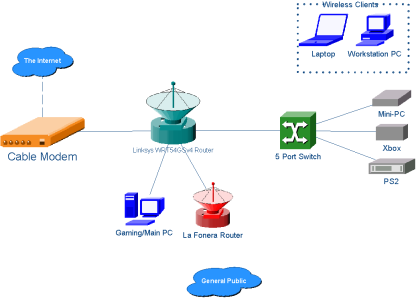
I have finished re doing our home network, the Mac was replaced with a Gaming PC and we all have Netbooks so the shared computer is not used that much now.

Lets see your network.

0t2iferzsfad1f1ufmf2.png
 
pmfr9pk3p90jb32e7mlj.jpg


The Linksys WRT54G router, i forgot to edit, I have a DGL-4500 dlink. I also don't have a HP netbook, I have a Acer netbook.
 
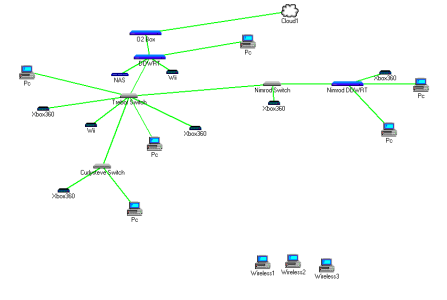
Enjoy my diagram from a very old version of the badass program, Lanflow.
attachment.php
 

Attachments

  • mynet.png
    mynet.png
    11.9 KB · Views: 2,424
Last edited by a moderator:
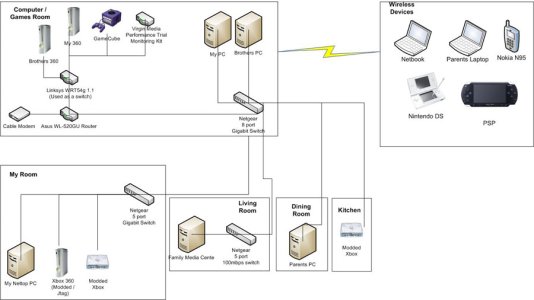
Our network started with 2 computers connected with a crossover cable...

attachment.php


The network wired up as logically as possible, the main devices connect in to the 8 port gigabit switch. Wires run around the outside of the house to network wall points in each of the rooms listed above. A switch is then connected to the wall point if more than one device is in that room.

We don’t really use wireless, its disabled 99% of the time unless the DS or PSP need to go online which is hardly ever. If the laptops are ever used at home they usually just connect to the switch in the living room.
 

Attachments

  • Network.jpg
    Network.jpg
    77.5 KB · Views: 3,670

About Digiex

Digiex is a technology and gaming forum, founded in 2004 by InsaneNutter and Nimrod. Digiex has served the internet community with breaking news, detailed guides, exclusive downloads and a popular discussion forum. A small, friendly community of like‑minded people has developed over the years. People are encouraged to register and participate in on‑going discussions.

Get Social

Back
Top Bottom