
-
 Welcome to the Digiex Download Center, you are welcome to download anything you like here. No registration is required! Digiex offers direct download links with no captchas or wait times.
The team do our best to ensure no content infringes copyrights and provide a DMCA Takedown request form to request the removal of content from Digiex.
Notable sections: Pokemon Archives | Xbox Archives | Xbox 360 Archives
You are using an out of date browser. It may not display this or other websites correctly.
You should upgrade or use an alternative browser.
You should upgrade or use an alternative browser.
Resident Evil 6 Xbox 360 Demo 2 Download [New 18.09.12]
- Thread starter InsaneNutter
- Start date
If you think this game is good, then you have never played the other games. Even the hardcore fan boys hate this.
Ccan't understand why they cannot recreate the same game play and atmosphere than Resi 4 had. They are not listening to fans.
They are just trying to make resident evil appeal to everyone, ruining it by doing so. If its not broken don't try and fix it.
Ccan't understand why they cannot recreate the same game play and atmosphere than Resi 4 had. They are not listening to fans.
They are just trying to make resident evil appeal to everyone, ruining it by doing so. If its not broken don't try and fix it.
 so, one new RE and i will be playing! and liking! sorry for the english :/
InsaneNutter
Resident Nutter
I personally quite enjoyed it too, i'm not even a big fan of the series. I've played the first Resident Evil and never finished it. I then played RE5 on co-op and loved it, i even finished all the extra DLC for it. For a game i had no interest in i'm glad i got it for my birthday a few years ago!

Trebor
Dolphin Fan
I personally quite enjoyed it too, i'm not even a big fan of the series. I've played the first Resident Evil and never finished it. I then played RE5 on co-op and loved it, i even finished all the extra DLC for it. For a game i had no interest in i'm glad i got it for my birthday a few years ago!
You're welcome
 . May have to give this demo a go this weekend, if I find time between playing Borderlands 2 that is

midnightphoenix123
Member
- Joined
- Sep 24, 2012
- Messages
- 10
Hi, this isn't the first time I have put a demo on a flashdrive, infact I did it with the other Resident Evil 6 demo on here and got it to work fine. With this one I get it on the flashdrive fine, open up the flashdrive on my xbox it shows it in the flashdrive, move it over the the harddrive, go to my games and it is there but when I open it to play it, all it shows is a black screen and I can't do anything and I am forced to turn my xbox off. Anyone know what is wrong?
InsaneNutter
Resident Nutter
Try installing the latest dashboard update here: https://digiex.net/downloads/downlo...60-dashboard-update-2-0-15574-0-download.html
midnightphoenix123
Member
- Joined
- Sep 24, 2012
- Messages
- 10
I am a bit confused on how to install it. Do I need to plug in the flashdrive to the xbox first and then put the update on after the xbox has configured it, or do I put it on before I configure it with the xbox. And I am a bit confused as to where I put the update when it says the root. Sorry I know this is the demo section and this is a bit off topic.

Rick
Veteran
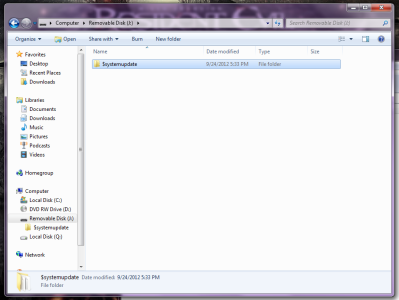
Root has all of your folders or no folders at all.You would copy the $SystemUpdate folder to the flash drive.
(removable disk)g:\
g:\$SystemUpdate

(removable disk)g:\
g:\$SystemUpdate
midnightphoenix123
Member
- Joined
- Sep 24, 2012
- Messages
- 10
Ok so I just open the flashdrive in my computer, not with one of the xbox flashdrive programs? And I don't need the flashdrive configured with the xbox for the update? Sorry if I am being a total noob right now.
Rick
Veteran
Yes. You don't need it configured but i don't think it matters.Ok so I just open the flashdrive in my computer, not with one of the xbox flashdrive programs? And I don't need the flashdrive configured with the xbox for the update? Sorry if I am being a total noob right now.
midnightphoenix123
Member
- Joined
- Sep 24, 2012
- Messages
- 10
So it should look like this on the flashdrive correct?
Rick
Veteran
Yes.

oO Flowzilla Oo
Addict
- Joined
- Jul 23, 2011
- Messages
- 248
Yes, now when you plug in the flash drive something like :
"A new system update is available"
should pop out. Click yes and it should install.
Isn't it easier to update via Xbox Live?....Maybe you can't connect your Xbox 360 to Live.....Whatever....Ignore me.
midnightphoenix123
Member
- Joined
- Sep 24, 2012
- Messages
- 10
Well do you need xbox live gold to update, and if not doesn't it just update on its own or do you have to do it youself somehow? When I plugged the flashdrive in nothing poped up at all.
Rick
Veteran
You don't need xbox gold. Turn the console off, insert the usb, then turn the console on and it should prompt for update.Well do you need xbox live gold to update, and if not doesn't it just update on its own or do you have to do it youself somehow? When I plugged the flashdrive in nothing poped up at all.
midnightphoenix123
Member
- Joined
- Sep 24, 2012
- Messages
- 10
I turned the consle off, plugged in the usb, turned it on and still nothing happened.
Rick
Veteran
In that case you might have the latest dashboard update. To check go to settings>system>console settings>system info>D:
What is the number next to D: ?
You could try deleting the demo and re-transfer it to the usb.
What is the number next to D: ?
You could try deleting the demo and re-transfer it to the usb.
midnightphoenix123
Member
- Joined
- Sep 24, 2012
- Messages
- 10
Sorry it took me so long to reply. The number is 2.0.15574.0
Rick
Veteran
That is the latest dashboard. Delete the demo and re-transfer it to the usb.Sorry it took me so long to reply. The number is 2.0.15574.0
About Digiex
Digiex is a technology and gaming forum, founded in 2004 by InsaneNutter and Nimrod.
Digiex has served the internet community with breaking news, detailed guides, exclusive downloads and a popular discussion forum. A small, friendly community of like‑minded people has developed over the years. People are encouraged to register and participate in on‑going discussions.
Get Social



