


Nimrod
Dev Ops
- Joined
- Jun 1, 2007
- Messages
- 1,514
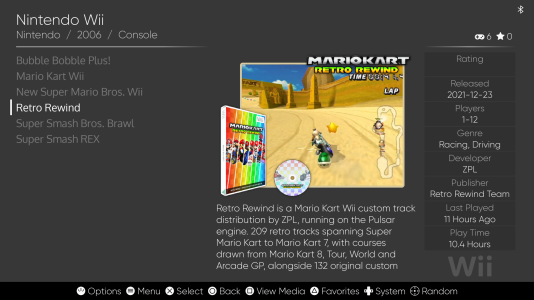
If you've got Retro Rewind showing up in ES-DE, you'll have noticed it looks a bit sad next to everything else. No box, no disc, no screenshot, just a name. Scraping won't fix it either, however many times you try.
That's because ES-DE identifies Wii games by the disc image, and Retro Rewind isn't one. In ES-DE it's a small Dolphin launch file (a .json game mod descriptor) that boots Mario Kart Wii with the Retro Rewind patches applied. There's nothing to match against, and it isn't on ScreenScraper anyway.
So here's a full set of artwork for it. Drop it in and Retro Rewind looks like it belongs.
WHAT'S IN IT
Nine images, one for every ES-DE media slot that makes sense, at the same sizes ScreenScraper uses for real Wii games so nothing looks out of place:
There's no manual or video. It's a mod, so there isn't a real manual or trailer to use, and a made-up one would be worse than nothing.
INSTALL
1. Extract the zip. You get a folder called wii with nine folders inside it.
2. Copy that wii folder into your ES-DE downloaded_media folder, and let it merge with the one that's already there.
On a default EmuDeck setup that is Emulation/tools/downloaded_media/ - under
/run/media/deck/<CARD>/Emulation or ~/Emulation, wherever yours lives.
Plain ES-DE without EmuDeck uses ~/ES-DE/downloaded_media/ instead.
Not sure? Look for MediaDirectory in ~/ES-DE/settings/es_settings.xml.
3. Make sure the names match. ES-DE finds artwork by the file name of the game, not the name shown in the menu. The images are all called "Retro Rewind", so your launch file needs to be called "Retro Rewind.json". If yours is named something else, either rename it, or rename all nine images to match (keep the .png, and the .jpg on the fanart).
4. Restart ES-DE.
DON'T HAVE RETRO REWIND IN ES-DE YET?
If you set Retro Rewind up with Wheel Wizard, it has already written the launch file for you, it's just not somewhere ES-DE looks. Copy it into your Wii ROMs folder under the right name:
Restart ES-DE and it shows up in the Wii list. Launching it boots straight into Retro Rewind in Dolphin, no menus. The file points at the Mario Kart Wii disc image you gave Wheel Wizard, so leave that where it is.
THE DESCRIPTION TEXT
The zip is images only. The description, developer, genre and so on in the screenshot aren't artwork, ES-DE keeps those in its gamelist. You can fill them in yourself from the game list with Options > Edit this game's metadata.
Tested on SteamOS 3.8.16 in Game Mode, with EmuDeck, ES-DE and the Dolphin Flatpak, on Retro Rewind 6.12.8.
Fan-made artwork. Mario Kart and the characters belong to Nintendo, Retro Rewind is by ZPL and the Retro Rewind team.
That's because ES-DE identifies Wii games by the disc image, and Retro Rewind isn't one. In ES-DE it's a small Dolphin launch file (a .json game mod descriptor) that boots Mario Kart Wii with the Retro Rewind patches applied. There's nothing to match against, and it isn't on ScreenScraper anyway.
So here's a full set of artwork for it. Drop it in and Retro Rewind looks like it belongs.
WHAT'S IN IT
Nine images, one for every ES-DE media slot that makes sense, at the same sizes ScreenScraper uses for real Wii games so nothing looks out of place:
- covers - Wii case front (486x680)
- backcovers - case back, with screenshots and a blurb (483x680)
- 3dboxes - Wii keep case (305x600)
- physicalmedia - disc (600x600)
- miximages - box, disc and screenshot together (1280x960)
- marquees - logo, transparent background (600x240)
- screenshots - in-game (608x344)
- titlescreens - (1440x810)
- fanart - (1920x1080)
There's no manual or video. It's a mod, so there isn't a real manual or trailer to use, and a made-up one would be worse than nothing.
INSTALL
1. Extract the zip. You get a folder called wii with nine folders inside it.
2. Copy that wii folder into your ES-DE downloaded_media folder, and let it merge with the one that's already there.
On a default EmuDeck setup that is Emulation/tools/downloaded_media/ - under
/run/media/deck/<CARD>/Emulation or ~/Emulation, wherever yours lives.
Plain ES-DE without EmuDeck uses ~/ES-DE/downloaded_media/ instead.
Not sure? Look for MediaDirectory in ~/ES-DE/settings/es_settings.xml.
3. Make sure the names match. ES-DE finds artwork by the file name of the game, not the name shown in the menu. The images are all called "Retro Rewind", so your launch file needs to be called "Retro Rewind.json". If yours is named something else, either rename it, or rename all nine images to match (keep the .png, and the .jpg on the fanart).
4. Restart ES-DE.
DON'T HAVE RETRO REWIND IN ES-DE YET?
If you set Retro Rewind up with Wheel Wizard, it has already written the launch file for you, it's just not somewhere ES-DE looks. Copy it into your Wii ROMs folder under the right name:
Code:
cp ~/.config/CT-MKWII/RR.json "Emulation/roms/wii/Retro Rewind.json"Restart ES-DE and it shows up in the Wii list. Launching it boots straight into Retro Rewind in Dolphin, no menus. The file points at the Mario Kart Wii disc image you gave Wheel Wizard, so leave that where it is.
THE DESCRIPTION TEXT
The zip is images only. The description, developer, genre and so on in the screenshot aren't artwork, ES-DE keeps those in its gamelist. You can fill them in yourself from the game list with Options > Edit this game's metadata.
Tested on SteamOS 3.8.16 in Game Mode, with EmuDeck, ES-DE and the Dolphin Flatpak, on Retro Rewind 6.12.8.
Fan-made artwork. Mario Kart and the characters belong to Nintendo, Retro Rewind is by ZPL and the Retro Rewind team.




