
You are using an out of date browser. It may not display this or other websites correctly.
You should upgrade or use an alternative browser.
You should upgrade or use an alternative browser.
Seagate 320GB HDD
- Thread starter Andami
- Start date


InsaneNutter
Resident Nutter
On a normal console its not possible, basically as it will be too much work for the hddhackr creator to support anything other then WD drives.
If you have a Jtag however you can use the drive.
If you have a Jtag however you can use the drive.

Harcroft
Addict
Actually it is possible, I've said it time and time again. You can write the same 7 sectors 16-22 to your hdd with a hex editor like WinHex. You will only get the hdd space equal to the hdds.bin (sector 16-22) you use. In your case, a 250gb hddss.bin would be used.
Harcroft
Addict
Not really, I didn't read it from some guide. I've just edited hard drives before using hex editors. WinHex I know for sure has the ability to write images to a hard drive. Writing a hdds.bin starting at sector 16 for example. Looking up the old way (pre hddhacker) to build a 360 hard drive might assist your search.

I too have a 500GB Seagate External HDD and was wondering if there was some way to make my non-modded Xbox to recognize it. I just want to use the HDD to play media stuff from it. I wish if there was an easy tutorial or some easy way to achieve this.

Rick
Veteran
I too have a 500GB Seagate External HDD and was wondering if there was some way to make my non-modded Xbox to recognize it. I just want to use the HDD to play media stuff from it. I wish if there was an easy tutorial or some easy way to achieve this.
for movies,music,pictures?**for this you need to back-up any files on the 500gb drive**
use this GParted -- About
1.burn iso to disk using any iso burner
2.change boot to disk..after some text..it will ask for numbers the 1st one is 02 for english 2nd is 0 for x desktop
3.when this screen appears
4.
5.There will be partitions there,if you dont need anything right click it and select format>fat32
6.Shut down the computer and transfer what you want to use on the xbox 360.
this can corrupt windows so only mess with the usb drive
Attachments
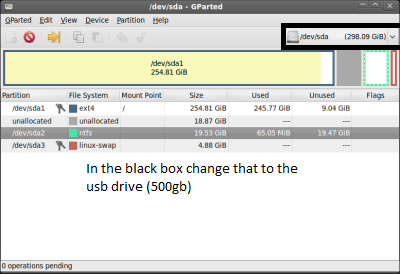
for movies,music,pictures?**for this you need to back-up any files on the 500gb drive**
use this GParted -- About
1.burn iso to disk using any iso burner
2.change boot to disk..after some text..it will ask for numbers the 1st one is 02 for english 2nd is 0 for x desktop
3.when this screen appears
4.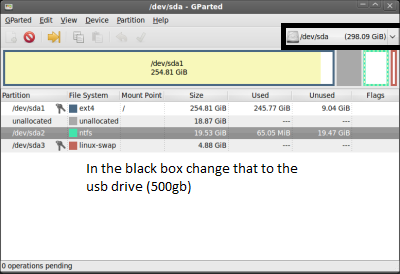
5.There will be partitions there,if you dont need anything right click it and select format>fat32
6.Shut down the computer and transfer what you want to use on the xbox 360.
this can corrupt windows so only mess with the usb drive
Thanks a lot for your help rick550
 , I have quite a few linux distro's, I can do this without touching windows. I had thought of formating the whole drive from NTFS to Fat32 but didn't want to, just for Xbox's sake. Anyway I'll try creating a 50 GB Fat32 partition using GParted on linux. It would be great if Xbox supported NTFS as it is, but MS wouldn't do that.
InsaneNutter
Resident Nutter
It would be great if Xbox supported NTFS as it is, but MS wouldn't do that.
Its strange it doesn't considering Microsoft develop NTFS, yet HFS+ works on the 360 and is developed by Apple...

Dark Scyth
Veteran
- Joined
- Mar 3, 2009
- Messages
- 2,520
Its strange it doesn't considering Microsoft develop NTFS, yet HFS+ works on the 360 and is developed by Apple...
There's an interesting weave we have woven.

And personally I have a 100GB partition that is FAT32 and it stores my 16GB Xbox 360 data (created the partition without making it FATX) and also holds my music and videos. I've been able to install games and play the installed game, plus playing DLC off the same device while listening to music from that same device, it's pretty amazing.
Harcroft
Addict
It's blatantly obvious why Microsoft neglected to include NTFS support.
You could store HD video (xmv or divx only for the 360) with an NTFS formatted drive. But why would you be allowed to play your own media when you can be sold that same media at a premium from Xbox Live. I think they actually thought their video service would do well in comparison to Netflix, iTunes, GoogleTV...it's a saturated market without their attempt at a video service.
HFS+ was simply included so people could use their iPods and other "i' devices fairly easy, in a half-hearted attempt at supporting more devices and formats.
You could store HD video (xmv or divx only for the 360) with an NTFS formatted drive. But why would you be allowed to play your own media when you can be sold that same media at a premium from Xbox Live. I think they actually thought their video service would do well in comparison to Netflix, iTunes, GoogleTV...it's a saturated market without their attempt at a video service.
HFS+ was simply included so people could use their iPods and other "i' devices fairly easy, in a half-hearted attempt at supporting more devices and formats.
Its strange it doesn't considering Microsoft develop NTFS, yet HFS+ works on the 360 and is developed by Apple...
Similar threads
- Replies
- 1
- Views
- 3K

- Replies
- 2
- Views
- 5K
- Replies
- 2
- Views
- 9K
About Digiex
Digiex is a technology and gaming forum, founded in 2004 by InsaneNutter and Nimrod.
Digiex has served the internet community with breaking news, detailed guides, exclusive downloads and a popular discussion forum. A small, friendly community of like‑minded people has developed over the years. People are encouraged to register and participate in on‑going discussions.
Get Social



