Windows Live Messenger 9 Wave 3 Beta Download

Nimrod

Vibe Coder
Joined
Jun 1, 2007
Messages
1,494
Have you been drooling over the latest screenshots of Windows Live wave 3? Now get yourself in on the action. Microsoft is launching the official Windows Live Wave 3 beta today.

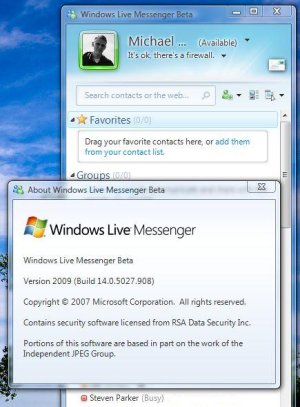
Watcher of all things Microsoft Live, LiveSide.net has the links to the official downloads from Microsoft, that include the latest versions of Live Messenger, Movie Maker, Mail with Calendar synchronization, Writer, Photo Gallery, Family Safety and the Outlook Connector. These downloads have been confirmed as functional, and in the case of Windows Live Messenger will install "Version 2009, build 14.0.5027.908"

Download:
Windows Live Messenger 9 Wave 3 Slim Beta Download | Windows Live Messenger 9 Wave 3 Full Beta Download

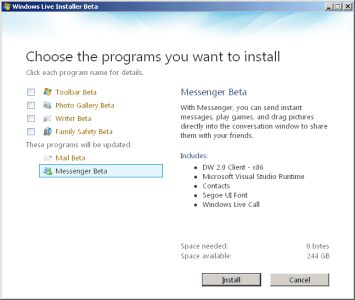
The slim version is just 1 MB and downloads only the software you select to install. The full installer is over 130 MB and already includes all installable software. Download the slim version if you're just going to install the Windows Live Messenger 9 Beta

Screenshot:
 

Attachments

  • 82_wlm9-screenshot.JPG
    82_wlm9-screenshot.JPG
    55.8 KB · Views: 4,953
  • windows-live-installer-wave3.png
    windows-live-installer-wave3.png
    24.8 KB · Views: 2,737
  • WLM9img1.jpg
    WLM9img1.jpg
    146.2 KB · Views: 3,155
  • WLM9img2.jpg
    WLM9img2.jpg
    265.2 KB · Views: 4,811
  • WLM9img3.jpg
    WLM9img3.jpg
    211 KB · Views: 2,127
  • WLM9img4.jpg
    WLM9img4.jpg
    192.6 KB · Views: 2,789
  • WLM9img5.jpg
    WLM9img5.jpg
    30.5 KB · Views: 2,208
Nice find nimrod. I'll download this soon. However what is the difference between the silm beta and the full beta?
 
Full beta will give you stuff like a browser toolbar and a bunch of other stuff no one really wants (I think anyway). Looks pretty nice, shame there is no new Mac version coming! :P
 
Here’s my opinion on various aspects of Windows Live Messenger 9.

When I saw the screenshots of this floating about on the net I thought it looked really clean and interesting. However I’ve been using it for the last two hours and it’s done nothing but annoy me.

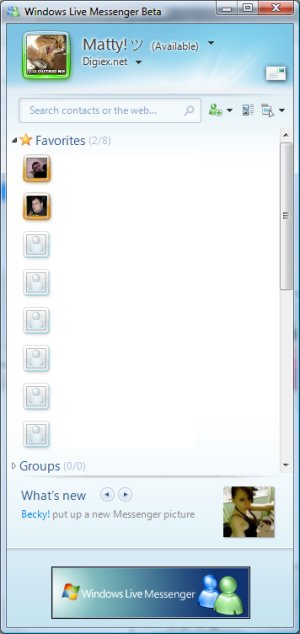
The contact list
The contact list looks nice, I’m finding the thing at the bottom telling me some one has changed there display picture, name or personal message annoying already, however that can be removed.

WLM9img1.jpg


The chat windows
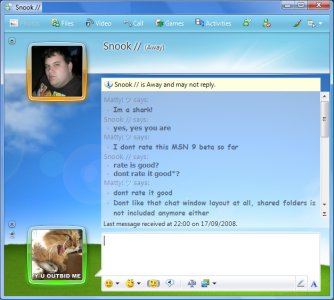
I really dont like the display pictures been on the left, we read from left to right so why change the location of the display pictures? I find it nothing but annoying.

Also as you can see when you apply a background to the chat it blurs all the text a bit, I’m guessing that’s just a bug in the beta though.

WLM9img2.jpg


Sounds
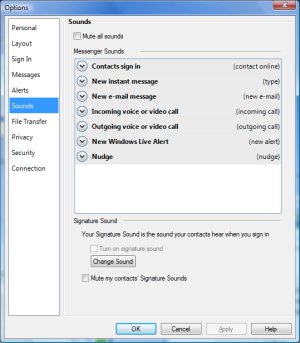
The sound options changed a bit, as you can see in the options you can have a signature sound what your contact hear when you sign in, I disable all sounds in MSN so that’s not really any use to me but I can see that been interesting.

WLM9img3.jpg


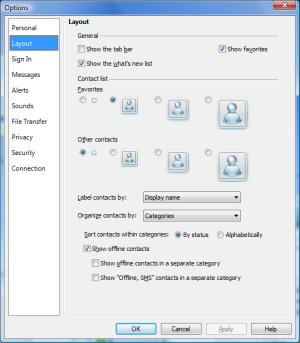
Layout
You get quite a few new options to personalise your messenger install, however as I said earlier I would really like peoples display pictures to be on the right. All these options have been in patches like Mess patch or Apatch for several years now, It’s nice to finally have them officially in WLM.

WLM9img4.jpg


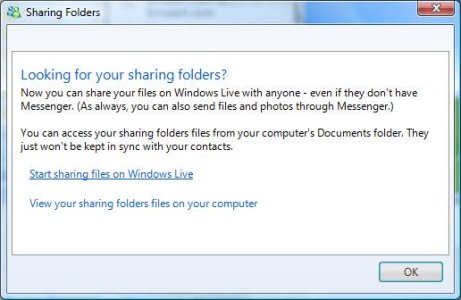
Shared Folders
Shared folders has been removed from Windows Live :( and replaced with a link to Windows Sky Drive. If i wanted to go to a website to upload some files I would do, I like shared folders because you and your contact can drop files in the shared folder and they will automatically be synced.. I would sooner not have to go to a website to upload them... it’s convenient just to dump the file in the shared folder, myself and Nimrod have often found this very useful when working on Digiex.


Multiple Locations
This is honestly the only good thing I can say about this build, you can now sign in to MSN from more than one location, to me this could be useful as I find myself using more than one computer at times and it would be very convenient to have my conversations delivered to both computers.

Uninstall
In my opinion that’s the best thing you can do with this beta, Im sure some people will disagree with me but in its current state I can’t honestly say I’m that keen on it, I’ll stick to Windows Live 8.5 for now.

WLM9img6.jpg


The first beta of Windows Live Messenger 8 was absolutely horrible, however that turned out very nice in my opinion so I still hold out a lot of hope for Windows Live Messenger 9 :)
 
Here is the A-Patch It will remove adverts on the following. It has lots of options that it can remove. I successfully remove adverts on windows live messenger 9.0 wave 3 messenger. Its working fine.

A-Patch for Windows Live Messenger 8.5

Version: 1.40 RC2 (build 31)
Compatibility: Windows Live Messenger 8.5.1235.0517, 8.5.1238.0601, 8.5.1288.0816 & 8.5.1302.1018
Downloads: 2,624,267

Download Now

A-Patch for Windows Live Messenger 9.0 Wave 3

Version: 1.42 (build 3)
Compatibility: Windows Live Messenger 9.0 (14.0.5027.0908)
Downloads: 177,668

Download Now


A-Patch for Yahoo Messenger
Version: 0.1 Beta
Compatibility: 8.1.0.421 and possibly more versions
Features: Remove advertisements, Polygamy (multi-messenger)
Downloads: 43,945

Download Now


A-Patch for Windows Live Messenger 8.0-8.1

Version: 1.30 RC1 (build 54)
Compatibility: Windows Live Messenger 8.0.0787, 8.0.0792, 8.0.0812, 8.1.0064, 8.1.0066, 8.1.0068, 8.1.0106, 8.1.0168 & 8.1.0178
Downloads: 5,754,785

Download Now


A-Patch for MSN Messenger

Version: 1.30 RC2 (build 26)
Compatibility: MSN Messenger 6.2.0205, 6.2.0208, 7.0.0816, 7.0.0820, 7.5.0306, 7.5.0311, 7.5.0316, 7.5.0319, 7.5.0320, 7.5.0322 & 7.5.0324
Downloads: 1,929,196

Download Now


Nimrod suggested to me the other day to also download Messenger Plus! If you have a messenger that's capable of Messenger Plus you must download it. That made my Windows Live Messenger do fantastic things. I can now type thing's like /ping to ping whoever I'm chatting with or /slap lol to slap whoever I'm chatting with, with a big smelly fish. At least check it out if you don't already have it. Information
 
Last edited:

About Digiex

Digiex is a technology and gaming forum, founded in 2004 by InsaneNutter and Nimrod. Digiex has served the internet community with breaking news, detailed guides, exclusive downloads and a popular discussion forum. A small, friendly community of like‑minded people has developed over the years. People are encouraged to register and participate in on‑going discussions.

Get Social

Back
Top Bottom