
Windows Media Center

Fred Zajac

New Member
Joined
Feb 29, 2020
Messages
3
I'm trying to configure TV Guide for my WMC, using EPGCentre.
"Tunning" function doesn't give me an option to enter parameters for Cable (USA, Comcast or Exfinity).
Comcast parameters are as follows:
256QAM, ATSC, 108MHz to 700MHz range
Tuner:
Ceton InfiniTV, Frequency 339000kHz, Modulation QAM256, Out of Band 75.250MHZ

Any suggestions?
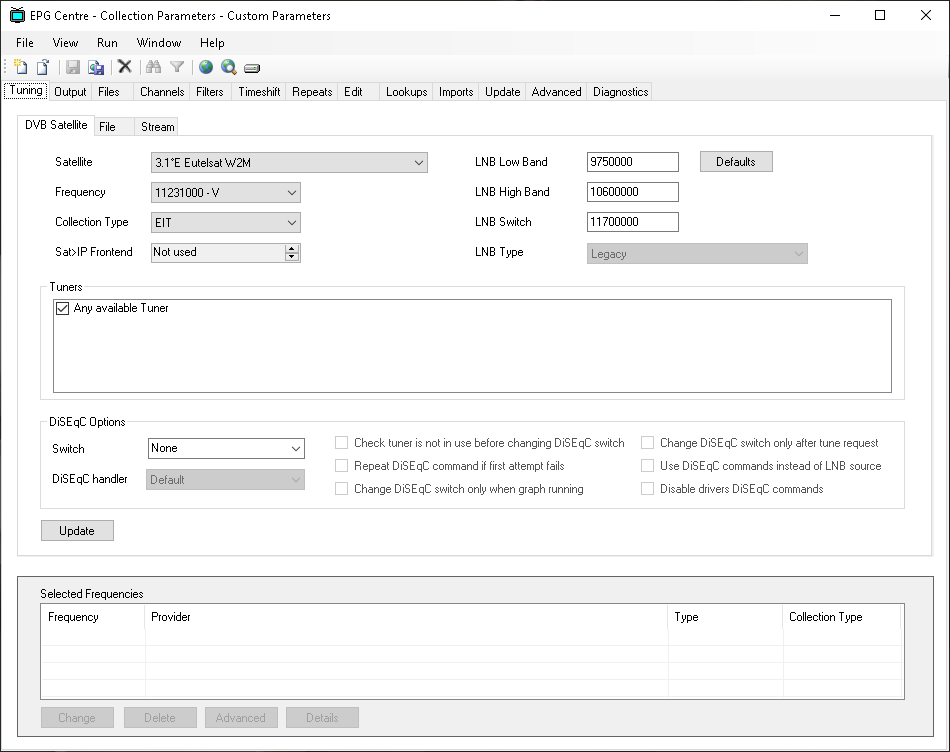

upload_2020-2-29_10-41-43.png
 
You look to be on DVB Satellite there and not DVB Cable.

Load up EPG Centre and select File > Create Collection Parameters:

media-center-epg-collector-1-jpg.15936


Here I selected "Custom Parameters":

media-center-epg-collector-2-jpg.15937


You want DVB Cable here, which is on the tab next to where i've labelled 2:

media-center-epg-collector-3-jpg.15938
 
I'm trying to configure TV Guide for my WMC, using EPGCentre.
"Tunning" function doesn't give me an option to enter parameters for Cable (USA, Comcast or Exfinity).
Comcast parameters are as follows:
256QAM, ATSC, 108MHz to 700MHz range
Tuner:
Ceton InfiniTV, Frequency 339000kHz, Modulation QAM256, Out of Band 75.250MHZ

Any suggestions?


View attachment 17250
Thank you very much!
Problem is though, tha I do not have an option of choosing "DVB Terrestrial", "DVB Cable" or "Clear QAM" after I click "Custom Parameters" (it is shown in my 1st post.
I only have three buttons available: "DVB Satellite", "File" and "Stream". Is there any other version of this software that would give me all options presented on web?

Thanks again.

FZ
 
Maybe try this older version from 2016 here: https://sourceforge.net/projects/epgcollector/files/V4.3/EPG Collector V040300 Install.zip/download

Those screenshots are from a guide I made a few years ago, so things might well have changed since then. I've moved on to Tvheadend and Kodi for my DVR since writing that guide, so havn't used Epg Collector for a while now.

It might also be an idea to ask on the Sourceforge project page: https://sourceforge.net/p/epgcollector/discussion/1125945 as your'll likely get the attention of the developers.
 
Maybe try this older version from 2016 here: https://sourceforge.net/projects/epgcollector/files/V4.3/EPG Collector V040300 Install.zip/download

Those screenshots are from a guide I made a few years ago, so things might well have changed since then. I've moved on to Tvheadend and Kodi for my DVR since writing that guide, so havn't used Epg Collector for a while now.

It might also be an idea to ask on the Sourceforge project page: https://sourceforge.net/p/epgcollector/discussion/1125945 as your'll likely get the attention of the developers.


Thank you so much!
I'll try these options.

Fred
 

About Digiex

Digiex is a technology and gaming forum, founded in 2004 by InsaneNutter and Nimrod. Digiex has served the internet community with breaking news, detailed guides, exclusive downloads and a popular discussion forum. A small, friendly community of like‑minded people has developed over the years. People are encouraged to register and participate in on‑going discussions.

Get Social

Back
Top Bottom



