

• Welcome to the Digiex Download Center, you are welcome to download anything you like here. No registration is required! Digiex offers direct download links with no captchas or wait times.
    The team do our best to ensure no content infringes copyrights and provide a DMCA Takedown request form to request the removal of content from Digiex.

    Notable sections: Pokemon Archives | Xbox Archives | Xbox 360 Archives

Xbox 360 Dashboard / System Update 2.0.16756.0 Download With Avatars

Status
Not open for further replies.

Rick

Veteran
Joined
Jul 14, 2010
Messages
2,748
Location
The Matrix
29ekm9sjzsbhmwn4rvrt.png


Xbox 360 System / Dashboard Update 2.0.16756.0 Download with Avatars
Released:

June 4,2014

Changes
-Most apps will work without gold membership.

How to install:

1.) Unrar the download
2.) Copy the $SystemUpdate folder to the root of a CD or USB Stick (The memory stick must be FAT or Fat32 formatted)
3.) Insert the CD or USB Stick into your Xbox 360 console.
4.) You will be automatically prompted to update with a USB stick, with a CD / DVD it should say Mixed Media Disc, power down the 360 and power it on again. You should be ask to update before the 360 boots to the dashboard.
5.) Once the update is complete your Xbox 360 will restart then boot up to the new dashboard. Enjoy!

Video tutorial on how to update the Xbox 360 dashboard with a USB memory stick:


Download: Xbox 360 Dashboard / System Update 2.0.16756.0 Download With Avatars
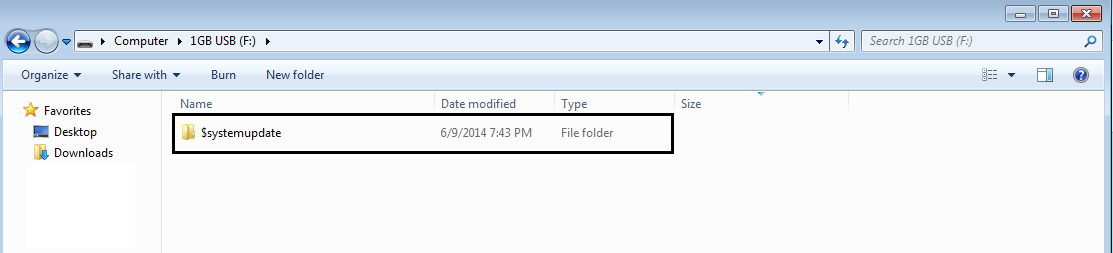
 
Update wont appear when I insert the USB with the file.

When I insert the USB containing the file I don't get the update request , help please.
 
Yes I did, I got the request, when I press "Yes" to restart the system I get a request for a system update saying that if I don't do the update it will redirect me to Xbox Dashboard, but if I do it, it says that the update failed and it gives me another status code, please help!
 
Once I get the request I press yes and I get a tab saying: "Update Required, To proceed, security and program updates are required.System updates will be added to ensure security and proper functionality. If you decline you will be returned to the Xbox Dashboard. Do you want to accept the update?" but if I press yes it says: "Update Failed, Can't process the update, If the problem persists go to www.xbox.com/support." :( giving me a status code: 4099 - 4174 - 1601 - 0300 - C800 - 0036
 
Last edited:
Status
Not open for further replies.

About Digiex

Digiex is a technology and gaming forum, founded in 2004 by InsaneNutter and Nimrod. Digiex has served the internet community with breaking news, detailed guides, exclusive downloads and a popular discussion forum. A small, friendly community of like‑minded people has developed over the years. People are encouraged to register and participate in on‑going discussions.

Get Social

Back
Top Bottom



