


InsaneNutter
Resident Nutter
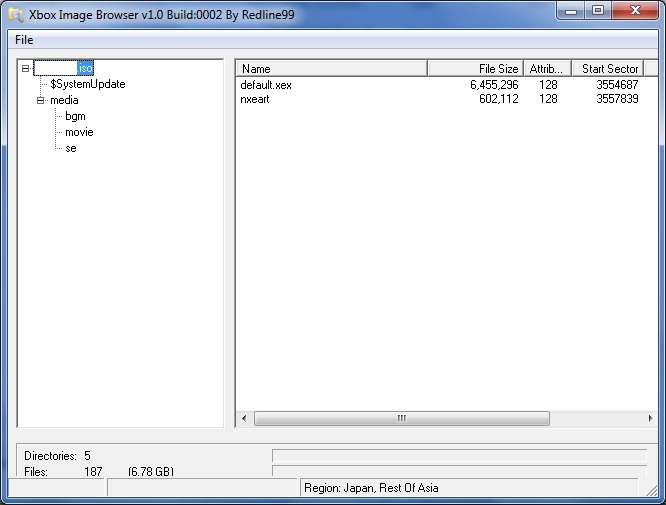
Xbox Image Browser allows you to browse the contents of Xbox 360 XISO's and extract the contents of the ISO. Useful if you want to play your game collection off a USB hard drive on your jtag hacked console.
Download Xbox 360 Image Browser v2.9.0.350
The contents of an ISO:
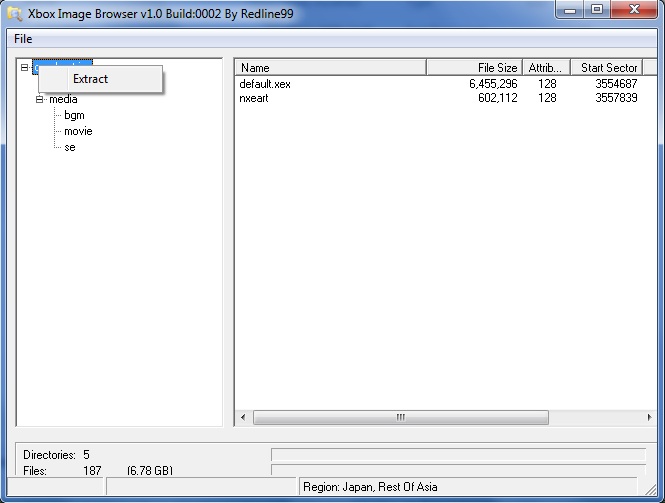
Right click on the ISO to extract it:
How to use Xbox Image Browser:
Selecting the "su20076000_00000000" will display the version number.
Selecting an "xex" file will display the region
Right clicking on top level file name will extract the entire ISO.
Right clicking on a folder will extract it and it's sub folders.
Right clicking on a single will will allow you to extract that file.
Right clicking on a single file will allow you to replace the file.
(The file size must be the same or smaller.)
This application is basically the same one embedded in Xbox Backup Creator.
Note on modern versions of Windows if your getting an error in with mscomctl.ocx, this is how to fix it.
For 32bit versions of Windows 7, 8 and 10 MSCOMCTL.OCX must be copied in to C:\Windows\system
Run command prompt as Administrator and ether type or copy and paste this in:
Regsvr32 c:\windows\system\MSCOMCTL.OCX
For 64bit versions of Windows 7, 8 and 10 MSCOMCTL.OCX must be copied in to C:\Windows\SysWOW64 folder.
Run command prompt as Administrator and ether type or copy and paste this in:
Regsvr32 c:\windows\SysWOW64\MSCOMCTL.OCX
Download Xbox 360 Image Browser v2.9.0.350
The contents of an ISO:
Right click on the ISO to extract it:
How to use Xbox Image Browser:
Selecting the "su20076000_00000000" will display the version number.
Selecting an "xex" file will display the region
Right clicking on top level file name will extract the entire ISO.
Right clicking on a folder will extract it and it's sub folders.
Right clicking on a single will will allow you to extract that file.
Right clicking on a single file will allow you to replace the file.
(The file size must be the same or smaller.)
This application is basically the same one embedded in Xbox Backup Creator.
Note on modern versions of Windows if your getting an error in with mscomctl.ocx, this is how to fix it.
For 32bit versions of Windows 7, 8 and 10 MSCOMCTL.OCX must be copied in to C:\Windows\system
Run command prompt as Administrator and ether type or copy and paste this in:
Regsvr32 c:\windows\system\MSCOMCTL.OCX
For 64bit versions of Windows 7, 8 and 10 MSCOMCTL.OCX must be copied in to C:\Windows\SysWOW64 folder.
Run command prompt as Administrator and ether type or copy and paste this in:
Regsvr32 c:\windows\SysWOW64\MSCOMCTL.OCX
 ? good post





