
Xbox 360 Jtag broke after updating dashboard

teazy

Member
Joined
Dec 3, 2022
Messages
15
Hello

I hope I get a reply since xbox 360 is a old console now, I wanted to update my xbox 360 dashboard to the latest version, I had seen a YouTube video about it and it seemed simple so I downloaded the update and put it on my USB, I restarted the console and no update icon would pop up then I moved the $SystemFolder file onto XeXMenu into the HDD folder, I restarted the console and this time the update icon did pop up, I pressed update and it would keep giving error code after several tries I just pressed update later and tried to play a game but then the game would say that the dashboard needs to be updated for the game to be played I again kept trying but the error code would come up whenever I tried to update.

Please help I really can't afford a repair and I definitely can't afford to tell my parents
 
Hello

I hope I get a reply since xbox 360 is a old console now, I wanted to update my xbox 360 dashboard to the latest version, I had seen a YouTube video about it and it seemed simple so I downloaded the update and put it on my USB, I restarted the console and no update icon would pop up then I moved the $SystemFolder file onto XeXMenu into the HDD folder, I restarted the console and this time the update icon did pop up, I pressed update and it would keep giving error code after several tries I just pressed update later and tried to play a game but then the game would say that the dashboard needs to be updated for the game to be played I again kept trying but the error code would come up whenever I tried to update.

Please help I really can't afford a repair and I definitely can't afford to tell my parents
After a while I realised that jtag consoles have their dashboards updated differently
 
Updating your Jtag with normal system updates is a good way to brick it.

What happens when you power the Xbox 360 on with the eject button? does it load Xell or to the Dashboard as normal.

Can you still load any homebrew apps such as XEX Menu after trying to update the 360?
 
Updating your Jtag with normal system updates is a good way to brick it.

What happens when you power the Xbox 360 on with the eject button? does it load Xell or to the Dashboard as normal.

Can you still load any homebrew apps such as XEX Menu after trying to update the 360?
When I press the eject button xell reloaded does work but xexmenu doesn't it asks me to update before I can use it
 
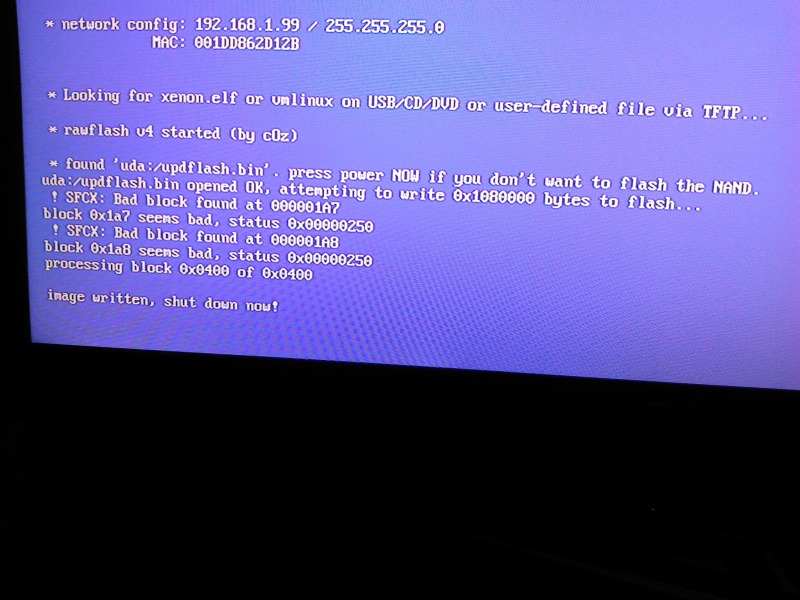
Power the console on with the eject button, Xell should load. Ensure the network cable it connected, then you should see an ip address in the network config:

11600d1349157999-easily-update-your-jtagged-rgh-xbox-360-kernel-dashboard-14699-xebuild-img_20120927_230702.jpg


Using your web browser on your PC go to http://192.168.1.99
0.png
or what ever your consoles ip address is, you should be able to download your "raw flash" from the console.

Use the raw_flash to build a new nand as per the tutorial I linked to above.

When it comes to flashing you will also have to do this from Xell, which is detailed on the tutorial under "RGH Xbox 360 Nand Flashing".

Hopefully that should get the Xbox back up and working.
 
Power the console on with the eject button, Xell should load. Ensure the network cable it connected, then you should see an ip address in the network config:

11600d1349157999-easily-update-your-jtagged-rgh-xbox-360-kernel-dashboard-14699-xebuild-img_20120927_230702.jpg


Using your web browser on your PC go to http://192.168.1.99
0.png
or what ever your consoles ip address is, you should be able to download your "raw flash" from the console.

Use the raw_flash to build a new nand as per the tutorial I linked to above.

When it comes to flashing you will also have to do this from Xell, which is detailed on the tutorial under "RGH Xbox 360 Nand Flashing".

Hopefully that should get the Xbox back up and working.
When I enter the network config address it says on Google "website is unreachable" my network config is 192.168.1.99
 
You need to enter the IP address your Xbox 360 has on your own network, so it must be connected to your router with a network cable.
 
You need to enter the IP address your Xbox 360 has on your own network, so it must be connected to your router with a network cable.
I connected my xbox 360 to my WiFi router using ethernet cable and entered the address into chrome but it still says that this website is unreachable
 
Last edited:
I connected my xbox 360 to my WiFi router and entered the address into chrome but it still says that this website is unreachable
It says on Xell Reloaded at the bottom

TFTP: no answer from server
TFTP: packet send error.
 
What is your PC's local IP address?

You can find this out by typing ipconfig /all in command prompt, will probably show as IPV4 address.
 
It's 192.168.1.7
Also I've noticed when I turn on my xbox with eject button with network cable plugged in the light on LAN1 on my router lights up meaning that the cable is working but when I type arp -a on command prompt it doesn't show the ip the xbox has
 
Does your router show anywhere what IP address it has given the Xbox?
Nope.
I also tried booting xbox normally and set network configuration and I set it to automatic it then it gave a different network config on xell which is 192.168.1.8 instead of what was showing up early which was 192.168.1.99
 
Nope.
I also tried booting xbox normally and set network configuration and I set it to automatic it then it gave a different network config on xell which is 192.168.1.8 instead of what was showing up early which was 192.168.1.99
Also the cable I'm using is CAT5, I use the same cable on my android TV box and it works perfectly
 
Also the cable I'm using is CAT5, I use the same cable on my android TV box and it works perfectly
Another thing I didn't add before it also says on xell at the bottom looking for xenon.elf but it says it can't find it, could that be because i deleted xexmenu? I think I've really ruined my xbox mate
 

About Digiex

Digiex is a technology and gaming forum, founded in 2004 by InsaneNutter and Nimrod. Digiex has served the internet community with breaking news, detailed guides, exclusive downloads and a popular discussion forum. A small, friendly community of like‑minded people has developed over the years. People are encouraged to register and participate in on‑going discussions.

Get Social

Back
Top Bottom



