• Welcome to the Digiex Download Center, you are welcome to download anything you like here, no registration is required! We offer direct download links with no captchas or wait times.
    We do our best to ensure no content infringes copyrights, and provide a DMCA Takedown Request Form to request the removal of content from Digiex

Xbox 360 Save Editor Download [Resign, Change ID's, Anonymise]

Michael_T

Addict
Joined
Dec 21, 2009
Messages
740
With this tool you can edit gamesaves that are not yours.
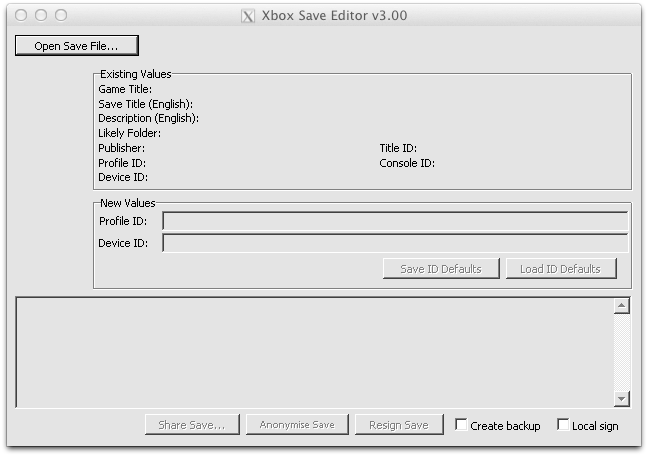
save-editor-png.7385


How to use :

1. Open the downloaded game save with the Xbox 360 Save Editor .
2. Open Xbox 360 Save Editor again with your game save from the same game .
3. Replace the Profile id & Device id from the downloaded game save with the Profile id & Device id from your game save .
4. After that check the Local sign box & press Resign Save .
5. Make a back-up of your own game save. Then replace your game save with the downloaded one on the usb flash drive.
6. Start up the game and it should read the downloaded game save . Enjoy .
 

Attachments
Last edited:
Excellent thanks, just came looking for this, want to transfer some Fifa12 saves to a different profile :)
 
how does this work? I'm sorry if it should be something known with modding but haven't modded before and probably never will except for this, do the saves have to be on the same 250GB HDD on a different profile or can they be on a smaller 120GB HDD on a different profile, please help me understand :S so i don't F something up thanks
 
When you have a game save from somewhere else , you need to re-sign the game save with a new id & device id .
If you open a gamesave from yourself & another game save , then just copy the id's and resign that game save .
Also tick on the local sign & select the KV.bin .
 
This is my second time doing this cause the first time i screwed up and decided to wait awhile before i did it again and so now i tried it again but when I turn on my xbox it shows it as a unknown game save so any idea on what i am doing wrong? as I have no clue thanks bro
 
This is my second time doing this cause the first time i screwed up and decided to wait awhile before i did it again and so now i tried it again but when I turn on my xbox it shows it as a unknown game save so any idea on what i am doing wrong? as I have no clue thanks bro

Ok , first play a game you want & create a saved game for it .
Then copy the file to a USB flash drive .
Open the game save with Xbox 360 Save Editor . You will now see profile id & device id , write them on a piece of paper or make a screenshot.
Now open the game save you have downloaded from the internet and change the profile id & device id .
They must be the same then your game save !
Mark the local sign & press resign save .
It will ask you for a kv.bin . The kv.bin is also in the Xbox 360 Save Editor folder.
After that open your usb flash drive again and replace your game save with the one you have downloaded from the internet .
It should work that way . Enjoy .
 
I got it to work, modded the downloaded save file and when I started the game it actually displayed the save file with the correct name and place. But upon opening it the game said "corrupted". Can that be linked to an error in the modding or most probably the file itself?

I now modded another downloaded savefile, but that one says corrupted from the start. Odd.
 
I got it to work, modded the downloaded save file and when I started the game it actually displayed the save file with the correct name and place. But upon opening it the game said "corrupted". Can that be linked to an error in the modding or most probably the file itself?

I now modded another downloaded savefile, but that one says corrupted from the start. Odd.


I actually got it to work! I after i deleted the other corrupt file, it suddenly was able to load.

I'm playing Rise of the Tomb Raider on Xbox360. It's a bug in the game that after completing 75% of the game and playing 25 hours, if you had done a specific thing in the wrong order you're stuck! And have to everything all over again.

I was able to find a save file that somebody uploaded which is some time after the moment I got stuck, but I can just read on what happend during that episode, and can finish the game myself.

Big thank you for the modd-program!
 
Ok , first play a game you want & create a saved game for it .
Then copy the file to a USB flash drive .
Open the game save with Xbox 360 Save Editor . You will now see profile id & device id , write them on a piece of paper or make a screenshot.
Now open the game save you have downloaded from the internet and change the profile id & device id .
They must be the same then your game save !
Mark the local sign & press resign save .
It will ask you for a kv.bin . The kv.bin is also in the Xbox 360 Save Editor folder.
After that open your usb flash drive again and replace your game save with the one you have downloaded from the internet .
It should work that way . Enjoy .

Ok, I know that this post is really old but I'm trying to download a game save for resident Evil 5 Xbox 360 using this software. I followed the directions perfectly but for some reason the game save isn't showing up at all. I saved me RE5 game save to a USB, pop it into my PC, find the game save on a website for RE5, save it to my downloads, it is a RAR Archive file so I unzip it and find the folder called savedata.bin, I open the Xbox 360 Save Editor open my personal game save, copy and paste the Profile ID and Device Id numbers from my gamesave. I close out The Xbox 360 Save Editor, open it again, but upload the downloaded RE5 game save. I delete the Profile and Device IDs and paste my Profile and Device IDs into the areas. I check the Local sign box, then press the Resign Save button and it says Failed to load specified keyvault, signing failed. I got o my USB, the go to the folder named content, then inside that folder I go to a folder named E0000199FA21A1A5 then inside that folder I go to a folder named 434307D4, inside that folder I go to a folder named 00000001, inside that folder is the folder saveddata.bin which I assume is my gamesave. I click on it and tap open. Nothing happens. What am I doing wrong? I read that you mentioned something about a kv.bin, I don't see that anywhere. Where do i find it and how do i enter it in? I uploaded an image of what my screen looks like. The image is below
 

Attachments

  • paper.jpeg
    paper.jpeg
    1.2 MB · Views: 815
If you unzip the zip file you will find the KV.bin, I suspect you have possibly just loaded the Xbox Save Editor directly from the zip file, in which case you are loading it from a temporary folder with no KV.bin in it.

Unzip the zip somewhere and you should have everything required in the same folder, like so:

upload_2022-6-19_12-23-17.png
 
Nice!

One question if possible, does that do *multiple* saves? I got a ton of Reach stuff to resign and currently been using Horizon for that, which hasn't been the fastest.
 

About Digiex

Digiex is a technology and gaming forum, founded in 2004 by InsaneNutter and Nimrod. Digiex has served the internet community with breaking news, detailed guides, exclusive downloads and a popular discussion forum. A small, friendly community of like‑minded people has developed over the years. People are encouraged to register and participate in on‑going discussions.

Get Social

Top Bottom