

Hoffman
Addict
- Joined
- Jun 1, 2007
- Messages
- 284
Burning Xbox 360 XGD3 ISO games is easy, once you know how. A lot of people seem to have problems with the newer XGD3 game discs which have been used since late 2011. The only way to correctly burn these larger XGD3 Xbox 360 ISO's is by using the BurnerMAX Payload Tool and a compatible DVD drive.
To get started burning Xbox 360 XGD3 ISO's you first need to download:
Once you have done that load IMGBurn up with your blank DVD-DL disc in your compatible DVD burner.
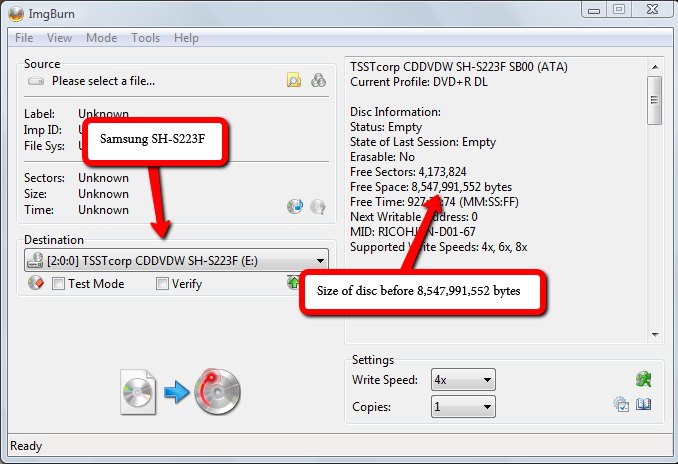
You should see the following, at this moment in time we are just taking note of the disc free space, which is 8,547,991,552 bytes:
Open the BurnerMAX Payload Tool, select the DVD drive you are using to burn the Xbox 360 ISO, then select burner max:

You should then see the patching taking progress, allowing the full sized XGD3 Xbox 360 ISO to be burned:

Now go back to IMGBurn and re load the DVD drive. You should see the disc size is now 8,738,897,920 bytes
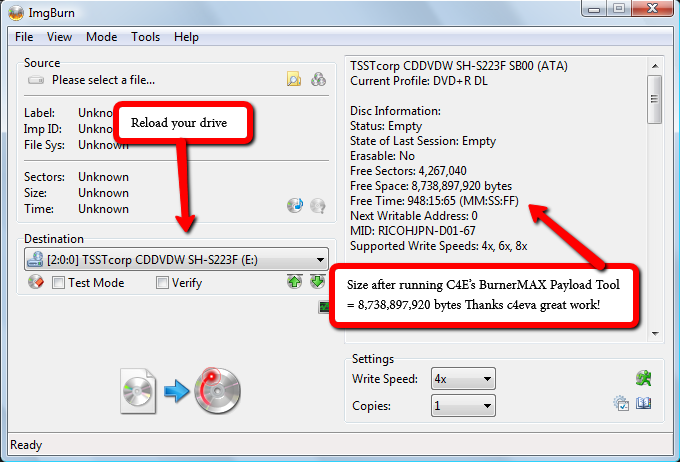
This means you can now burn the full Xbox 360 XGD3 ISO and the burn process will not fail at 97%.
Be aware you will need to use the BurnerMAX Payload every time you insert a blank DVD+R DL disc.
Not all DVD burners are compatible with the BurnerMAX Payload, however below is a list of DVD drives confirmed working with the BurnerMAX Payload. If your DVD drive is not on the list, I have no idea if it will work. You will just need to try and see if it does.
BurnerMAX Payload compatible DVD drives:
ASUS DRW-20B1LT
ASUS DRW-24B1 ST/LT
ASUS DRW-24B3 ST/LT
ASUS DRW-24B5 ST/LT
ASUS DRW-24D5MT (Reported by @sinasinahm)
ATAPTI EHU 324 A5L1Q
DH-16ABS
DVR-SL18LBK
HP DVD1260i
HP DVD1270i
HP PLDSDL8ATL
LITE-ON DH-16ABSH11B
LITE-ON iHAP 122-04W
LITE-ON iHAS 322
LITE-ON iHAS x24 (A)/B/C/DU
LITE-ON iHAS/iHAP 122-04C
Optiarc AD-7220S
Optiarc AD-7580S
Optiarc AD-7640A
Optiarc AD-7740H
Optiarc BC-5500S
PIONEER DVR-110D
PIONEER DVR-111D
PIONEER DVR-118L
PIONEER DVR-216D
PIONEER DVR-218
PIONEER DVR-219
PIONEER DVR-220
PIONEER DVR-A18L
PIONEER DVR-TD10RS
PIONEER S18LBK
Plextor PX-880SA
Plextor PX-L890SA
Slimtype DS8A3S
Slimtype DS8A5SH
Slimtype DS8A8SH
SLIMTYPE DVD A SS8A55HXAA2
TEAC DV-W524GSB
TSSTcorp SE-S084B
TSSTcorp SH-222AB
TSSTcorp SH-223F
TSSTcorp SH-224BB
TSSTcorp SH-243N
TSSTcorp SH-S202
TSSTcorp SH-S202N
TSSTcorp SH-S203D
TSSTcorp SH-S223Q
TSSTcorp SN-208AB
TSSTcorp SN-208BB
TSSTcorp TS-L633B
TSSTcorp TS-L633J
TSSTcorp TS-L633R
TSSTcorp TS-T633C
To get started burning Xbox 360 XGD3 ISO's you first need to download:
Once you have done that load IMGBurn up with your blank DVD-DL disc in your compatible DVD burner.
You should see the following, at this moment in time we are just taking note of the disc free space, which is 8,547,991,552 bytes:
Open the BurnerMAX Payload Tool, select the DVD drive you are using to burn the Xbox 360 ISO, then select burner max:
You should then see the patching taking progress, allowing the full sized XGD3 Xbox 360 ISO to be burned:
BurnerMAX Payload Tool - Version: 0.15
Found 2 CD/DVD drives D: E:
BurnerMAX not enabled, YET !
Scanning: E:\ [TSSTcorpCDDVDW SH-S223F SB00]
L0: 0x87C8
L0: 0x8E75
L1: 0x8657
L1: 0x8E45
L1: 0x8E71
L1: 0x8E89
Patching: ..................
BurnerMAX IS enabled !
Free Space: 8,738,897,920 bytes
Now go back to IMGBurn and re load the DVD drive. You should see the disc size is now 8,738,897,920 bytes
This means you can now burn the full Xbox 360 XGD3 ISO and the burn process will not fail at 97%.
Be aware you will need to use the BurnerMAX Payload every time you insert a blank DVD+R DL disc.
Not all DVD burners are compatible with the BurnerMAX Payload, however below is a list of DVD drives confirmed working with the BurnerMAX Payload. If your DVD drive is not on the list, I have no idea if it will work. You will just need to try and see if it does.
BurnerMAX Payload compatible DVD drives:
ASUS DRW-20B1LT
ASUS DRW-24B1 ST/LT
ASUS DRW-24B3 ST/LT
ASUS DRW-24B5 ST/LT
ASUS DRW-24D5MT (Reported by @sinasinahm)
ATAPTI EHU 324 A5L1Q
DH-16ABS
DVR-SL18LBK
HP DVD1260i
HP DVD1270i
HP PLDSDL8ATL
LITE-ON DH-16ABSH11B
LITE-ON iHAP 122-04W
LITE-ON iHAS 322
LITE-ON iHAS x24 (A)/B/C/DU
LITE-ON iHAS/iHAP 122-04C
Optiarc AD-7220S
Optiarc AD-7580S
Optiarc AD-7640A
Optiarc AD-7740H
Optiarc BC-5500S
PIONEER DVR-110D
PIONEER DVR-111D
PIONEER DVR-118L
PIONEER DVR-216D
PIONEER DVR-218
PIONEER DVR-219
PIONEER DVR-220
PIONEER DVR-A18L
PIONEER DVR-TD10RS
PIONEER S18LBK
Plextor PX-880SA
Plextor PX-L890SA
Slimtype DS8A3S
Slimtype DS8A5SH
Slimtype DS8A8SH
SLIMTYPE DVD A SS8A55HXAA2
TEAC DV-W524GSB
TSSTcorp SE-S084B
TSSTcorp SH-222AB
TSSTcorp SH-223F
TSSTcorp SH-224BB
TSSTcorp SH-243N
TSSTcorp SH-S202
TSSTcorp SH-S202N
TSSTcorp SH-S203D
TSSTcorp SH-S223Q
TSSTcorp SN-208AB
TSSTcorp SN-208BB
TSSTcorp TS-L633B
TSSTcorp TS-L633J
TSSTcorp TS-L633R
TSSTcorp TS-T633C





