


Rick
Veteran
BitTorrent Sync synchronizes your files using a peer-to-peer (P2P) protocol. This protocol is very effective for transferring large files across multiple devices, and is very similar to the powerful protocol used by applications like µTorrent and BitTorrent. The data is transferred in pieces from each of the syncing devices, and BitTorrent Sync chooses the optimal algorithm to make sure you have a maximum download and upload speed during the process.
The devices you setup to sync are connected directly using UDP, NAT traversal and UPnP port mapping. We also provide such additional methods of ensuring connectivity as relay and tracker servers. If your devices are on the same local network, BitTorrent Sync will use your LAN for faster synchronization.
Security
BitTorrent Sync was designed with privacy and security in mind. All the traffic between devices is encrypted with AES cypher and a 256-bit key created on the base of the secret—a random string (20 bytes or more) that is unique for every folder.
It’s our priority to make sure that nobody has unauthorized access to your folders. That’s why there are no 3rd party servers involved when syncing your files. All the files are stored only on your trusted devices, controlled and managed solely by you.
For the same reason we provide you with a quick and easy way to manage secrets. You can regularly change them and invite people by sharing a one-time secret instead of distributing a permanent one.
At the moment BitTorrent Sync works on Windows, Mac and Linux devices that meet the following system requirements:
In the future, we plan to also support most popular mobile platforms.
Mac
Linux and NAS
WebUI is the default way of accessing BitTorrent Sync. It can be reached at YourLocalIP:8888/gui
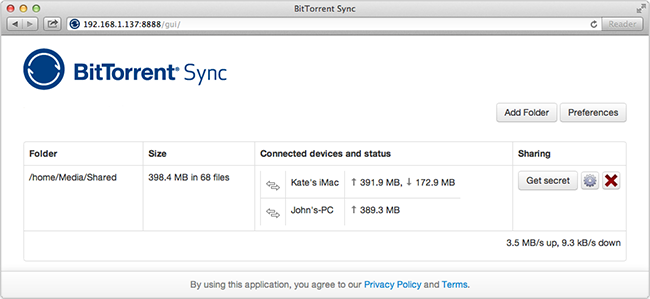
Linux Downloads or latest here http://labs.bittorrent.com/experiments/sync.htmlbtsync_linux_arm.zip
btsync_linux_glibc23_i386.zip
btsync_linux_glibc23_x64.zip
btsync_linux_i386_x32.zip
btsync_linux_powerpc.zip
Sync and Share
-Sync unlimited files between your own devices, or share a folder with friends and family to automatically sync anything.
Private and Secure
-File transfers are encrypted. Your information is never stored on a server in the cloud and your data is protected by private keys.
Bigger is Better
-BitTorrent Sync is specifically designed to handle large files, so feel free to sync original, high quality, uncompressed files.
FAQ
Can other BitTorrent users see my shared files?
No. BitTorrent Sync is based on BitTorrent protocol, but all the traffic is encrypted using a private key derived from the shared secret. Your files can be viewed and received only by the people with whom you share your private secret.
What is a Secret and how does it work?
A secret is a key that connects different devices and joins them together. We automatically generate secrets to ensure their uniqueness. Since each secret is 32 characters long, it is virtually impossible for the same secret to be automatically generated in two separate instances. After a folder is added to BitTorrent Sync, the Secret is stored in its advanced preferences and can be accessed by double or right click on a folder in the “Folders’ tab.
There are 3 types of secrets: master (full access) secret, read only Secret for one-way sync and one-time secrets (both full access and read-only). Read only and one-time secrets may be generated only for folders operated by master secrets.
If you are concerned about security, BitTorrent Sync provides opportunity to regularly generate new Secrets for a folder, or replace an existing secret with your own Base64 string more than 40 characters long. The new folder Secret should be re-entered on all the devices in sync.
How soon does synchronization start?
When a file is added to the shared folder, the changes start syncing immediately (due to system peculiarities, sync onMac OS X 10.6 may be delayed up to 10 minutes). If you change a file inside a shared folder, sync will start after the file is saved and/or closed.
What happens if a file is deleted on one of the devices?
Files deleted from a sync folder on your computer are handled depending on your OS preferences (moved to Trash/Recycle Bin/similar folders or deleted completely). On the other syncing devices these files will be moved to the ‘.SyncTrash’ in their sync folders (‘.SyncTrash’ is hidden by default).
What if several people make changes to the same file?
When a file is changed on one of the devices, it will be recreated as a new copy and synced to the other devices. We save only the latest version of the file.
What if files with same names are added from different computers?
We give human action first priority and always consider it right. That's why if several files with the same name are added on different devices, BitTorrent Sync will synchronize the file that was the latest added to BitTorrent Sync even if it is not the newest version of the file itself. Previously added files will be deleted, but you can find them in .SyncTrash (if enabled in folder preferences).
What happens when I remove folder from BitTorrent Sync?
If a folder is removed from BitTorrent Sync, all the synced files stay there; incomplete files with the .! sync extension will be deleted.
Does BitTorrent Sync support versioning?
Currently versioning is not available. We are planning to add it in the future versions.
Is one-way synchronization possible?
Yes, starting from the version 1.0.95 BitTorrent Sync features one-way synchronization. It is established via read only secret (permanent or one-time). Any folder with a read-only secret will be fully synced, but changes made in this folder will not be synced back.
Do I have an option to ignore some files during sync?
If you have files in your sync folder that you don’t want BitTorrent Sync to track, you can use .SyncIgnore. .SyncIgnore is a UTF-8 encoded .txt file that helps you specify single files, paths and rules for ignoring during the synchronization job. It supports ‘?’ and ‘*‘ wildcard symbols.
Note that .SyncIgnore is applied only to the folder where it is contained and will not work with the files that have already been synced. If you add indexed files to .SyncIgnore, they will be deleted on other syncing devices. In order to avoid this:
1. Quit BitTorrent Sync or remove the folder from sync on all the devices.
2. Modify .SyncIgnore file on all of them so that it contains same info.
3. Run BitTorrent Sync or re-add the modified folders.
Sources
http://labs.bittorrent.com/experiments/sync.html
http://labs.bittorrent.com/experiments/sync/get-started.html
http://labs.bittorrent.com/experiments/sync/technology.html
The devices you setup to sync are connected directly using UDP, NAT traversal and UPnP port mapping. We also provide such additional methods of ensuring connectivity as relay and tracker servers. If your devices are on the same local network, BitTorrent Sync will use your LAN for faster synchronization.
Security
BitTorrent Sync was designed with privacy and security in mind. All the traffic between devices is encrypted with AES cypher and a 256-bit key created on the base of the secret—a random string (20 bytes or more) that is unique for every folder.
It’s our priority to make sure that nobody has unauthorized access to your folders. That’s why there are no 3rd party servers involved when syncing your files. All the files are stored only on your trusted devices, controlled and managed solely by you.
For the same reason we provide you with a quick and easy way to manage secrets. You can regularly change them and invite people by sharing a one-time secret instead of distributing a permanent one.
At the moment BitTorrent Sync works on Windows, Mac and Linux devices that meet the following system requirements:
- Mac OS X Snow Leopard or later
- Windows XP SP3 (32-bit) or newer (32 and 64-bit)
- Linux with kernel 2.6.16 (glibc 2.4) or newer on ARM/PPC/i386/x86_64
In the future, we plan to also support most popular mobile platforms.
Mac
- Download: BTSync_Windows.zip or latest here http://labs.bittorrent.com/experiments/sync.html
- Run BTSync.exe
- If necessary, allow the program to make changes and follow the install wizard
- After installation, BitTorrent Synс will start automatically
Linux and NAS
WebUI is the default way of accessing BitTorrent Sync. It can be reached at YourLocalIP:8888/gui
Linux Downloads or latest here http://labs.bittorrent.com/experiments/sync.htmlbtsync_linux_arm.zip
btsync_linux_glibc23_i386.zip
btsync_linux_glibc23_x64.zip
btsync_linux_i386_x32.zip
btsync_linux_powerpc.zip
Sync and Share
-Sync unlimited files between your own devices, or share a folder with friends and family to automatically sync anything.
Private and Secure
-File transfers are encrypted. Your information is never stored on a server in the cloud and your data is protected by private keys.
Bigger is Better
-BitTorrent Sync is specifically designed to handle large files, so feel free to sync original, high quality, uncompressed files.
FAQ
Can other BitTorrent users see my shared files?
No. BitTorrent Sync is based on BitTorrent protocol, but all the traffic is encrypted using a private key derived from the shared secret. Your files can be viewed and received only by the people with whom you share your private secret.
What is a Secret and how does it work?
A secret is a key that connects different devices and joins them together. We automatically generate secrets to ensure their uniqueness. Since each secret is 32 characters long, it is virtually impossible for the same secret to be automatically generated in two separate instances. After a folder is added to BitTorrent Sync, the Secret is stored in its advanced preferences and can be accessed by double or right click on a folder in the “Folders’ tab.
There are 3 types of secrets: master (full access) secret, read only Secret for one-way sync and one-time secrets (both full access and read-only). Read only and one-time secrets may be generated only for folders operated by master secrets.
If you are concerned about security, BitTorrent Sync provides opportunity to regularly generate new Secrets for a folder, or replace an existing secret with your own Base64 string more than 40 characters long. The new folder Secret should be re-entered on all the devices in sync.
How soon does synchronization start?
When a file is added to the shared folder, the changes start syncing immediately (due to system peculiarities, sync onMac OS X 10.6 may be delayed up to 10 minutes). If you change a file inside a shared folder, sync will start after the file is saved and/or closed.
What happens if a file is deleted on one of the devices?
Files deleted from a sync folder on your computer are handled depending on your OS preferences (moved to Trash/Recycle Bin/similar folders or deleted completely). On the other syncing devices these files will be moved to the ‘.SyncTrash’ in their sync folders (‘.SyncTrash’ is hidden by default).
What if several people make changes to the same file?
When a file is changed on one of the devices, it will be recreated as a new copy and synced to the other devices. We save only the latest version of the file.
What if files with same names are added from different computers?
We give human action first priority and always consider it right. That's why if several files with the same name are added on different devices, BitTorrent Sync will synchronize the file that was the latest added to BitTorrent Sync even if it is not the newest version of the file itself. Previously added files will be deleted, but you can find them in .SyncTrash (if enabled in folder preferences).
What happens when I remove folder from BitTorrent Sync?
If a folder is removed from BitTorrent Sync, all the synced files stay there; incomplete files with the .! sync extension will be deleted.
Does BitTorrent Sync support versioning?
Currently versioning is not available. We are planning to add it in the future versions.
Is one-way synchronization possible?
Yes, starting from the version 1.0.95 BitTorrent Sync features one-way synchronization. It is established via read only secret (permanent or one-time). Any folder with a read-only secret will be fully synced, but changes made in this folder will not be synced back.
Do I have an option to ignore some files during sync?
If you have files in your sync folder that you don’t want BitTorrent Sync to track, you can use .SyncIgnore. .SyncIgnore is a UTF-8 encoded .txt file that helps you specify single files, paths and rules for ignoring during the synchronization job. It supports ‘?’ and ‘*‘ wildcard symbols.
Note that .SyncIgnore is applied only to the folder where it is contained and will not work with the files that have already been synced. If you add indexed files to .SyncIgnore, they will be deleted on other syncing devices. In order to avoid this:
1. Quit BitTorrent Sync or remove the folder from sync on all the devices.
2. Modify .SyncIgnore file on all of them so that it contains same info.
3. Run BitTorrent Sync or re-add the modified folders.
Sources
http://labs.bittorrent.com/experiments/sync.html
http://labs.bittorrent.com/experiments/sync/get-started.html
http://labs.bittorrent.com/experiments/sync/technology.html
Attachments
-
BTSync_Windows.zip580.4 KB · Views: 1,387
-
BTSync_Mac.zip2.9 MB · Views: 1,275
-
btsync_linux_arm.zip1.3 MB · Views: 1,226
-
btsync_linux_glibc23_i386.zip1.1 MB · Views: 1,104
-
btsync_linux_glibc23_x64.zip1.3 MB · Views: 1,088
-
btsync_linux_i386_x32.zip1.3 MB · Views: 1,123
-
btsync_linux_powerpc.zip1.3 MB · Views: 1,160
-
BitTorrentSyncUserGuide.zip846.7 KB · Views: 2,294





