Copy and Extract content from an Xbox One USB Formatted Drive on a Windows PC

You can copy the container for the games files off the usb drive, however beyond that i don't think you can really do very much at the moment.
 
I tried using it on a usb 2.0 500gb drive. It created the drive fine. But when i change it to pc mode, the drive has to be created again for xbox one use. It does recognize the extra space though. Im not in the update preview either.
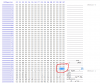
if you are having Trouble use a hex editor its really simple to use. Just fellow the pictures i have uploaded you change the 55CC to 99AA where the highlighted section is and save it will give you and error regarding you could damage this but i have never had any issues
Xbox one Format in HEx editior.PNG
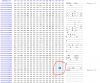
You now unplug and plug the drive in and it will load as a windows formated drive back up you files as you want. To revert back to a xbox one format repeat the process but changing the highlighted section back to 55CC save unplug and plug back into the pc load your hex editor and go to to sector 20 and make sure you change this number back to 2 if not the xbox will read the drive but read it as empty
Changing pc drive so the xbox will read it again.PNG
sorry if its not the best this is my 1st post but had to help as i had the same issue for months untill i gave up and started messing with hex editior on my drives to solve this Hopes this helps
 
ok so i have the xbox one external hard drive changed to pc mode and then i go to scan but nothing comes up?

also the whole reason i am doing this is because i want to move loads of files video files from my pc to the 1 tb seagate expansion. is it possible?
 
so i have removed the hard drive and its shut down my pc. gave me a warning saying along the lines that this isnt healthy for your pc. so i have my pc turned on but i cannot plug the hardrive in as it will crash my pc. what should i do? i tried to use my hardrive on the xbox one but it said the files are not compatible. prob because i changed them to pc mode. how should i continue?
 
Last edited:
Once you have changed the drive to PC mode you need to remove it then connect it to the PC again, it will appear as a USB hard drive then.

To use it in the Xbox One again you have to change it back to Xbox One mode otherwise the Xbox will want to format the hard drive.
 
it doesnt work as soon as i plug in the hard drive it shuts my computer down?.

any help would be great i dont want to have to wipe my hardrive thats got all my game saves and that on it. alot of time spend on that hardrive :)

insane nutter i pm you could you reply please
 
Last edited:
Once you have changed the drive to PC mode you need to remove it then connect it to the PC again, it will appear as a USB hard drive then.

To use it in the Xbox One again you have to change it back to Xbox One mode otherwise the Xbox will want to format the hard drive.
but what i am saying is. that as soon as i put the xbox hard drive into the pc again. my pc just shuts down for no reason?
 
So the hard drive has never worked at all in the computer? if your PC is actually turning off like you had switched the plug off when the hard drive is connected i'd say something is causing your computer to short circuit.
 
Hi there,

I've had a hard drive plugged into my console for about 4 months now. However, as of 5 hours ago (I went to work and was using content on there before hand) it stopped working?
I tried converting it to PC mode (that worked and the app is great, I'll use it to back things up in future) but the drive is apparently inaccessible/corrupt? and it shows 0 bytes when I go into properties?

I have no idea how it's happened and I am hoping that I can save the data of the 20+ games I have on there as I don't really have the internet to download all of them again. I couldn't find any other help anywhere.
 
I've had a hard drive plugged into my console for about 4 months now. However, as of 5 hours ago (I went to work and was using content on there before hand) it stopped working?

At a guess the drive might have failed, or be failing. Maybe Recuva can recovery some data for you.
 
Hoping someone can help with my situation. My son's X Box One fell victim to a power surge from a lightning strike. We bought an "S" as a replacement, and started reloading all the games. My son then asks if I can get some of his saved games from the damaged machine. I pulled the hard drive from the damaged machine, put it in a 3.0 USB enclosure, then plugged it into the S. Nothing happens. I unplug the HDD and plug it into the PC; it appears to be intact and working. My guess is that the system software prevents the S from reading the external HDD.

So, my question is, can the saved game data be copied to a PC, reformat the external HDD, then copy the saved game data back to the HDD?
 
The saves should sync to the cloud, so if he signs in with his Xbox Live profile on the new machine and installs the game again, when it loads up it should sync any saves back to the new console.

This tool was designed to work with external usb drives the Xbox One has formatted, i don't think it will work with the internal drive unfortunately.

You could maybe try your luck with a Linux Live CD to browse the hard drive if the game saves don't sync from the cloud.
 
Hoping someone can help me out here. I have two HDD's, trying to transfer all Xbox game data from Drive A to Drive B. I use the tool to convert both from Xbox Mode to PC Mode. I do the safe ejection using windows sys tray and then unplug both USB drives and plug them back in, however, windows does not recognize them at that point. Not sure what else to do from here. I am running Windows 10. Any and all help would be appreciated. Thanks!
 
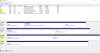
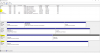
Search in the start menu for "create and format disk partitions"

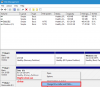
See if your hard drives are listed in disk management, if so trying giving them a drive letter:

drive.png
 
The option to "Change Drive Letter and Paths..." is grey and unclickable
Drives.JPG
Not sure why the pic is small but if you click it will expand
 

Attachments

  • Drives.PNG
    Drives.PNG
    576.8 KB · Views: 1,185
I think Microsoft must have changed something, I unfortunately can no longer access the Xbox One external hard drive on the PC either.

Using the exact same external hard drive on the same PC all i can now see is the GPT Protective Partition in disk management.

I last had the Xbox One usb hard drive hooked up to my PC around June or July this year with no problems, so something has changed since then by the looks of it.
 
Top Bottom