InsaneNutter
Resident Nutter
Background:
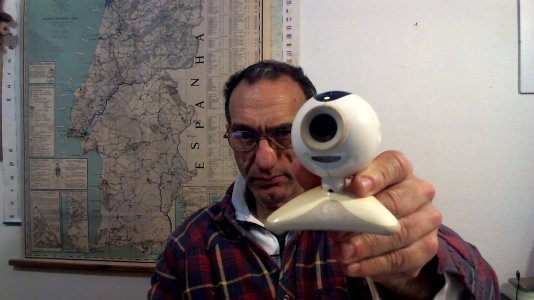
This was a pretty expensive webcam back in 2005 when it was given to the MSN Messenger beta participants, which is how i ended up with it. Unfortunately Logitech never bothered to release any drivers to support the webcam in Windows Vista or Windows 7, let alone any 64bit drivers.
Because of this the webcam has sat in my cupboard for the last 4 years not been used, i randomly found it again today and did a quick Google, to my surprise someone had released some hacked drivers for it that work in both 32bit and 64bit Windows 7
You can check out his blog here and send thanks his way, i have mirrored the drivers here in case anything ever happens to his website.
Download:
Download Logitech QuickCam Zoom Windows 7, 8 or 10 Driver
How to install:
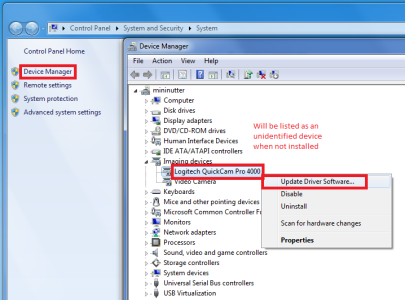
Plug the camera in and go to device manager, this can be found by right clicking on "computer" in the start menu, going to properties and clicking device manager on the left.
Unzip the driver you downloaded
Right click on unidentified device and select "Update device driver" > "Browse my computer for driver software" > Select the folder with the driver you unzipped.
The drivers will install and both the webcam and built in mic should work perfectly.
You will need to disable driver signature checks to install these drivers, which varies between different versions of Windows.
This was a pretty expensive webcam back in 2005 when it was given to the MSN Messenger beta participants, which is how i ended up with it. Unfortunately Logitech never bothered to release any drivers to support the webcam in Windows Vista or Windows 7, let alone any 64bit drivers.
Because of this the webcam has sat in my cupboard for the last 4 years not been used, i randomly found it again today and did a quick Google, to my surprise someone had released some hacked drivers for it that work in both 32bit and 64bit Windows 7
You can check out his blog here and send thanks his way, i have mirrored the drivers here in case anything ever happens to his website.
Download:
Download Logitech QuickCam Zoom Windows 7, 8 or 10 Driver
How to install:
Plug the camera in and go to device manager, this can be found by right clicking on "computer" in the start menu, going to properties and clicking device manager on the left.
Unzip the driver you downloaded
Right click on unidentified device and select "Update device driver" > "Browse my computer for driver software" > Select the folder with the driver you unzipped.
The drivers will install and both the webcam and built in mic should work perfectly.
You will need to disable driver signature checks to install these drivers, which varies between different versions of Windows.

 thats all for now.