Minecraft Version Tool [Windows, Linux, Mac]

Status
Not open for further replies.

xzKinGzxBuRnzx

Veteran
Joined
Aug 9, 2008
Messages
1,702
Want to switch between multiple versions of Minecraft, such as 1.3_01 and 1.2_02? Then download the Minecraft Version Switcher. It works for Windows, Linux, and Mac! All three have a GUI as well.

Want to try it? Download below...

utp1kl379j2y5zilbwea.png


lsgrq9hgzj853p428pax.png


dwxmgvg25mjevrxvroi0.jpg
 
And the installer creates a desktop shortcut for future playing ;)

If you have vista or 7 remember to run installer AND the minecraft launcher as administrator (It may or may not work without administrator privileges)
Right click the shortcut and select Run as administrator.
 
Last edited:
I cant use it... i have windows 7 tell snook and if longer thn 2 weeks tell him not to ban me frum server plz
 
I cant use it... i have windows 7 tell snook and if longer thn 2 weeks tell him not to ban me frum server plz

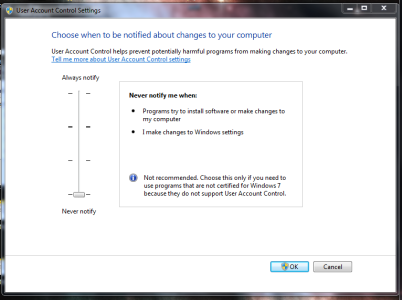
Theres a Windows 7 version. If its not working try turning off UAC. (Start / Picture,Icon at top right / Change User Account Control Settings / Drag to bottom / Save / Restart

Then re-enable later if you like UAC like commander snook does. ;)
 
Doesn't work

I am on a Windows 7 machine with UAC disabled. I right clicked and ran as administrator for the installation and for the switcher.

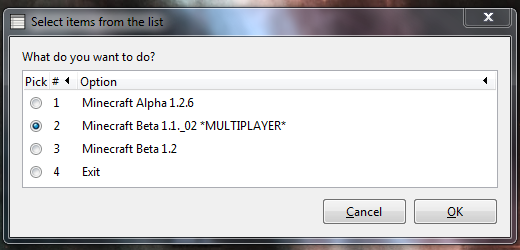
The program launches and asks me "What do you want to do?"

I pick option #2 (for the downgrade version of Minecraft Beta). Press OK.

The window vanishes and then reappears. It continues to ask me which option I want every time I press OK.

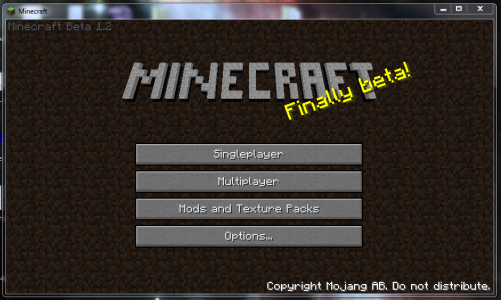
After a few tries, I decided to select option #4 (exit), but when I launched the game manually, it still says Minecraft Beta 1.2 in the top left.

Attached: screen shots.
 

Attachments

  • uac.png
    uac.png
    120.2 KB · Views: 3,232
  • whattodo.png
    whattodo.png
    72.1 KB · Views: 3,067
  • still1.2.png
    still1.2.png
    159.6 KB · Views: 118,355
Your problem is that your java is not installed correctly and doesn't show up on PATH environment variable. You need to add it manually.
To fix that problem, follow these steps:
Go to my computer and open C:\Program Files\
Find the java installation, as example my java is installed in C:\Program Files (x86)\Java\jre6\bin
Then you need to modify environment variables:

For Windows XP:
Start -> Control Panel -> System -> Advanced
Click on Environment Variables, under System Variables, find PATH, and click on it.
In the Edit windows, modify PATH by adding the location of the java to the value for PATH. Like "something;more;andmore;C:\Program Files (x86)\Java\jre6\bin". If you do not have the item PATH, you may select to add a new variable and add PATH as the name and the location of the java as the value.

Close the window.

For Windows Vista:
Right click “My Computer” icon
Choose “Properties” from context menu
Click “Advanced” tab (“Advanced system settings” link in Vista)
In the Edit windows, modify PATH by adding the location of the java to the value for PATH. Like "something;more;andmore;C:\Program Files (x86)\Java\jre6\bin" If you do not have the item PATH, you may select to add a new variable and add PATH as the name and the location of the java as the value.
 
hey, whenever i try and run it i come up with this message in Terminal
"Last login: Sat Jan 15 10:36:54 on ttys000
S8-LiamHargenson:~ 814liamh$ /Users/814liamh/Desktop/Launch\ Minecraft ; exit;
Starting up
/Users/814liamh/Library/Application Support/minecraft/bin/Minecraft: line 2: syntax error near unexpected token `newline'
/Users/814liamh/Library/Application Support/minecraft/bin/Minecraft: line 2: `<html>'
logout

[Process completed]"

i am using a mac osx v 10.5.8 so, i REALLY want some help.
 
hey, whenever i try and run it i come up with this message in Terminal
"Last login: Sat Jan 15 10:36:54 on ttys000
S8-LiamHargenson:~ 814liamh$ /Users/814liamh/Desktop/Launch\ Minecraft ; exit;
Starting up
/Users/814liamh/Library/Application Support/minecraft/bin/Minecraft: line 2: syntax error near unexpected token `newline'
/Users/814liamh/Library/Application Support/minecraft/bin/Minecraft: line 2: `<html>'
logout

[Process completed]"

i am using a mac osx v 10.5.8 so, i REALLY want some help.

Delete it and download again, sorry i was in the process of updating it. Therefore broke a few things. Also delete patch_install folder in you're minecraft folder

/Library/Application Support/minecraft/

Now has encrpytion, stats, checks that minecraft is installed.
 
Your problem is that your java is not installed correctly and doesn't show up on PATH environment variable. You need to add it manually.
To fix that problem, follow these steps:
Go to my computer and open C:\Program Files\
Find the java installation, as example my java is installed in C:\Program Files (x86)\Java\jre6\bin
Then you need to modify environment variables:

For Windows XP:
Start -> Control Panel -> System -> Advanced
Click on Environment Variables, under System Variables, find PATH, and click on it.
In the Edit windows, modify PATH by adding the location of the java to the value for PATH. Like "something;more;andmore;C:\Program Files (x86)\Java\jre6\bin". If you do not have the item PATH, you may select to add a new variable and add PATH as the name and the location of the java as the value.
Close the window.

For Windows Vista:
Right click “My Computer” icon
Choose “Properties” from context menu
Click “Advanced” tab (“Advanced system settings” link in Vista)
In the Edit windows, modify PATH by adding the location of the java to the value for PATH. Like "something;more;andmore;C:\Program Files (x86)\Java\jre6\bin" If you do not have the item PATH, you may select to add a new variable and add PATH as the name and the location of the java as the value.


This fixed my problem, however, my Java is installed to C:\Program Files\Java\jre6\bin

This is because I am using a 64-bit version of Java.


EDIT - While this DID fix the problem of it not launching Minecraft, there is a new issue. Once Minecraft opens, it shows the login screen. When I attempt to click on anything, it freezes and crashes.
 
This fixed my problem, however, my Java is installed to C:\Program Files\Java\jre6\bin

This is because I am using a 64-bit version of Java.


EDIT - While this DID fix the problem of it not launching Minecraft, there is a new issue. Once Minecraft opens, it shows the login screen. When I attempt to click on anything, it freezes and crashes.

Could you go to %appdata%\.minecraft and delete the bin-folder. Then run Minecraft once without the patch, it should update itself. Try the patch after that.


Mukavaa, kun laitoit sen suomeksi! :) T:suomalainen

Hyvä :) T: toinen suomalainen :P
 
EDIT - While this DID fix the problem of it not launching Minecraft, there is a new issue. Once Minecraft opens, it shows the login screen. When I attempt to click on anything, it freezes and crashes.

Freezing and crashing is also common on my vmware. It could be a gpu driver issue. Read the error to us please. if it says something like unable to create pixel format. Then it must be a gpu issue.
 
i think i glitched it, How do i fix or am i screwed, i use Mac os X 10.5.8

Last login: Sun Dec 31 19:00:55 on console
You have new mail.
/Users/duncan/Downloads/Launch\ Minecraft ; exit;
DuncBook:~ duncan$ /Users/duncan/Downloads/Launch\ Minecraft ; exit;
Starting up
/Users/duncan/Downloads/Launch Minecraft: line 40: unexpected EOF while looking for matching `"'
/Users/duncan/Downloads/Launch Minecraft: line 42: syntax error: unexpected end of file
logout

[Process completed]
 
Last edited:
i think i glitched it, How do i fix or am i screwed, i use Mac os X 10.5.8

Last login: Sun Dec 31 19:00:55 on console
You have new mail.
/Users/duncan/Downloads/Launch\ Minecraft ; exit;
DuncBook:~ duncan$ /Users/duncan/Downloads/Launch\ Minecraft ; exit;
Starting up
/Users/duncan/Downloads/Launch Minecraft: line 40: unexpected EOF while looking for matching `"'
/Users/duncan/Downloads/Launch Minecraft: line 42: syntax error: unexpected end of file
logout

[Process completed]

Nope! I was probably in the process of updating it. Glad to see you're using it though!!!! :D Retry now, if you've got the old launcher it will throw an error and then auto download you a the new one. Run that one and it will work!

Any time you see that I'm most likely doing something to it and when that happens you may get errors like that. If however it doesn't work, which I'm almost certain it will. Just delete the files it installed from "/Library/Application Support/minecraft/" in folder "patch_install" Then download the new launcher however like I said, it should auto do this for you. As I've tested as well as a friend. So you shouldn't have anymore problems.
 
Em,i downloded this yesterday and when i came on it today it said minecrat is not instelled when it is.it also say write a path to the minecraft.bin folder and i dont know what to do please help.Now my minecraft does not work.=[
 
adding mods to the game....

hey is there a way to add mods to the game from this application, that would be really great. Otherwise great application

thanks,
Harrison
 
Status
Not open for further replies.

About Digiex

Digiex is a technology and gaming forum, founded in 2004 by InsaneNutter and Nimrod. Digiex has served the internet community with breaking news, detailed guides, exclusive downloads and a popular discussion forum. A small, friendly community of like‑minded people has developed over the years. People are encouraged to register and participate in on‑going discussions.

Get Social

Back
Top Bottom