• Welcome to the Digiex Download Center, you are welcome to download anything you like here, no registration is required! We offer direct download links with no captchas or wait times.
    We do our best to ensure no content infringes copyrights, and provide a DMCA Takedown Request Form to request the removal of content from Digiex

PS3 Bruteforce Save Data v4.6 Download

Nimrod

Exotic Vendor
Joined
Jun 1, 2007
Messages
1,504
Location
London, United Kingdom
PS3 Bruteforce Save Data will resign save data and trophies for the PlayStation 3, this allows PlayStation 3 owners to download PS3 save games to help them progress in games and unlock parts of the game without spending hours trying to 100% everything.

With PS3 Bruteforce Save Data you can share PS3 save games with family or friends, or even with people all over the world via the internet, knowing you can Bruitforce the downloaded save to work on your PlayStation 3.

PS3 Bruteforce Feature List:
  1. Click on the happy face to change views.
  2. Able to load saves from available user accounts from PS3.
  3. RIght-click on the happy face for quick links to webMAN’s features (setup, temperature, mount games) and restart/shutdown the PS3.
  4. Items with blue text are stored locally. Items with black text are remote only. Remote saves are listed with a blue folder icon.
  5. Double click on the “Save Manager” title to open the “Download Save from PS3 via FTP” module.
  6. Use F3 or Ctrl+F to find a save.
  7. Right-Click on empty to show/hide column
  8. Switch between Saves or Trophies
  9. Works fine with webMAN’s ftp server and multiMAN’s ftp server.
Download:

Download PS3 Bruteforce Save Data v4.6

View older Version of PS3 Bruteforce Save Data v4.4.2
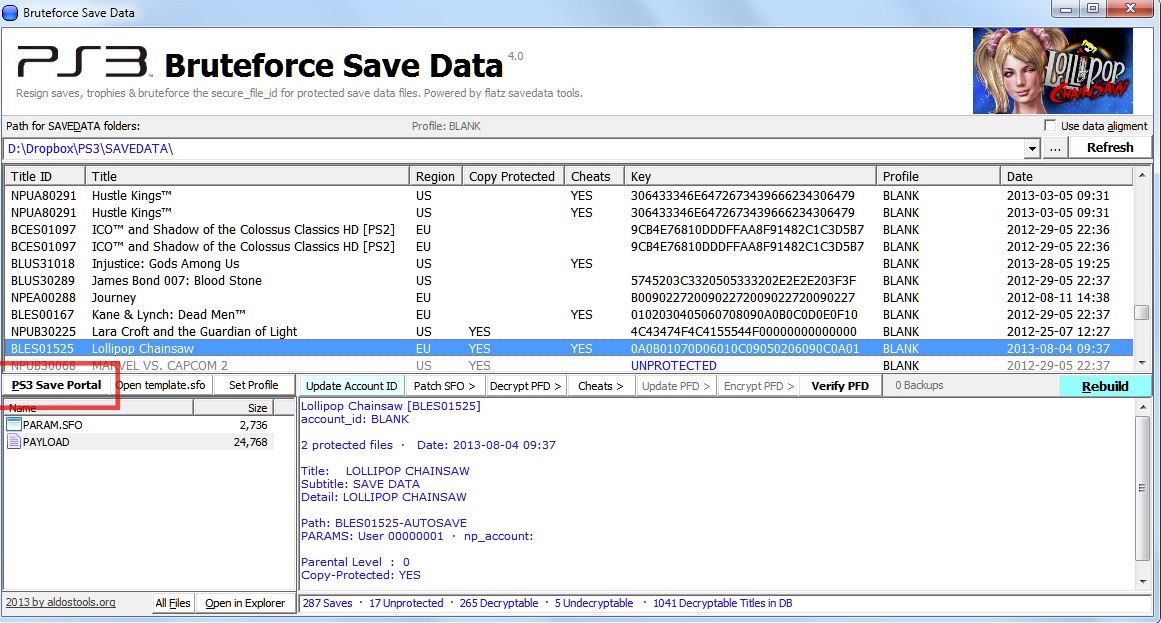
ps3-bruteforce-save-data.jpg
 
I have attached the DLL you appear to have missing. Either copy this in to the PS3 Bruteforce Save Data folder and run PS3 Bruteforce Save Data with admin rights.

Or copy the msvbvm50.dll to C:\windows\system32 then open a command prompt with admin rights and type:

cd c:\windows\system32

Now press enter

Type:

regsvr32 msvbvm50.dll

Now press enter and the DLL should be registered and hopefully PS3 Bruteforce Save Data should then work / work without requiring admin rights.
 

Attachments

Hi, I'm new here.
But I followed your instructions carefully but I still get the error FAILED TO LOAD

MSVBVM is inside windows 32, i did the command prompt and all. See my screencap to show the problem

MHI7v7S.jpg

Thank you for your help!
 
upload_2019-4-14_0-28-49.jpeg

I’ve tried ignoring the issue and it’ll complete the download but it won’t open up the editor. Help please
 
I tried installing Bruteforce and got this message? any tips on what I should do?
Capture (1).png
 
Hello, and sorry if I’m in the wrong place to post my message.

So here, for a while "BruteForce Save Data", when I open it, it closes immediately without any error message, it’s on my Fixed Computer, I put the latest version its luck nothing. By cons I try on a laptop there no problem, it launches, but impossible to decrypt the backups, the backups are original backups that have not been downloaded to a site, I tried to make sure if it worked well with " Save Editor For PS3" the software recognized them without problem except a backup seen that I play with the emulator "RPCS3". Here is some screenshot on the problem of my laptop. If I do a check here it marks me see picture two.

1.jpg
2.jpg

Thanks, if anyone can help me.
 
I tried installing Bruteforce and got this message? any tips on what I should do?
View attachment 17606

It's simple (I did same message when I tried install) ,you need just click on "IGNORE" and when you get Icon on desktop BruteForce,don't start before you write THIS :
  1. Open a Command Prompt using Run as Administrator or disable UAC.

  2. Execute the following command:
    bcdedit.exe /set nx AlwaysOff

  3. Restart the Windows system.

When you run windows again,start BruteForce and program will work 100%. :)

Enjoy
 
I have attached the DLL you appear to have missing. Either copy this in to the PS3 Bruteforce Save Data folder and run PS3 Bruteforce Save Data with admin rights.

Or copy the msvbvm50.dll to C:\windows\system32 then open a command prompt with admin rights and type:

cd c:\windows\system32

Now press enter

Type:

regsvr32 msvbvm50.dll

Now press enter and the DLL should be registered and hopefully PS3 Bruteforce Save Data should then work / work without requiring admin rights.
I have attempted to do as you mention in this however still not able to get the program to work correctly
 
It's simple (I did same message when I tried install) ,you need just click on "IGNORE" and when you get Icon on desktop BruteForce,don't start before you write THIS :
  1. Open a Command Prompt using Run as Administrator or disable UAC.

  2. Execute the following command:
    bcdedit.exe /set nx AlwaysOff

  3. Restart the Windows system.

When you run windows again,start BruteForce and program will work 100%. :)

Enjoy
I've attempted to try your solution however am still getting an error that wont allow the program to run and it's becoming very frustrating
 
Hello, i downloaded a set of PS3 save files in order to platinum White Knight Chronicles II, but they are missing the param.sfo files.

When i try Bruteforce save data, it adds automatically my player id to the save and creates param.sfo files, but when trying to transfer them to my PS3, i get an error message "The data is damaged (8001051C)".

Is there a way to add the param.sfo files correctly and/or fix those save files ?
 
At first I got an error saying that I was missing the file msvbvm50.dll, then I was able to solve it but after that it programmed, opened for 2 or 3 seconds and then closed automatically, does anyone have a solution?
 
IMG_20240711_221841.jpg
This 'MSCOMCTL.OCX' file was not installed when downloaded, reinstalling does not help.
img_20240711_221841-jpg.18504
 
Top Bottom