

• Welcome to the Digiex Download Center, you are welcome to download anything you like here. No registration is required! Digiex offers direct download links with no captchas or wait times.
    The team do our best to ensure no content infringes copyrights and provide a DMCA Takedown request form to request the removal of content from Digiex.

    Notable sections: Pokemon Archives | Xbox Archives | Xbox 360 Archives

Resident Evil 6 Xbox 360 Demo Download (Dragon’s Dogma Demo)

^^^^^^^^^^ Eddy_1210 (Forgot to quote)

Don't use Party Buffalo, use the other one, it's far simpler. On the first post scroll down to the tutorials section, find the one entitled "Inject a demo to a USB flash drive". This will bring you to the tutorial on how to do everything, and the link to download the program.
 
^^^^^^^^^^ Eddy_1210 (Forgot to quote)

Don't use Party Buffalo, use the other one, it's far simpler. On the first post scroll down to the tutorials section, find the one entitled "Inject a demo to a USB flash drive". This will bring you to the tutorial on how to do everything, and the link to download the program.

Alright well I decided to use a DVD-R. I followed the link to help download the file. I used ImgBurn and I burned the disc but it shows up as a mixed disc. I was reading the first page and someone else had the same problem and i just updated my dashboard yet the files show up when I look it through the music player on Xbox. I have the free xbox live could that be a problem?
 
so if i download theglumbo one do i still need the party buffalo??
You can use that or usbxtaf, the torrent and glumbo are the same.

Alright, I did everything. All I have left is to make the file structure (and un-RAR it, because I think I did it wrong). I have it like:

ResidentEvil6Demo>Content>0000000000000000>4343882D>00080000>60CBBE264CC205195AD91592D44756A 2B3BD2C2343

Is that how it's supposed to go, or...

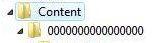
If you are using the dvd way, it has to be like this
Content>0000000000000000>4343882D>00080000>60CBBE264CC205195AD91592D44756A2B3BD2C2343
Hello

When i use Party Buffalo Explorer..I cant connect my usb drive...What should i do?
Configure it with your xbox in system settings>storage
 
Ok so I got mostly everything working but is it right if I'm burning the files to the dvd and it only shows the 4343882D and 00080000 part?
 
Ok so I got mostly everything working but is it right if I'm burning the files to the dvd and it only shows the 4343882D and 00080000 part?
Nope, follow below.
Did you create these 2 folders as shown in this picture below,folder structure should be like this.

Content>0000000000000000>4343882D>00080000>60CBBE264CC205195AD91592D44756A2B3BD2C2343
d1a1ebc39c73271cac8c5e6bd645f892.png
 
Alright so i transferred the demo to my hard drive and its not working. I get the same issue the other guy got where it freezes and i hear a notification come up but i cant see it and my screen is completely black..What do i do now? Also i have the most updated version of the dashboard

EDIT:
I redownloaded it and everything and this time it works. Thank you guys :)
 
Okay, so I'm a horrible n00b at all of these things and have no experience with any of these programs so I'm in desperate need of help with this. If anyone can walk me through this, I'd really appreciate it.

1. Where do I extract the demo? And is the demo the whole folder or do I open that and extract something inside it somewhere?

2. It can't find my USB. I've used it for moving videos onto my xbox and such, so it should work right? I've used the buffalo thing and the other program, neither one could find my USB when I tried to select a device.

Thanks it advance to anyone who can help me with this
 
You just need to make a Content folder and then another folder inside the folder with sixteen 0's so it'll look like 0000000000000000 then you go ahead and put the 4343882D folder in that. Then the folder directory will look like Content/0000000000000000/4343882D/00080000/60CBBE264CC205195AD91592D44756A 2B3BD2C2343. You need to burn the content folder, with all of the folders inside onto a disc.
 
You just need to make a Content folder and then another folder inside the folder with sixteen 0's so it'll look like 0000000000000000 then you go ahead and put the 4343882D folder in that. Then the folder directory will look like Content/0000000000000000/4343882D/00080000/60CBBE264CC205195AD91592D44756A 2B3BD2C2343. You need to burn the content folder, with all of the folders inside onto a disc.

And we do that in ImgBurn?
 
Hey, first off this is a great and informative site and the hard work done by its staff and moderators is greatly appreciated.

I am having issues with playing the demo. I have it so that my xbox recognizes the demo and allows me to launch it. The problem is that when I launch it I get a message that reads: "Game Error. The game couldn't start. Try downloading the game again." and then I am sent back to the dashboard. I have updated and re updated the dashboard to its current build.

I have noticed that a few members have this issue and that they were somehow able to get around it. Any help on this matter would be greatly appreciated.

Thanks.
 
And we do that in ImgBurn?

If you want to burn it to a disc rather than use a flashdrive, yes. The one that says write files/folders to disc, that is what you want. Just tell it to burn the Content folder with the other folders inside and you'll be good to go.
 
I've got a question I've been trying to download this demo onto a DVD+R disc and using image burn to do it but I'm not seeing it in my games on my Xbox. Can someone please help me?
 
HI, i have tried to do this a few times and it doesn seem to work for me. i put the USB into my xbox and seet it up for use, and it says its fine and meets the specifications. but when i put it in my computer and use the buffalo driver it only shows up 2 dots and not anything else that i can go into aand inject a folder. can you please help and advise me whatt to do? i have read all theese replies but none of them seeem to yield any results. thanks!

rainbow_geisha
 
Try copying a demo on to your 360 memory stick once it has been configured, see if this then shows up in party buffalo drive explorer.
Its probably because the stick is empty it has nothing to show which is leading you to think its not working.
 
Try copying a demo on to your 360 memory stick once it has been configured, see if this then shows up in party buffalo drive explorer.
Its probably because the stick is empty it has nothing to show which is leading you to think its not working.


i have copied some saved data to the memory stick now and the content folder is showing up with the 0000000000000000 but it wont let me inject anything into it and im using the USB XTAF to do this. i just dont know what im doing wrong?
 
Right ok, i think im getting somewhere, i have the 000000000000000000 and then the 4343882D folder then i have the 00080000 folder and then it was empty so i injected the res 6 demo. and it did it no problem, now when i go into my xbox, its not under demos, and i go to settings and memory and it just says that its empty and nothing on there (apart from the game save of left 4 dead i have on there) so im nearly there, i just dont know how to get it working now i have it on the USB.

rainbow geisha
 
hi, if i use this demo offline, with a profile that has never had access to xbox live i can be banned on the main profile?

Sorry for my bad english.
 

About Digiex

Digiex is a technology and gaming forum, founded in 2004 by InsaneNutter and Nimrod. Digiex has served the internet community with breaking news, detailed guides, exclusive downloads and a popular discussion forum. A small, friendly community of like‑minded people has developed over the years. People are encouraged to register and participate in on‑going discussions.

Get Social

Back
Top Bottom



