


I am developing a custom Xbox 360 Dashboard. Here is the first version!
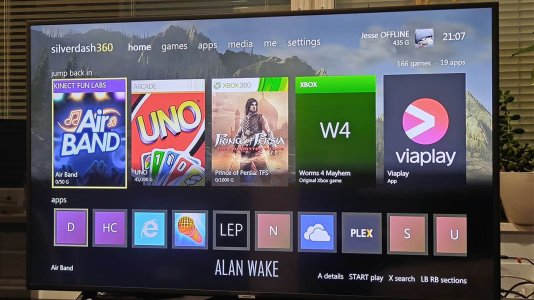
A dashboard for the Xbox 360. It lists the games and apps on your console, with their box art, and starts them; plays your music, videos and pictures from the console's drives and from media servers on your network; and shares the console's drives over FTP. It runs on the console's own Silverlight platform, built with Silverlight360.
Features:
Base Download:
Silverdash360 Homebrew Xbox 360 Dashboard Download
Update Package:
Silverdash360 Latest Update Package
The full version will only be posted here, but there are newer update files on Github: https://github.com/Digiex/Silverdash360/releases
To apply an update, take the attached zip here and replace the files with ones from the Github release.
A dashboard for the Xbox 360. It lists the games and apps on your console, with their box art, and starts them; plays your music, videos and pictures from the console's drives and from media servers on your network; and shares the console's drives over FTP. It runs on the console's own Silverlight platform, built with Silverlight360.
Features:
- Games and apps from the hard drive and USB drives: Games on Demand, Arcade, Indie, demos, original Xbox games and homebrew in Apps and Games folders, with box art and store details from the Xbox Marketplace, kept for offline use.
- Jump back in with the titles you played last, and the disc in the drive first.
- Covers or a list, sorted and filtered as you like, with letters to jump through a long shelf.
- Media: music, videos and pictures from the drives, data discs and DLNA media servers such as Plex, and the videos you downloaded from Xbox LIVE.
- Your profile, gamerscore and achievements.
- Themes: the wallpapers of the console dashboard's themes.
- Search, storage, a file browser and an FTP server.
- Updates itself when there's a new version.

Base Download:
Silverdash360 Homebrew Xbox 360 Dashboard Download
Update Package:
Silverdash360 Latest Update Package
The full version will only be posted here, but there are newer update files on Github: https://github.com/Digiex/Silverdash360/releases
To apply an update, take the attached zip here and replace the files with ones from the Github release.
Last edited:





