

Silverdash360 Homebrew Xbox 360 Dashboard

jessenic

Addict
Joined
Nov 17, 2008
Messages
284
Location
Finland
I am developing a custom Xbox 360 Dashboard. Here is the first version!
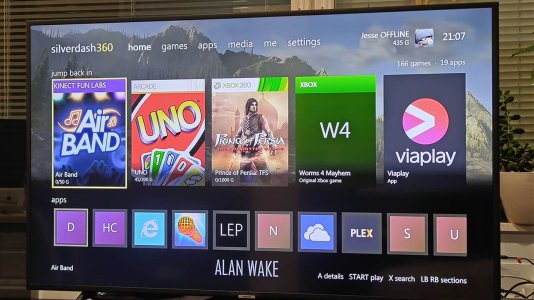
silverdash-360.jpg

A dashboard for the Xbox 360. It lists the games and apps on your console, with their box art, and starts them; plays your music, videos and pictures from the console's drives and from media servers on your network; and shares the console's drives over FTP. It runs on the console's own Silverlight platform, built with Silverlight360.

Features:
  • Games and apps from the hard drive and USB drives: Games on Demand, Arcade, Indie, demos, original Xbox games and homebrew in Apps and Games folders, with box art and store details from the Xbox Marketplace, kept for offline use.
  • Jump back in with the titles you played last, and the disc in the drive first.
  • Covers or a list, sorted and filtered as you like, with letters to jump through a long shelf.
  • Media: music, videos and pictures from the drives, data discs and DLNA media servers such as Plex, and the videos you downloaded from Xbox LIVE.
  • Your profile, gamerscore and achievements.
  • Themes: the wallpapers of the console dashboard's themes.
  • Search, storage, a file browser and an FTP server.
  • Updates itself when there's a new version.
Documentation:

Base Download:
Silverdash360 Homebrew Xbox 360 Dashboard Download
Update Package:
Silverdash360 Latest Update Package

The full version will only be posted here, but there are newer update files on Github: https://github.com/Digiex/Silverdash360/releases

To apply an update, take the attached zip here and replace the files with ones from the Github release.
 
Silverdash360 0.1.2 is out!

Download: Silverdash360 0.1.2


If you have 0.1.1 installed, Silverdash360 offers the update by itself at the next start, or go to Settings > Check for updates. You can also download the update package from GitHub: https://github.com/Digiex/Silverdash360/releases/latest

What's new:

  • Welcome screen on a fresh install with the basic settings: start the FTP server with Silverdash, and its user name and password. After an update, it shows any new settings, marked new.
  • Themes: the Xbox Dashboard's built-in Spectrum, Day and Night themes, picture themes you made in the Xbox Dashboard, and two colour schemes from the first Xbox 360 dashboard, Blades (Default) and Blades (Carbon), with a colour for each section like the old blades.
  • Theme editor: Settings > Theme > Edit current theme. Pick the colours and up to four wallpapers, from other themes or your own pictures. Save it for your profile, for nobody signed in too, or with Save as... for everyone on the console.
  • A theme for each profile: each profile keeps the theme it picked, and signing out switches to the theme picked with nobody signed in.
  • Faster starts: a start only looks for new games, apps and themes. A title's add-ons and saves are read when you open its page, and Settings > Refresh library reads everything.
  • Profiles: each profile's saves and played titles are kept apart, Silverdash360 works with nobody signed in, and signing in or out from the Guide shows straight away, even while it's still reading the drives.
  • Wallpapers go on the sections in the order of the first dashboard's blades.
  • Holding left or right to run through a shelf now stops at its end; press again after a moment to go to the next section, or use LB/RB.
  • Switching tabs on a title's page with lots of content no longer locks up.
  • Updated documentation with new screenshots: https://digiex.github.io/Silverdash360/

Screenshots below. Let me know how it works for you!
games-covers.png
home.png
theme.png
theme-editor.png
title-details.png
welcome.png
 
Silverdash360 0.2.0 is out!

Huge speed boost: Silverdash360 now runs compiled. Since 0.1.4 it ships native images made with XboxNGen, so its code no longer goes through the console's slow IL interpreter: menus, scrolling and starting up are much faster. 0.2.0 compiles its libraries the same way.

Update: if you have Silverdash360 installed, it offers the update by itself at the next start, or go to Settings > Check for updates. The update package is also on GitHub: https://github.com/Digiex/Silverdash360/releases/latest

What's new:
  • System settings: the console's own settings right in Silverdash360 (display, audio, language and region, clock, power, Auto-Play, console name, 3D TV and remote control), as the Xbox Dashboard has them.
  • Network settings: set up a wired or wireless connection, test your Xbox Live connection, and see network statistics (latency, packet loss, upload and download speed, Wi-Fi signal).
  • System Info: your console's serial number, console ID and support codes.
  • Box art, backgrounds and descriptions for many more titles, from the x360db archive, including ones Microsoft's servers no longer have. Original Xbox games get covers from xdb.
  • Changing resolution: try a new one and keep it or go back, with the old one restored if you can't see the picture.
  • Wallpapers fade from one section to the next, and change straight away when you switch sections.
  • Smoother scrolling, and games and apps show up sooner after starting.
  • The Xbox Dashboard is always listed among your apps, and starts even with DashLaunch installed.
  • The FTP server shows the system cache and system aux partitions too.
  • Updates and art downloads use modern HTTPS (TLS 1.3).

Fixes:
  • B goes back to the item you came from in Settings, Storage and Media.
  • After a setting restarts Silverdash360, you're back on the settings page you were on.
  • A wireless network shows Connected only when the console has joined it, and a wrong password is reported.
  • System settings no longer close Silverdash360 on HDMI TVs, and changing the remote control setting no longer freezes the console.
  • Icons that are mostly dark or transparent show properly.

Known limits: on HDMI and DVI displays the resolution list is the standard HDTV one, without "Optimal Resolution" or your TV's own modes, and System Info leaves out the E and P support codes.

Documentation: https://digiex.github.io/Silverdash360/

Let me know how it works for you!
 
Mirror for the full build updated in the original post.

Nice to see another significant updated to Silverdash360 already, with some good QOL updates!
 

About Digiex

Digiex is a technology and gaming forum, founded in 2004 by InsaneNutter and Nimrod. Digiex has served the internet community with breaking news, detailed guides, exclusive downloads and a popular discussion forum. A small, friendly community of like‑minded people has developed over the years. People are encouraged to register and participate in on‑going discussions.

Get Social

Back
Top Bottom