

InsaneNutter
Resident Nutter
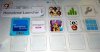
This tutorial will teach you how to install a permanent Homebrew Channel on your 5.5.1 to 5.5.3 Wii U. The end result will be you can load the Homebrew Launcher from the Wii U’s home screen, just like any other app or game. The Homebrew Launcher will load first time, every time, unlike the unreliable web browser exploit we have had to use until now.
Updated 5.5.3 Support:
My web browser exploit mirror for the Wii U is updated to detect a 5.5.3 Wii, so now you can follow this tutorial on a 5.532 Wii U. The 5.5.3 exploit has become very reliable so you should be able to hack a Wii U on the 5.5.3 firmware easily now. @Gunz4Hire has tested the new exploit on his 5.5.3 Wii U and was able to exploit it on the second attempt.
Below - a video showing my Wii U booting from been totally powered off, then loading the Homebrew Launcher directly from the Home Screen (On the System Nand) without any previous hacked applied. This is all thanks to a new hack called Haxchi.
What you need:
1. A Wii U on firmware 5.5.1 to 5.532, the region doesn't matter.
If you are on a firmware lower than 5.5.1, these games should have firmware 5.1.1 on disc:
- Paper Mario Color Splash
- Skylanders: Imaginators
- Just Dance 2017
- Minecraft: Story Mode - The Complete Adventure
- Shantae: Half-Genie Hero
- The Legend of Zelda: Breath of the Wild
- Darksiders: Warmastered Edition
- Cars 3: Driven to Win
2. You must have previously followed my Easy Nintendo Wii U Homebrew Channel Hack Guide or be capable of launching the Homebrew Launcher from the Wii U’s web browser.
3. Own one of the following DS Virtual Console games on the Wii U:
- Kawashima: Motto Nou wo Kitaeru Otona no DS Training [JPN]
- Brain Age: Train Your Brain in Minutes a Day! [USA]
- Dr. Kawashima's Brain Training [PAL]
- Catch! Touch! Yoshi! [JPN]
- Yoshi Touch & Go [USA]
- Yoshi Touch & Go [PAL]
- Mario Kart DS [JPN]
- Mario Kart DS [USA]
- Mario Kart DS [PAL]
- New Super Mario Bros. [JPN]
- New Super Mario Bros. [USA]
- New Super Mario Bros. [PAL]
- Yoshi's Island DS [JPN]
- Yoshi's Island DS [USA]
- Yoshi's Island DS [PAL]
- Yawaraka Atama Juku [JPN]
- Big Brain Academy [USA]
- Big Brain Academy [PAL]
- Sawaru: Made in Wario [JPN]
- WarioWare: Touched! [USA]
- WarioWare: Touched! [PAL]
- Mario & Luigi RPG 2x2 [JPN]
- Mario & Luigi: Partners in Time [USA]
- Mario & Luigi: Partners in Time [PAL]
- Donkey Kong: Jungle Climber [JPN]
- DK: Jungle Climber [USA]
- Donkey Kong: Jungle Climber [PAL]
- Hoshi no Kirby: Sanjou! Dorocche Dan [JPN]
- Kirby: Squeak Squad [USA]
- Kirby: Mouse Attack [PAL]
- Kaitou Wario the Seven [JPN]
- Wario: Master of Disguise [USA]
- Wario: Master of Disguise [PAL]
- Star Fox Command [JPN]
- Star Fox Command [USA]
- Star Fox Command [PAL]
- Touch! Kirby's Magic Paintbrush [JPN]
- Kirby: Canvas Curse [USA]
- Kirby: Power Paintbrush [PAL]
- Zelda no Densetsu: Daichi no Kiteki [JPN]
- The Legend of Zelda: Spirit Tracks [USA]
- The Legend of Zelda: Spirit Tracks [PAL]
- Super Mario 64 DS [JPN]
- Super Mario 64 DS [USA]
- Super Mario 64 DS [PAL]
- Zelda no Densetsu: Mugen no Sunadokei [JPN]
- The Legend of Zelda: Phantom Hourglass [USA]
- The Legend of Zelda: Phantom Hourglass [PAL]
- Atsumete! Kirby [JPN]
- Kirby Mass Attack [USA]
- Kirby Mass Attack [PAL]
- Pokemon Ranger [JPN]
- Pokemon Ranger [USA]
- Pokemon Ranger [PAL]
- Oideyo Doubutsu no Mori [JPN]
- Animal Crossing: Wild World [USA]
- Animal Crossing: Wild World [PAL]
- Pokemon Fushigi no Dungeon: Sora no Tankentai [JPN]
- Pokemon Mystery Dungeon: Explorers of Sky [USA]
- Pokemon Mystery Dungeon: Explorers of Sky [PAL]
- Pokemon Ranger: Batonnage [JPN]
- Pokemon Ranger: Shadows of Almia [USA]
- Pokemon Ranger: Shadows of Almia [PAL]
- Pokemon Ranger: Hikari no Kiseki [JPN]
- Pokemon Ranger: Guardian Signs [USA]
- Pokemon Ranger: Guardian Signs [PAL]
Note: Keep in mind if you have blocked your Wii U from updating and do not currently own an exploitable game you will need to allow updating and purchased one of the above games on the Eshop. Only do this is 5.5.3 is still the latest firmware otherwise you will likely loose all access to homebrew if you update the Wii U past 5.5.3 if an update is released in the future. Be sure to block updates again after you have purchased one of the above games.
4. The game you are going to use above must be installed on to the Wii U's internal memory, not a USB drive.
Installing the Homebrew Launcher Permanently to the Wii U:
Preparing the Wii U:
To install the Homebrew Launcher Permanently to your Wii U we are going to use the Homebrew Launcher to load a homebrew app, which will hack the DS Virtual Console game of your choice. After following this tutorial when you load the DS game you purchased, it will actually load the Homebrew Launcher.
I have created a zip file containing all the files needed to follow this tutorial.
Download: Haxchi SD Card Files
You want to simply extract the contents of this zip file to the root of the SD card, as shown below:
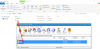
Note: The Haxchi Github will always contain the latest haxchi.elf - At this time of writing Haxchi v2.2 is the latest version, which is what I have included in my above SD Card Files download. If a newer version is ever released simply download the haxchi.elf from the github page and copy it to your Wii U's SD card under: wiiu\apps\haxchi
Once you have the files on your SD Card you are ready to proceed with the hack.
Installing The Homebrew Launcher:
Now you have completed all the preparation it’s time to make the Homebrew Launcher a prominent fixture on your Wii U’s Home Screen.
Launch the Homebrew Launcher as usual though the web browser exploit (you should have already followed my Nintendo Wii U Homebrew Channel Hack Guide for this as i mentioned earlier).
Once you have the Homebrew Launcher loaded you then want to load the Haxchi installer, as shown below:
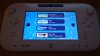
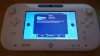
All you need to do now is select the DS Virtual Console game you wish to exploit for the Homebrew Launcher and press A, for me this was Brain Training:
Press "A" again and the installation will proceed:
That’s it the hack is now installed.
You will be returned to your Wii U's home screen, your DS game will have changed to The Homebrew Launcher. You can now simply load this for easy offline access to Nintendo Wii U Homebrew:
Note: Once you have loaded the Homebrew Launcher from the DS game, if you exit out of it without powering the Wii U off you can access it again from the Mii Maker. If you load the DS game (Homebrew Launcher Icon) to get back to the Homebrew Launcher you will crash the Wii U.
Congratulations you now have a 100% reliable way to launch Homebrew:
This tutorial uses the Haxchi hack worked on by smea, FIX94, plutoo, yellows8, naehrwert and derrek along with the Homebrew Launcher created by dimok. These guys and many others are the reason we have Wii U Homebrew today!





