InsaneNutter
Resident Nutter
What Xbox 360 (Jtag / RGH DLC content manager) Does:
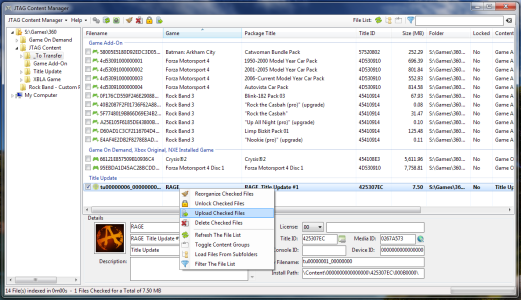
* Browse 360 files on your PC by their real info, like game name and package title.
* Unlock XBLA, DLC and Avatar files downloaded from Xbox Live.
* Upload files (XBLA, DLC, GOD, Avatar, Title Update) to your console over FTP with a single click. Files are automatically uploaded to the right folders.
* Drag and drop files to other applications, if you'd prefer to use your own FTP client.
* Organize a messy folder of downloaded content into 1 of many different directory styles. Restore the original filenames for XBLA and DLC files.
* View the MediaID of Title Updates and GODs so you can match them, and search JQE and XBUC for matching TUs.
* View the MediaID of ISO files. (Requires abgx360)
* View the MediaID of default.xex files.
* Browse your 360's hard drive directly, using FSD. This allows you to delete, unlock, edit and copy the contents of the 360's internal drive over the network.

Version 3 Change log:
- Reordered context menus.
- Fixed bug where the welcome screen would always appear.
- Added feature to create and upload multidisc game entries to the multi.ini file for diskswapper.
- Added support for DashLaunch FTP server.
- Fixed bugs in content organizer. Added new Content Organizer mode.
- Added support for overwriting duplicates during rename operation.
- Increased speed of Content Organizer.
- Added rename mode in Content Organizer to rename files to their package titles. Filenames in this mode are limited to 42 characters in order to comply with the specifications of the FATX filesystem. Spaces and other special characters are removed in order to preserve as much of the original package title as possible.
- Added support for uploading to devices other than the internal hard drive (Hdd1).
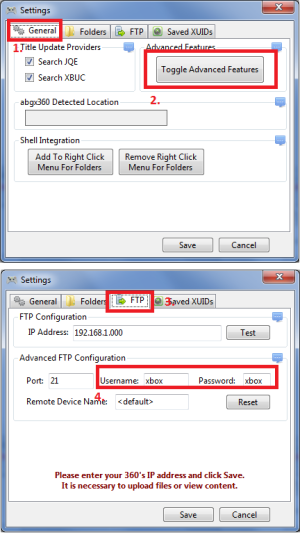
- Enable advanced features and then edit the device setting on the FTP tab.
- Please note the following limitations exist: Depending on what device you upload to, Title Updates may not be put in a location the console will check. Content is uploaded using the same folder stucture that would be used on an internal hard drive, so make sure you point FSD at the « Content » folder for it to load the files. This custom device will also be mapped and viewed when using the « Show Xbox 360 Drive » option with FSD, as long as the share name is used by FSD. Game Name and Package Title can be edited by clicking the edit button next to their text boxes, changing the
text and then pressing Enter to save. This should work for all LIVE and CON files.
- Fixed bug in display of Console ID.
- Added Drag and Drop support
for dragging files INTO the currently displayed folder. Fixed bug with
dragging and dropping a folder from the treeview. Resign gamesaves (and
other CON files) to a different Profile ID.
Download Xbox 360 Content Manager v3.0
* Browse 360 files on your PC by their real info, like game name and package title.
* Unlock XBLA, DLC and Avatar files downloaded from Xbox Live.
* Upload files (XBLA, DLC, GOD, Avatar, Title Update) to your console over FTP with a single click. Files are automatically uploaded to the right folders.
* Drag and drop files to other applications, if you'd prefer to use your own FTP client.
* Organize a messy folder of downloaded content into 1 of many different directory styles. Restore the original filenames for XBLA and DLC files.
* View the MediaID of Title Updates and GODs so you can match them, and search JQE and XBUC for matching TUs.
* View the MediaID of ISO files. (Requires abgx360)
* View the MediaID of default.xex files.
* Browse your 360's hard drive directly, using FSD. This allows you to delete, unlock, edit and copy the contents of the 360's internal drive over the network.
Version 3 Change log:
- Reordered context menus.
- Fixed bug where the welcome screen would always appear.
- Added feature to create and upload multidisc game entries to the multi.ini file for diskswapper.
- Added support for DashLaunch FTP server.
- Fixed bugs in content organizer. Added new Content Organizer mode.
- Added support for overwriting duplicates during rename operation.
- Increased speed of Content Organizer.
- Added rename mode in Content Organizer to rename files to their package titles. Filenames in this mode are limited to 42 characters in order to comply with the specifications of the FATX filesystem. Spaces and other special characters are removed in order to preserve as much of the original package title as possible.
- Added support for uploading to devices other than the internal hard drive (Hdd1).
- Enable advanced features and then edit the device setting on the FTP tab.
- Please note the following limitations exist: Depending on what device you upload to, Title Updates may not be put in a location the console will check. Content is uploaded using the same folder stucture that would be used on an internal hard drive, so make sure you point FSD at the « Content » folder for it to load the files. This custom device will also be mapped and viewed when using the « Show Xbox 360 Drive » option with FSD, as long as the share name is used by FSD. Game Name and Package Title can be edited by clicking the edit button next to their text boxes, changing the
text and then pressing Enter to save. This should work for all LIVE and CON files.
- Fixed bug in display of Console ID.
- Added Drag and Drop support
for dragging files INTO the currently displayed folder. Fixed bug with
dragging and dropping a folder from the treeview. Resign gamesaves (and
other CON files) to a different Profile ID.
Download Xbox 360 Content Manager v3.0